





Relative Performance Areas
Nov 19, 2025
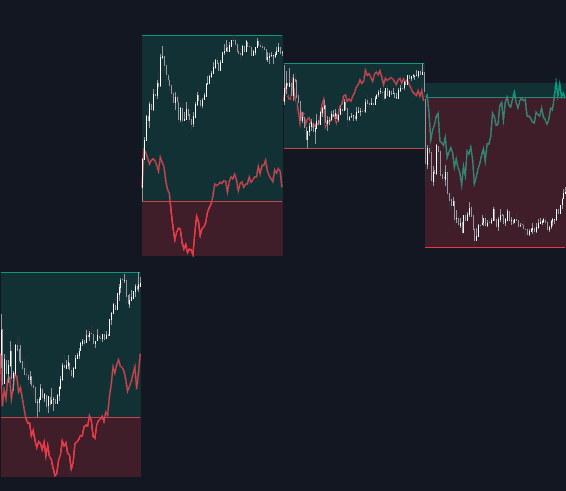
The Relative Performance Areas trading indicator helps traders visually compare any asset against a chosen benchmark on a session-by-session basis. By rescaling benchmark performance and highlighting overperformance or underperformance directly on the chart, this tool makes relative strength analysis clearer, more intuitive, and more actionable for all types of traders. Its built-in dashboard also provides powerful statistics on performance streaks, helping traders refine both their trading strategies and market timing.
How to Trade the Relative Performance Areas Trading Indicator?
Each trading session is highlighted with an area that reflects the asset’s price movement for that session. When the asset outperforms the benchmark, the session background appears green. When it underperforms, it appears red. This creates a simple, visually driven way to monitor relative performance without needing to calculate returns manually.
The benchmark itself is plotted as a green or red line depending on whether its performance is above or below the asset. The indicator also includes an optional extended price area when the benchmark outpaces the asset. SPX is the default benchmark, but traders can easily switch to any symbol.
Comparing performance against a benchmark is a core component of many trading strategies. Traders often use major indexes like the S&P 500 (SPX) or NASDAQ 100 (NDX) to evaluate whether their assets or portfolios are outperforming or lagging behind the broader market. This trading indicator simplifies that process by marking each session and summarizing performance clearly.
As shown in the chart, traders can quickly see how an asset such as QQQ performed relative to BTCUSD or GOLD session by session. For example, over the previous 15 sessions, the NASDAQ 100 outperformed BTCUSD in eight sessions and GOLD in six, while underperforming in the remaining sessions. This type of clear session-based comparison helps traders understand relative strength dynamics more effectively.
Display Mode (Rescaling Options)
The Display Mode settings determine how the benchmark is transformed before comparison. This is crucial for traders who want a more statistically meaningful interpretation of relative performance. The three benchmark display modes are:
- Net Returns – This uses raw benchmark returns from the start of the session, offering a simple and direct comparison.
- Rescaled Returns – Adjusts benchmark returns based on the ratio of its volatility to the asset’s volatility, creating a more balanced and fair comparison.
- Standardized Returns – Converts benchmark returns into a z-score and then rescales them using the asset’s volatility. This is the most advanced method and helps traders compare assets that behave differently.
Different display modes can highlight unique dynamics depending on market conditions. Standardized or rescaled returns are particularly helpful when comparing assets with differing volatility profiles.
Dashboard (Performance Analytics)
The indicator’s performance dashboard provides session-level statistics and streak analytics that enhance decision-making for systematic and discretionary traders.
The dashboard includes:
- Total number of overperforming and underperforming sessions
- Streak analysis, where a streak is defined as two or more consecutive sessions of outperformance or underperformance
- Winning and losing streak counts
- Median and mode streak durations
- Percentage of streaks lasting 3, 4, 5, and 6+ sessions
These insights help traders understand market behavior patterns such as momentum phases, mean-reversion tendencies, or shifts in relative strength. This is valuable for both trend-following trading strategies and contrarian approaches.
SETTINGS
- Benchmark: Choose the benchmark ticker for comparison.
- Display Mode: Select how the benchmark is transformed.
- Net Returns
- Rescaled Returns
- Standardized Returns
Dashboard
- Dashboard: Toggle the dashboard on or off.
- Position: Choose where the dashboard appears on the chart.
- Size: Adjust the size for readability.
Style
- Overperforming: Show or hide overperforming session areas and choose the color.
- Underperforming: Show or hide underperforming areas and choose the color.
- Benchmark: Customize the benchmark line visibility and colors.
FAQ
What is the Relative Performance Areas trading indicator used for?
It’s designed to help traders compare an asset’s performance against a benchmark session by session, making relative strength and weakness immediately visible.
Which display mode is best?
Net Returns is simplest, while Rescaled and Standardized Returns provide more statistically balanced comparisons. Choice depends on your trading strategy and preference.
Can I use this tool for any market?
Yes. You can compare stocks, crypto, forex, commodities, or any TradingView-supported asset with any benchmark you choose.
How do I access the Relative Performance Areas indicator?
You can get access on the LuxAlgo Library for charting platforms like TradingView, MetaTrader (MT4/MT5), and NinjaTrader for free.
Trading & investing are risky and many will lose money in connection with trading and investing activities. All content on this site is not intended to, and should not be, construed as financial advice. Decisions to buy, sell, hold or trade in securities, commodities and other investments involve risk and are best made based on the advice of qualified financial professionals. Past performance does not guarantee future results.
Hypothetical or Simulated performance results have certain limitations. Unlike an actual performance record, simulated results do not represent actual trading. Also, since the trades have not been executed, the results may have under-or-over compensated for the impact, if any, of certain market factors, including, but not limited to, lack of liquidity. Simulated trading programs in general are designed with the benefit of hindsight, and are based on historical information. No representation is being made that any account will or is likely to achieve profit or losses similar to those shown.
Testimonials appearing on this website may not be representative of other clients or customers and is not a guarantee of future performance or success.
As a provider of technical analysis tools and strategies, we do not have access to the personal trading accounts or brokerage statements of our customers. As a result, we have no reason to believe our customers perform better or worse than traders as a whole based on any content, tool, or platform feature we provide.
Charts used on this site are by TradingView in which the majority of our technical indicators are built on. TradingView® is a registered trademark of TradingView, Inc. www.TradingView.comTradingView® has no affiliation with the owner, developer, or provider of the Services described herein.
Market data is provided by CBOE, CME Group, BarChart, CoinAPI. CBOE BZX real-time US equities data is licensed from CBOE and provided through BarChart. Real-time futures data is licensed from CME Group and provided through BarChart. Select cryptocurrency data, including major coins, is provided through CoinAPI. All data is provided “as is” and should be verified independently for trading purposes.
This does not represent our full Disclaimer. Please read our full disclaimer.
© 2026 LuxAlgo Global, LLC.