Stop Placement vs Liquidity Pools
 By LuxAlgoMar 14, 2026
Stop Placement vs Liquidity Pools is an indicator on Vela, our next-generation charting platform, written in Pine Script®.
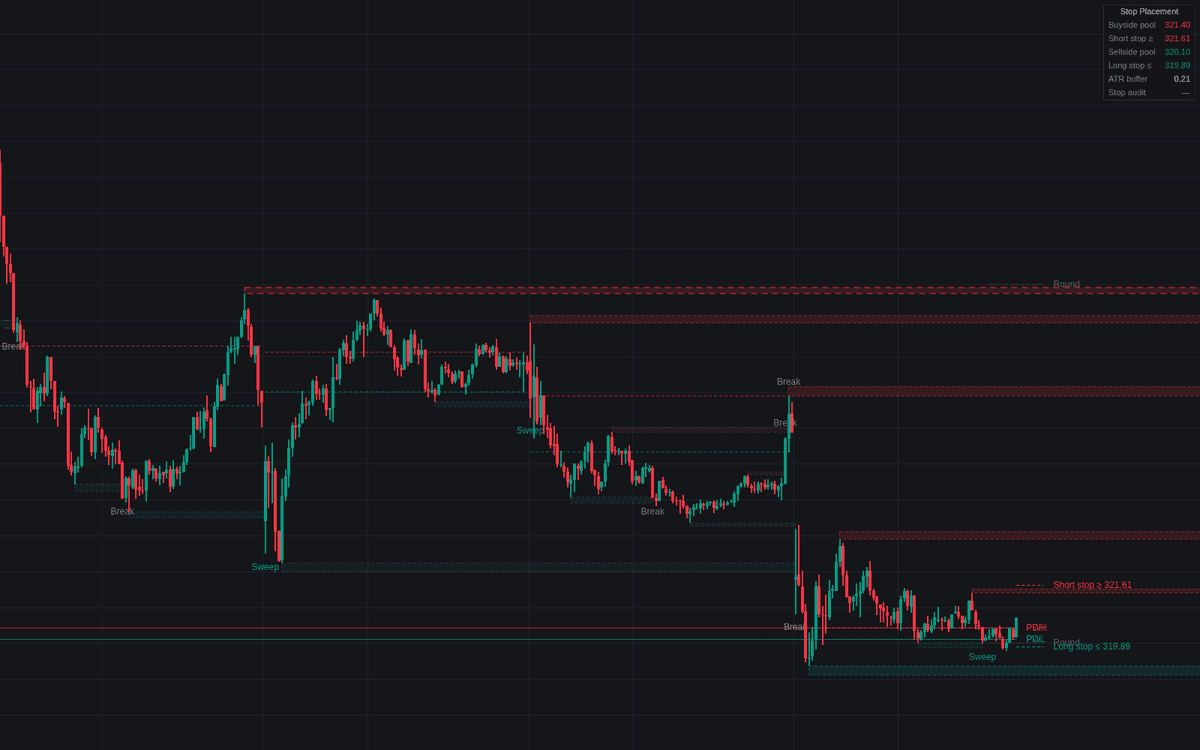

Stop Placement vs Liquidity Pools turns stop placement vs liquidity pools into a mapped, auditable overlay. Confirmed swings, prior day and week extremes and nearby round numbers become ATR-scaled stop pockets (buyside above highs, sellside below lows), and equal extremes merge into thicker pools. Dashed guides mark the closest safer stop beyond the nearest pockets; a dashboard sums up pools, guides, buffer and audit verdict.
How to Trade the Stop Placement vs Liquidity Pools?
- Sweep label: price pierces a pool but closes back inside: a stop-driven run, often a short-term extreme.
- Break label: the close holds beyond the level: acceptance rather than a stop run.
- Safer stop guides: park short stops beyond the buyside guide, long stops beyond the sellside guide, resizing for the wider distance.
- Stop audit: set a price and a stop inside any mapped pocket is relocated beyond the pool plus buffer.
Approach alerts fire within the configured ATR distance of the nearest pocket; pools register on closed bars only and never repaint.
Stop Placement vs Liquidity Pools Settings
- Swing Length (default 10): bars each side to confirm a swing.
- Pocket Depth (default 0.25): pocket span beyond each level, in ATR.
- Equal Level Tolerance (default 0.25): ATR distance within which swings merge as equal.
- Active Pools per Side (default 5) and ATR Length (default 14).
- Prior Day High/Low and Prior Week High/Low (default enabled); Round Numbers (default enabled) with Step (default 0 = automatic grid).
- Stop Buffer (default 0.5) and Safer Stop Guides (default enabled).
- Audit Intended Stop (default disabled) with a Price field.
- Sweep / Break Labels (default enabled) and Approach Distance (default 1.0).
- Style options cover colors, dashboard corner and text size.
Frequently Asked Questions
Free to use
Run it on Vela. Go further with a paid plan.
- Up to 500 Custom Alerts, with webhook automation
- Up to 10× the chart history of Free
- Orderflow lookback up to full history
- More Quant usage to customize it, plus extra usage when you need it
- Futures data alongside crypto, stocks, forex and commodities

Related indicators
Run it on Vela. Make it yours with Quant.
Open this indicator free on Vela, our next-generation charting platform. Then ask Quant, our coding agent built into Vela, to retune it or turn it into a backtested strategy of your own.