Structural Leg Profiler

Apr 28, 2026

Static chart image
Volume Based

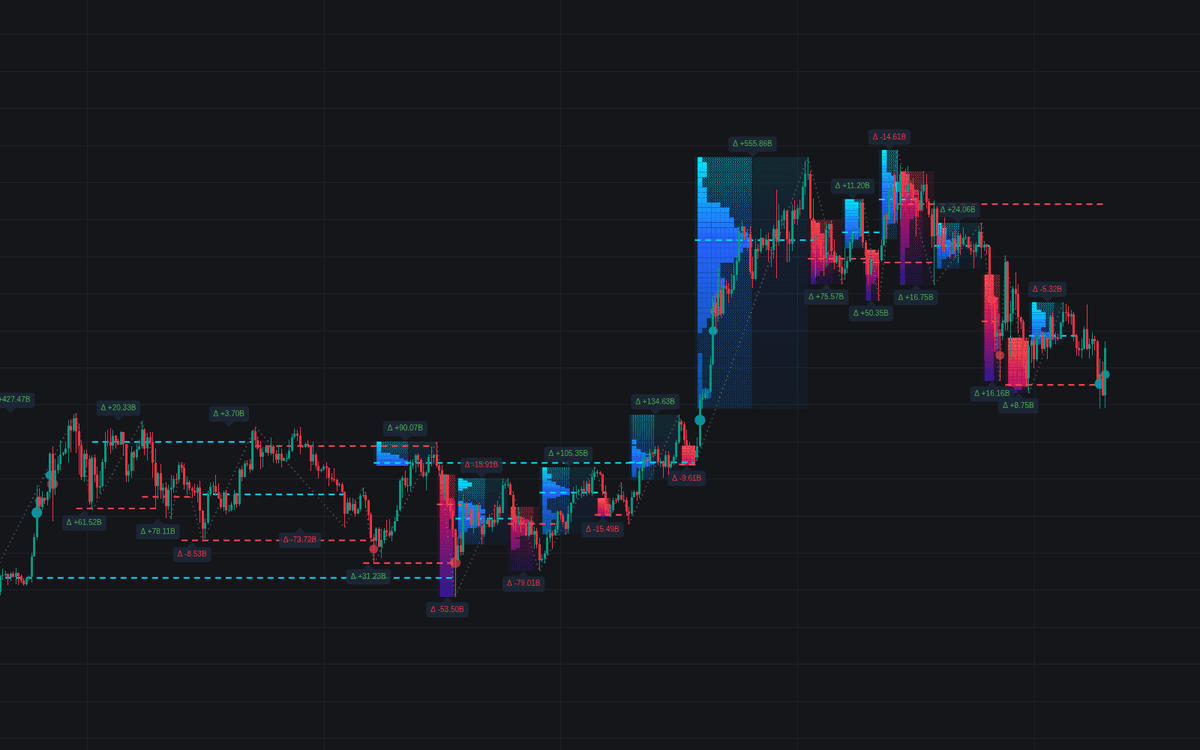
The Structural Leg Profiler indicator is a trading indicator built to connect market structure, swing analysis, volume profile, and order flow into one chart-based tool. It automatically detects major bullish and bearish structural legs, then maps lower-timeframe volume distribution across each move so traders can see where the most important buying and selling activity occurred inside a trend.

How to Trade with the Structural Leg Profiler Indicator

The Structural Leg Profiler is designed to bridge the gap between traditional price action trading and deeper volume analysis. Instead of only showing where price made a swing high or swing low, this tool helps traders understand what happened inside that move by profiling the volume traded throughout each structural leg.

Using an ATR-based swing detection method, the indicator identifies meaningful upward and downward price movements, also known as structural legs. Once a leg is detected, it creates a volume distribution profile for that specific move. This allows traders to analyze whether a trend leg was supported by strong participation, where the Point of Control formed, and whether aggressive buyers or sellers were dominant.

For traders building a trading strategy around market structure, trend continuation, pullbacks, liquidity zones, or support and resistance, the Structural Leg Profiler provides a more detailed way to validate price movement using volume data.

Reading Structural Leg Volume Profiles

Each structural leg displays a volume profile across its full duration. The profile is built from lower-timeframe data, helping provide a more precise view of where volume was concentrated during the move.

  • Volume Gradient Mode: Highlights profile nodes based on total trading activity. Lower-volume areas appear less prominent, while high-volume nodes stand out more clearly. The Point of Control, or POC, marks the price level with the highest volume traded during that structural leg.
  • Delta Mode: Colors each profile block based on the net difference between buying volume and selling volume. Bright green represents stronger aggressive buying pressure, while bright red represents stronger aggressive selling pressure.
  • Summary Labels: Each leg includes a compact label showing Total Leg Volume, Net Delta, and the exact POC price, giving traders quick context without needing to manually inspect every profile row.

These profile readings can help traders determine whether a swing was driven by broad market participation or whether the move was weak, thin, or potentially vulnerable to reversal.

Using Point of Control Zones in a Trading Strategy

The Point of Control is one of the most important levels displayed by the Structural Leg Profiler. Because it represents the price level with the highest traded volume inside a structural move, it can often act as a meaningful support or resistance area.

In a bullish leg, a POC below current price may become a potential pullback zone where buyers could defend value. In a bearish leg, a POC above current price may act as resistance if sellers remain in control. When combined with broader trend direction, price action confirmation, and liquidity analysis, POC levels can help traders build more structured entries, exits, and invalidation zones.

Identifying Volume Anomalies

The indicator automatically detects unusual volume spikes and highlights them with dynamic volume bubbles. These bubbles are useful for spotting moments where participation suddenly increases, which may signal breakout momentum, trend exhaustion, liquidation events, or institutional activity.

  • Standard Bubbles: Show candles where volume is significantly above the 20-period average.
  • Large Bubbles with Values: Highlight extreme volume spikes and print the exact volume value inside the bubble for immediate context.

Volume anomalies are especially useful when they appear near swing highs, swing lows, breakout levels, or the Point of Control. A large spike during a breakout may support continuation, while a major spike at the end of an extended move may warn of exhaustion.

Structural Leg Profiler Indicator Details

Untested POC Extensions

A core feature of the Structural Leg Profiler is its Naked POC logic. When a structural leg is completed, the Point of Control is projected forward as a dashed line. These untested POC levels can act as future support or resistance because they mark high-interest price zones that have not yet been revisited by the market.

The dashed POC line continues extending until price eventually tests or crosses it. Once that happens, the line automatically terminates, helping keep the chart clean while still preserving important untested volume levels.

This makes the indicator useful for traders who want to track high-volume zones from prior swings without manually drawing support and resistance levels.

Lower Timeframe Volume Precision

Unlike standard volume profile tools that rely only on the chart’s current resolution, the Structural Leg Profiler uses lower-timeframe data for more accurate volume mapping.

request.security_lower_tf

This allows the indicator to pull more granular data and build a more detailed view of volume distribution inside each structural leg. Compared to simple OHLC-based approximations, lower-timeframe profiling can provide a clearer picture of where trading activity actually occurred.

This is especially helpful for traders analyzing fast-moving trends, intraday swings, futures markets, crypto markets, forex pairs, or any asset where volume concentration and order flow context matter.

Structural Leg Profiler Settings

Swing Detection Settings

  • ATR Period: Controls the lookback period used to calculate volatility for swing detection.
  • Swing Multiplier (ATR): Adjusts how sensitive the structural leg detection is. Higher values focus on larger trend legs, while lower values detect smaller micro-swings.

These settings allow traders to adapt the indicator to different trading styles. A swing trader may prefer higher ATR sensitivity settings to focus on major market structure, while a scalper or intraday trader may use lower values to capture more frequent shifts.

Profile Settings

  • Max Profile Boxes: Defines the vertical resolution and maximum number of rows used in each volume profile.
  • Profile Alignment: Determines where the volume bars are anchored within the leg area, with options such as Left, Right, or Center.
  • Show Volume Value: Toggles numeric volume values inside the profile boxes.
  • Extend Untested POCs: Enables forward projection of naked POC lines until price mitigates or tests them.

These settings help traders balance chart detail, readability, and performance depending on the market and timeframe being analyzed.

Volume Anomaly Settings

  • Show Volume Bubbles: Turns the volume anomaly visualization on or off.
  • Spike Threshold: Sets the multiplier relative to the 20-period average volume required to trigger a volume bubble.

Lower thresholds will detect more volume spikes, while higher thresholds will only highlight the most extreme volume events.

Style and Color Settings

  • Box Color Mode: Choose between Volume Gradient mode for total volume analysis or Delta mode for buy-versus-sell pressure.
  • Up/Down Leg Colors: Customize the color gradients used for bullish and bearish structural legs.

These visual settings allow traders to adjust the indicator for their preferred chart style while keeping the main market structure and volume profile information easy to read.

FAQ

What is the Structural Leg Profiler indicator?

The Structural Leg Profiler is a trading indicator that maps volume profiles onto automatically detected market structure legs. It helps traders identify Point of Control levels, volume concentration zones, delta pressure, and unusual volume spikes within bullish and bearish price swings.

How can traders use the Structural Leg Profiler in a trading strategy?

Traders can use the indicator to identify high-volume support and resistance zones, validate trend strength, analyze pullbacks, monitor naked POC levels, and compare buying versus selling pressure during each structural leg.

What is a Naked POC?

A Naked POC is an untested Point of Control from a completed structural leg. The indicator projects this level forward as a dashed line until price returns to test it, helping traders track potential support or resistance zones.

Why does the indicator use lower-timeframe data?

The indicator uses lower-timeframe data to create more accurate volume profiles inside each structural leg. This gives traders a more detailed view of where volume was actually traded during a move.

How do I access the Structural Leg Profiler indicator?

You can get access on the LuxAlgo Library for charting platforms like TradingView, MetaTrader (MT4/MT5), and NinjaTrader for free.

Free access on the following platforms
tradingviewSymbolTradingView
ninjatraderNinjaTrader
metatrader4MetaTrader 4/5
thinkorswimThinkorswim

Trading & investing are risky and many will lose money in connection with trading and investing activities. All content on this site is not intended to, and should not be, construed as financial advice. Decisions to buy, sell, hold or trade in securities, commodities and other investments involve risk and are best made based on the advice of qualified financial professionals. Past performance does not guarantee future results.

Hypothetical or Simulated performance results have certain limitations. Unlike an actual performance record, simulated results do not represent actual trading. Also, since the trades have not been executed, the results may have under-or-over compensated for the impact, if any, of certain market factors, including, but not limited to, lack of liquidity. Simulated trading programs in general are designed with the benefit of hindsight, and are based on historical information. No representation is being made that any account will or is likely to achieve profit or losses similar to those shown.

Testimonials appearing on this website may not be representative of other clients or customers and is not a guarantee of future performance or success.

As a provider of technical analysis tools and strategies, we do not have access to the personal trading accounts or brokerage statements of our customers. As a result, we have no reason to believe our customers perform better or worse than traders as a whole based on any content, tool, or platform feature we provide.

Charts used on this site are by TradingView in which the majority of our technical indicators are built on. TradingView® is a registered trademark of TradingView, Inc. www.TradingView.comTradingView® has no affiliation with the owner, developer, or provider of the Services described herein.

Market data is provided by CBOE, CME Group, BarChart, CoinAPI. CBOE BZX real-time US equities data is licensed from CBOE and provided through BarChart. Real-time futures data is licensed from CME Group and provided through BarChart. Select cryptocurrency data, including major coins, is provided through CoinAPI. All data is provided “as is” and should be verified independently for trading purposes.

This does not represent our full Disclaimer. Please read our full disclaimer.

© 2026 LuxAlgo Global, LLC.