Temporal Volume Profile 3D

Apr 20, 2026

Static chart image
Volume Based
Time Based
Liquidity
Works on the following platforms:
tradingviewSymbolTradingView
For free use on the TradingView platform
ninjatraderNinjaTrader
For free use on the NinjaTrader platform
metatrader4MetaTrader 4/5
For free use on the MetaTrader 4/5 platform
thinkorswimThinkorswim
For free use on the Thinkorswim platform

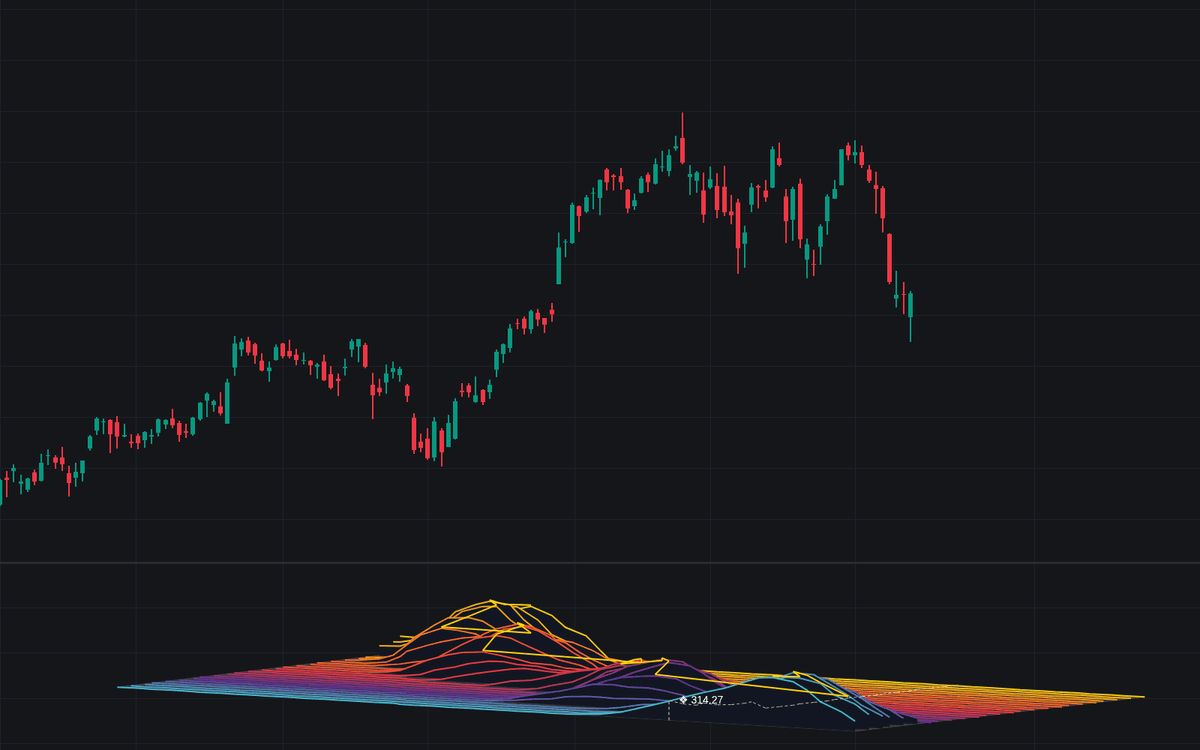
The Temporal Volume Profile 3D indicator is an advanced trading indicator that turns traditional volume profile analysis into a dynamic 3D market map. Instead of showing volume as a flat histogram, it reveals how liquidity builds, shifts, and fades over time by plotting price, time, and traded volume in a spatial landscape. For traders looking to improve market structure analysis, identify support and resistance, and better understand volume-based trading strategy concepts, this tool offers a more complete view of where the market has accepted or rejected price over time.

How to Trade the Temporal Volume Profile 3D Indicator

The biggest strength of this trading indicator is that it shows the evolution of volume, not just the final result. A standard Volume Profile compresses all activity into one static profile, which is useful, but it hides when that activity occurred. The Temporal Volume Profile 3D solves that problem by separating volume into multiple historical layers, allowing traders to see whether important liquidity zones are recent, aging, strengthening, or fading.

This makes the indicator especially useful for traders who want to combine volume analysis with trend trading, support and resistance, price action, or liquidity-based trading strategies.

Tracking Volume Migration and Shifting Fair Value

One of the clearest uses of this indicator is monitoring how the Point of Control (POC) changes over time. In volume trading, the POC often represents the market’s most accepted price level within a given window. With this 3D visualization, traders can see whether that accepted value is moving.

If the highest-volume area gradually shifts from older slices in the background toward newer slices in the foreground, it suggests that market participants are accepting new prices and fair value is migrating. This can support a trend-following trading strategy, especially when price continues to hold above or below prior high-volume areas.

If the highest peak remains clustered in the same price region across many slices, that area may represent a durable support or resistance zone. In those cases, traders may look for mean reversion setups, bounces, or rejection trades around that long-standing volume node.

How Current Price Interacts With Historical Liquidity

The real-time price tracker helps traders understand where price currently sits relative to prior participation. When price enters a large historical volume peak, the indicator can trigger a Peak Warning, showing that price is interacting with a high-liquidity zone.

In practical trading terms, these zones often act like magnets. Price may slow down, consolidate, or reverse as it enters an area where heavy business was previously conducted. This can help traders avoid chasing breakouts directly into thick overhead liquidity or identify areas where the market may pause before choosing its next direction.

For day traders, swing traders, and intraday traders alike, this can improve timing around entries and exits by highlighting where price is most likely to encounter friction.

Using Low Volume Valleys for Fast-Moving Price Zones

The valleys in the 3D landscape represent Low Volume Nodes (LVNs), which are price areas where the market historically spent little time and executed relatively little volume. These zones often matter because markets tend to move quickly through areas of low agreement.

When an LVN stays thin or empty across multiple time slices, it suggests that the market repeatedly found little reason to transact there. That can create a path of least resistance. If price re-enters one of these zones, traders may see a faster move as the market travels through the low-liquidity gap toward the next major volume peak.

This concept can be especially useful in breakout trading strategy development, where traders want to identify not just where price may stall, but where it may accelerate.

Why This Volume Indicator Is Different

Most volume profile tools are helpful, but they are still static. They tell you where volume accumulated, but not how that structure developed over time. The Temporal Volume Profile 3D adds the missing time element, giving traders a better sense of whether a level is still relevant, becoming more relevant, or losing significance.

This makes the indicator well suited for:

  • Volume profile trading
  • Liquidity analysis
  • Support and resistance mapping
  • Trend continuation strategy development
  • Reversal trading around high-volume acceptance zones
  • Breakout trading through low-volume areas

Indicator Mechanics and Visualization Details

Traditional Volume Profiles lose the timeline behind volume accumulation. A standard profile may show a major node at a given price, but it cannot explain whether the majority of that volume formed recently or much earlier in the lookback window. That missing context matters, especially when traders want to judge how fresh or stale a liquidity zone really is.

The Temporal Volume Profile 3D addresses this by dividing the lookback range into separate time slices and rendering them along a depth axis. This creates a full terrain of historical participation, where traders can visually inspect how volume nodes build and migrate through time.

3D Projection Engine and Camera Control

The script uses a custom trigonometric projection engine that lets traders rotate and tilt the full 3D volume landscape. This is more than a cosmetic feature. Different viewing angles help reveal different market insights.

A wider, more top-down view can make it easier to identify the overall layout of major volume clusters and the relation between old and new liquidity. A more side-on angle emphasizes the vertical size of volume peaks, which can help traders quickly spot dominant high-volume zones and compare their strength.

This flexibility makes the indicator easier to adapt to different chart layouts and trading preferences.

POC Ridge Line and Market Acceptance Path

The POC Ridge Line connects the highest-volume node from each time slice, creating a continuous path through the 3D terrain. This can act as a visual map of changing market acceptance.

When the ridge rises or falls gradually over time, it can indicate that the market’s perception of fair value is trending. When it stays flat, it may confirm a long-standing balance area. Traders can use this information to better align volume analysis with broader market structure and directional bias.

Settings Explained

Volume Profile & Matrix

  • Lookback Bars: Defines the total historical range used in the volume calculation. A larger setting gives more context, while a smaller one focuses on recent market behavior.
  • Price Bins (Width): Controls the horizontal resolution of the volume map. Higher values create finer price detail, which can help traders locate more precise support and resistance levels.
  • Time Slices (Depth): Determines how many historical segments are shown. More slices provide a richer view of how liquidity evolves through time.
  • Terrain Smoothing: Softens neighboring volume nodes to create a cleaner and more natural 3D landscape. This can improve readability when analyzing broad volume structure.

Camera Projection

  • Yaw / Pitch: Adjusts the rotation and tilt of the 3D object so traders can focus on either the overall map or the height of specific volume peaks.
  • Scale X / Y / Z: Changes the dimensions of the terrain. This helps traders fine-tune the width, depth, and height of the volume structure for their screen and chart style.
  • Offset X / Y: Moves the full 3D landscape on the chart so it does not interfere with live candles or nearby annotations.

Style & Colors

  • Show Ridge Lines: Displays the outlines for each time slice, making it easier to distinguish the layered structure of the profile.
  • Mountain Fills: Uses filled background occlusion to create a stronger 3D effect and make the landscape easier to read visually.
  • Show POC Ridge Line: Displays the highlighted line that tracks the highest-volume node through time.
  • Peak Proximity Warning: Changes the real-time price tracker when price enters a major high-volume zone, helping traders notice likely reaction areas quickly.

How Traders Can Use This Indicator in a Trading Strategy

This trading indicator can be used in several ways depending on your style.

A trend trader may watch for the POC ridge to migrate higher or lower as confirmation that fair value is moving with price. A reversal trader may focus on strong historical volume peaks that have remained stable through many slices, using them as likely reaction zones. A breakout trader may look for price to leave a high-volume region and move into a persistent low-volume valley, where price may travel faster with less resistance.

Because the tool combines volume profile logic with time-based context, it can also be used alongside other trading indicators such as VWAP, moving averages, RSI, or market structure tools to build more complete trading strategies.

FAQ

What is the Temporal Volume Profile 3D indicator?

The Temporal Volume Profile 3D indicator is a volume-based trading indicator that visualizes historical volume across price, time, and magnitude in a 3D landscape. It helps traders identify shifting liquidity, evolving support and resistance, and the migration of the Point of Control.

How is this different from a standard Volume Profile?

A standard Volume Profile combines all volume into one static 2D view. The Temporal Volume Profile 3D preserves the timing of that volume, allowing traders to see how important levels formed and changed over different periods.

What do the peaks and valleys mean?

Peaks represent high-volume areas where the market showed strong acceptance and liquidity. Valleys represent low-volume areas where price often moves more quickly because there was less historical interest.

How can this help a trading strategy?

This indicator can improve a trading strategy by helping traders find high-liquidity reaction zones, identify fair value migration, and spot low-volume paths where price may move quickly. It can be useful for breakout trading, trend trading, and support and resistance analysis.

Who is this trading indicator for?

It can be useful for day traders, swing traders, and any trader who wants a deeper view of volume structure, liquidity, and market acceptance over time.

How do I access the Temporal Volume Profile 3D indicator?

You can get access on the LuxAlgo Library for charting platforms like TradingView, MetaTrader (MT4/MT5), and NinjaTrader for free.

Trading & investing are risky and many will lose money in connection with trading and investing activities. All content on this site is not intended to, and should not be, construed as financial advice. Decisions to buy, sell, hold or trade in securities, commodities and other investments involve risk and are best made based on the advice of qualified financial professionals. Past performance does not guarantee future results.

Hypothetical or Simulated performance results have certain limitations. Unlike an actual performance record, simulated results do not represent actual trading. Also, since the trades have not been executed, the results may have under-or-over compensated for the impact, if any, of certain market factors, including, but not limited to, lack of liquidity. Simulated trading programs in general are designed with the benefit of hindsight, and are based on historical information. No representation is being made that any account will or is likely to achieve profit or losses similar to those shown.

Testimonials appearing on this website may not be representative of other clients or customers and is not a guarantee of future performance or success.

As a provider of technical analysis tools and strategies, we do not have access to the personal trading accounts or brokerage statements of our customers. As a result, we have no reason to believe our customers perform better or worse than traders as a whole based on any content, tool, or platform feature we provide.

Charts used on this site are by TradingView in which the majority of our technical indicators are built on. TradingView® is a registered trademark of TradingView, Inc. www.TradingView.comTradingView® has no affiliation with the owner, developer, or provider of the Services described herein.

Market data is provided by CBOE, CME Group, BarChart, CoinAPI. CBOE BZX real-time US equities data is licensed from CBOE and provided through BarChart. Real-time futures data is licensed from CME Group and provided through BarChart. Select cryptocurrency data, including major coins, is provided through CoinAPI. All data is provided “as is” and should be verified independently for trading purposes.

This does not represent our full Disclaimer. Please read our full disclaimer.

© 2026 LuxAlgo Global, LLC.