Volatility Ratio
 By LuxAlgoFeb 6, 2026
Volatility Ratio is an indicator on Vela, our next-generation charting platform, written in Pine Script®.
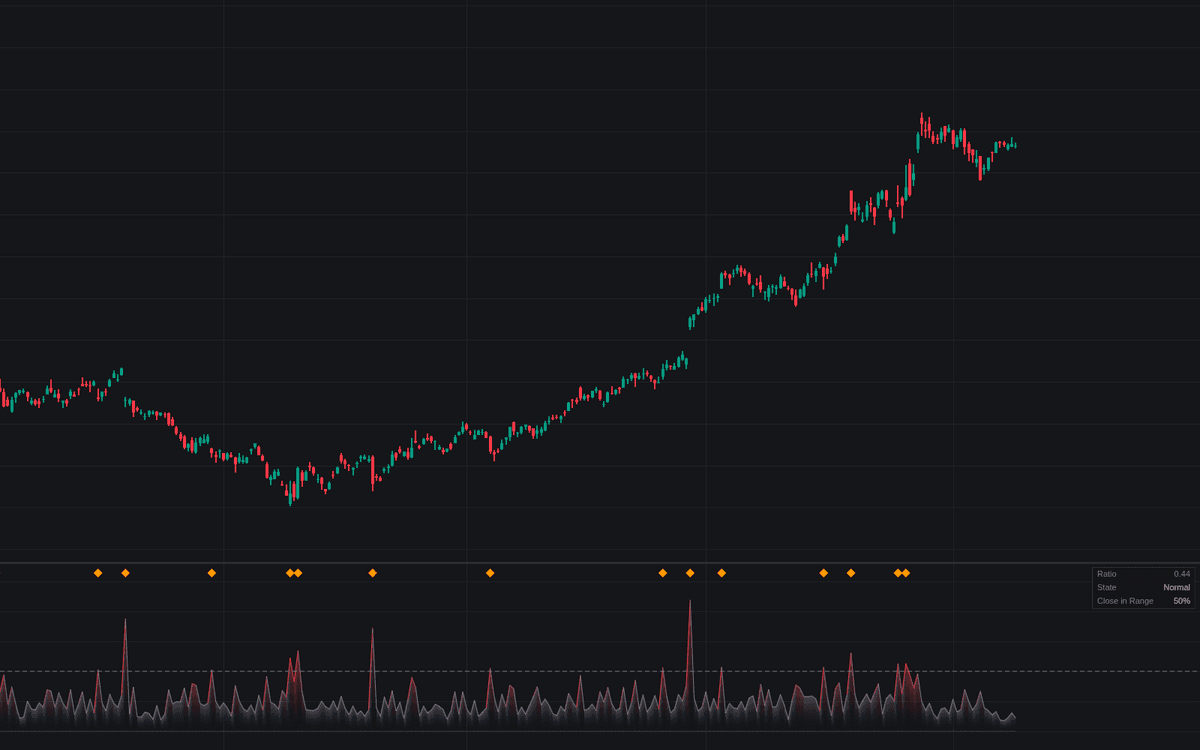

Volatility Ratio reduces "was that bar unusual?" to a single dimensionless number. Its default mode implements the Volatility Ratio as Jack Schwager framed it (the current bar's true range over a trailing baseline, flagging wide-range bars with diamonds above a threshold), while a second mode divides short-lookback by long-lookback volatility, read around a dashed 1 line.
How to Trade the Volatility Ratio?
- Wide-range event bar: a reading above the Event Threshold marks a bar that swallowed an unusually large share of recent movement, often news, breakouts, or capitulation. The ratio measures size only. The dashboard's close-in-range figure adds the directional hint.
- Expansion above 1: in Short vs Long mode the market runs hotter than its own norm; the 1-line crossings are alerted both ways.
- Contraction below 1: conditions cooling, where squeeze setups form.
Volatility Ratio Settings
- Ratio Mode (default Wide-Range Bar (Schwager)): the event-bar construction, or Short vs Long Volatility.
- Baseline Length (default 14): trailing window the bar is measured against, taken on the prior bar so a bar never inflates its own reference.
- Baseline Type (default Average True Range): the window's ATR, or the gap-adjusted Window Span, which runs smaller and needs lower cutoffs.
- Event Threshold (default 2): the wide-range cut, about twice the typical recent bar with the ATR baseline; a convention, not a law.
- Mark Event Bars (default enabled): diamonds at the top of the pane.
- Short Length (default 5) and Long Length (default 20): the fast and slow windows of the short-over-long form.
- Volatility Basis (default ATR): ATR or Standard Deviation on both sides, with Stdev Source (default close) feeding the latter.
- Show Dashboard (default enabled) and Gradient Fill (default enabled): the readout panel and fill from zero.
Frequently Asked Questions
Free to use
Run it on Vela. Go further with a paid plan.
- Up to 500 Custom Alerts, with webhook automation
- Up to 10× the chart history of Free
- Orderflow lookback up to full history
- More Quant usage to customize it, plus extra usage when you need it
- Futures data alongside crypto, stocks, forex and commodities

Original indicatorBuilt in-house by LuxAlgo
Related indicators
Run it on Vela. Make it yours with Quant.
Open this indicator free on Vela, our next-generation charting platform. Then ask Quant, our coding agent built into Vela, to retune it or turn it into a backtested strategy of your own.