SuperTrend Oscillator
 By LuxAlgoMay 11, 2021
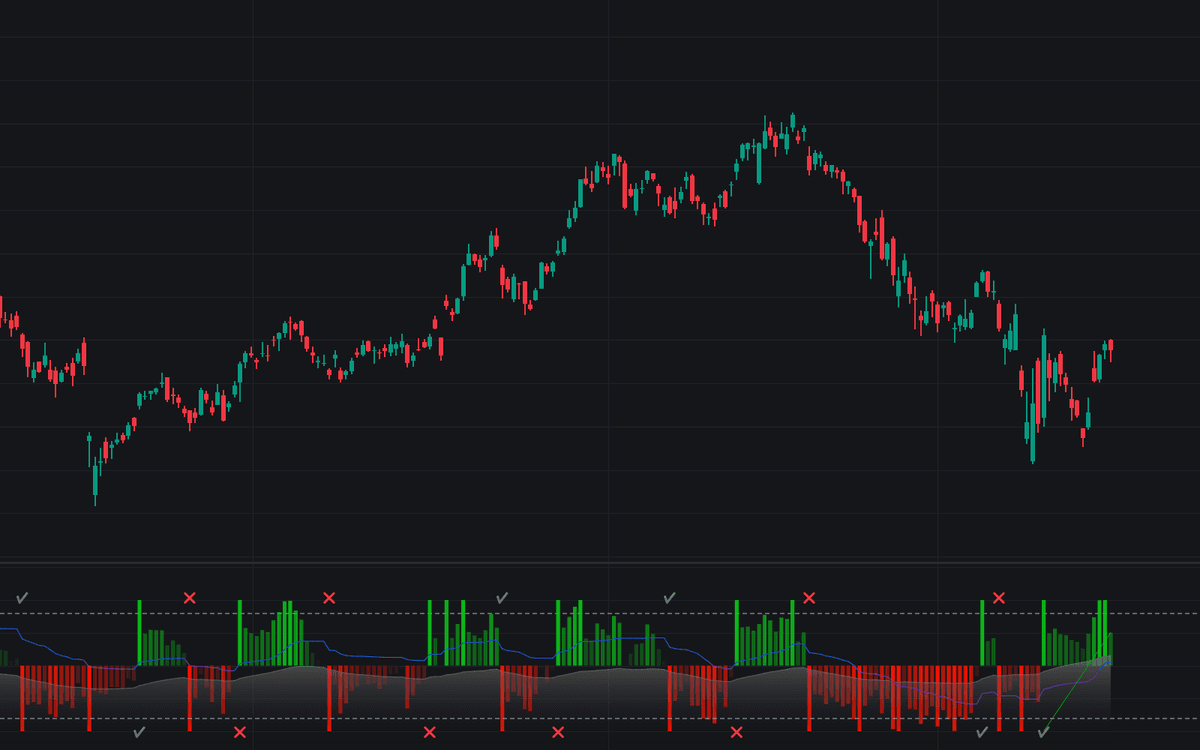

The SuperTrend Oscillator converts the gap between price and the SuperTrend band into a bounded oscillator on a (-100, 100) scale, normalized by the widest spread between the band's extremities. Three components stack into a MACD-like anatomy: the main oscillator, a Signal line smoothed by an adaptive filter that distorts less in trends, and a Histogram of their difference, plus on-chart symbols that grade the SuperTrend's own signals as true or false.
How to Trade the SuperTrend Oscillator?
- Main oscillator above 0: price sits above the SuperTrend (bullish posture); below 0 is the bearish mirror.
- Readings near +100 or -100: a strong trend is in force.
- Pullbacks into the 50/-50 zone: retracement territory within trending markets, while overbought and oversold extremes flag potential exit areas.
- Main and histogram signs disagree: when the main reads positive while the histogram is negative (or vice versa), upcoming SuperTrend crossovers can be disregarded as likely false.
- Cross and checkmark symbols: printed at the top for buy signals and at the bottom for sell signals to validate the previous signal, with the false-signal percentage summarized over the chart's history.
SuperTrend Oscillator Settings
- Length: the ATR period behind the SuperTrend calculation.
- Mult: the ATR multiplier.
- Smooth: smoothing applied to the histogram.
- Fixed Transparency / Show Lines and Labels: display toggles for the pane.
Frequently Asked Questions
Free indicator
Get free access to this indicator on the platforms below.
TradingView
NinjaTrader
MetaTrader 4/5

Original indicatorBuilt in-house by LuxAlgo
The Library is free. Quant makes it yours.
Pull any concept or indicator into Quant: rebuild it, retune it, or turn it into a backtested strategy of your own.