Gaussian Volume Profile
 By LuxAlgoFeb 15, 2026
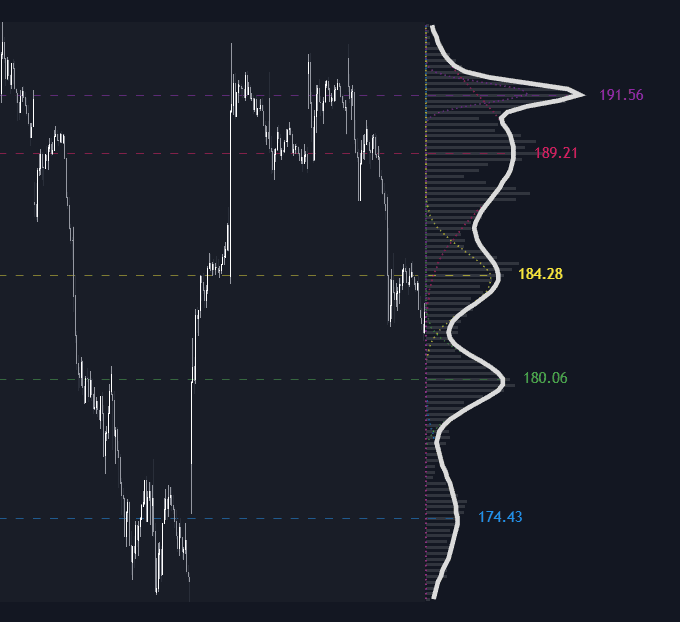

The Gaussian Volume Profile replaces the familiar jagged histogram with a fitted model. Over a chosen lookback it organizes traded volume by price like any volume profile, then fits a Sum of Gaussians to the distribution with Levenberg-Marquardt optimization. The output is a smooth volume density curve projected beside price, with every detected peak marked as a liquidity center.
How to Trade the Gaussian Volume Profile?
- Dashed peak lines: each local maximum of the fitted curve marks a liquidity center, candidate support and resistance, color-coded to its Gaussian component.
- Narrow, sharp peaks: tightly concentrated agreement at one price, natural places to watch for rejections.
- Wide, shallow components: volume spread across a range, broader value areas better suited to rotation than to precision entries.
- Clearing a dominant node: supports a breakout read; pullbacks into prior high-density zones frame continuation entries.
Peaks land at the fitted center of each cluster rather than on a bin midpoint, and minor histogram noise is smoothed away. It shares a goal with kernel density estimation (turning discrete data into a smooth density) but works by refining a limited set of Gaussian components.
Gaussian Volume Profile Settings
- Lookback Window: bars included in the distribution; larger windows capture structural value, smaller ones recent positioning.
- Number of Bins: vertical resolution, more detail at more computational cost.
- Max Potential Peaks: the maximum number of Gaussian components the model may fit.
- Max Iterations: optimizer refinement cycles; more sharpen the fit but run slower.
- Initial Lambda: the damping factor guiding early optimization steps.
- Histogram Resolution / Highlight Window Range / Highlight Detected Peaks / Auto Mode: control projection length, lookback shading, peak lines, and curve coloring.
Frequently Asked Questions
Free on Vela
Run it on Vela. Go further with a paid plan.
- Up to 500 strategy alerts, with webhook automation
- Up to 10× the chart history of Free
- Orderflow lookback up to full history
- More Quant usage to customize it, plus extra usage when you need it
- Futures data alongside crypto, stocks, forex and commodities
Also works on

Related indicators
All 30 Volume Profile indicators
.png&w=3840&q=75)
Run it on Vela. Make it yours with Quant.
Open this indicator free on Vela, our next-generation charting platform. Then ask Quant, our coding agent built into Vela, to retune it or turn it into a backtested strategy of your own.