ultraultimate
Backtester (S&O)
 By LuxAlgoNov 21, 2022
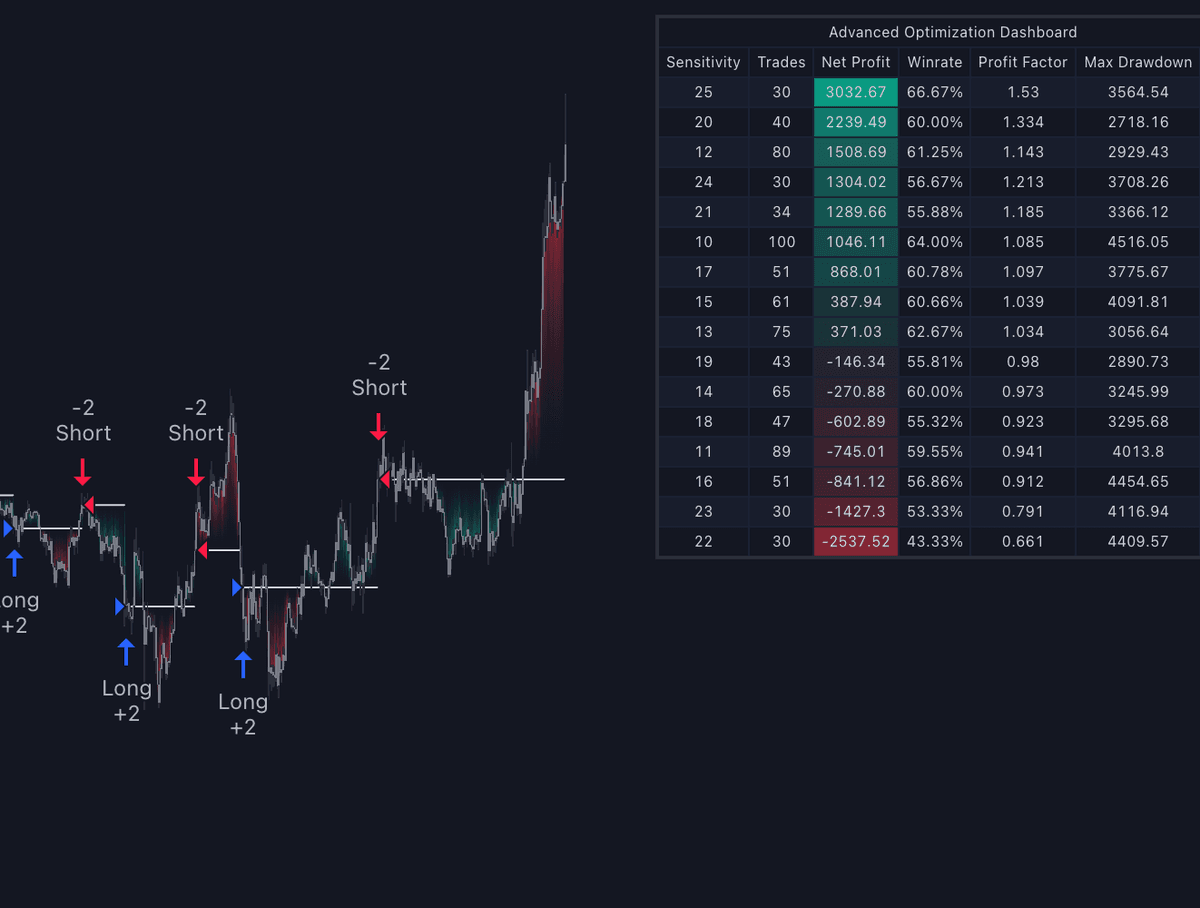
The Backtester (S&O) is the strategy-script companion to the Signals & Overlays™ toolkit: it takes its Confirmation Signals, overlays, and optimization methods and wraps them in a strategy engine so signal-based ideas produce trade statistics instead of impressions. It serves traders who want to know how a sensitivity value, a filter, or an exit rule would have behaved before risking it, and it extends the toolkit's dashboard-level Optimal Sensitivity into full, visible optimization.
What's Inside the Backtester (S&O)?
- Sensitivity Optimization: the script internally backtests the Confirmation Signals' Sensitivity parameter across a user-set range and reports the best-performing value on its dashboard, with the option to Maximize for Winrate or Best Profit.
- Optimization Matrix: an optional dashboard table showing all tested Sensitivity permutations, so the win rate landscape around the suggested setting is visible rather than a single opaque number.
- Built-in filters: 10+ pre-built filters gate Confirmation Signals with the toolkit's own Indicator Overlays (for example only taking bullish signals while the Trend Catcher is bullish), turning confluence rules into testable entry conditions.
- Confirmation exit points: the toolkit's exit logic is built in and enabled by default, so backtests reflect the same exits a chart trader would see.
- Counter Trade Mode: reverses Confirmation Signals into direct contrarian entries for ranging conditions, documented alongside its cost, potentially large max drawdowns during trends.
- External Source Input: any external indicator, including other LuxAlgo toolkits, can filter signals or trigger custom take-profits and stop-losses, for example the HyperWave from Oscillator Matrix™ exiting longs on a cross of 80 and shorts at 20.
- Backtest window: defaults to the most recent 2,000 bars, with dashboard location options.
- Complete strategy alerts: every action the strategy takes can notify you, making the script a bridge toward external automation.
How to Trade with the Backtester (S&O)?
- Structure ideas as filter, trigger, and exit: pick a signal mode as the trigger, gate it with an overlay filter, and choose between built-in Confirmation exits or an external TP/SL source. The script exists to make each layer measurable.
- Optimize, then distrust the optimum: run the Sensitivity optimization and inspect the Optimization Matrix; a best value surrounded by similar results is more trustworthy than an isolated spike, and optimized settings are guaranteed to change over time.
- Judge robustness, not headline profit: the documented markers of a well-optimized strategy are 100+ closed trades with a consistently rising equity curve, outperformance of buy-and-hold, a low max drawdown relative to net profit, and a profit factor around 1.5 or above.
- Reserve Counter Trade Mode for ranges: contrarian entries are designed for sideways conditions, so pair the mode with stop-loss conditions that cap trend-driven drawdowns during testing.
- Fix the Strategy Properties first: adjust them to match your own account and trading platform before reading any result. Defaults cannot be realistic for every instrument.
Key Settings & Modes
- Sensitivity ranges for the optimization sweep, with Maximize for Winrate or Best Profit.
- Optimization Matrix dashboard option and Dashboard locations.
- Buy & Sell conditions filters using Indicator Overlays and External Source.
- Take Profit exit signals option plus External Source for Take Profit & Stop Loss.
- Counter Trade Mode toggle.
- Backtest window (default 2,000 bars).
- Strategy Properties: the script's authors strongly recommend aligning these with your real account and platform before trusting results.
Frequently Asked Questions
The Library is free. Quant makes it yours.
Pull any concept or indicator into Quant: rebuild it, retune it, or turn it into a backtested strategy of your own.