Session Gap Fill
 By LuxAlgoOct 8, 2025
Session Gap Fill is an indicator on Vela, our next-generation charting platform, written in Pine Script®.
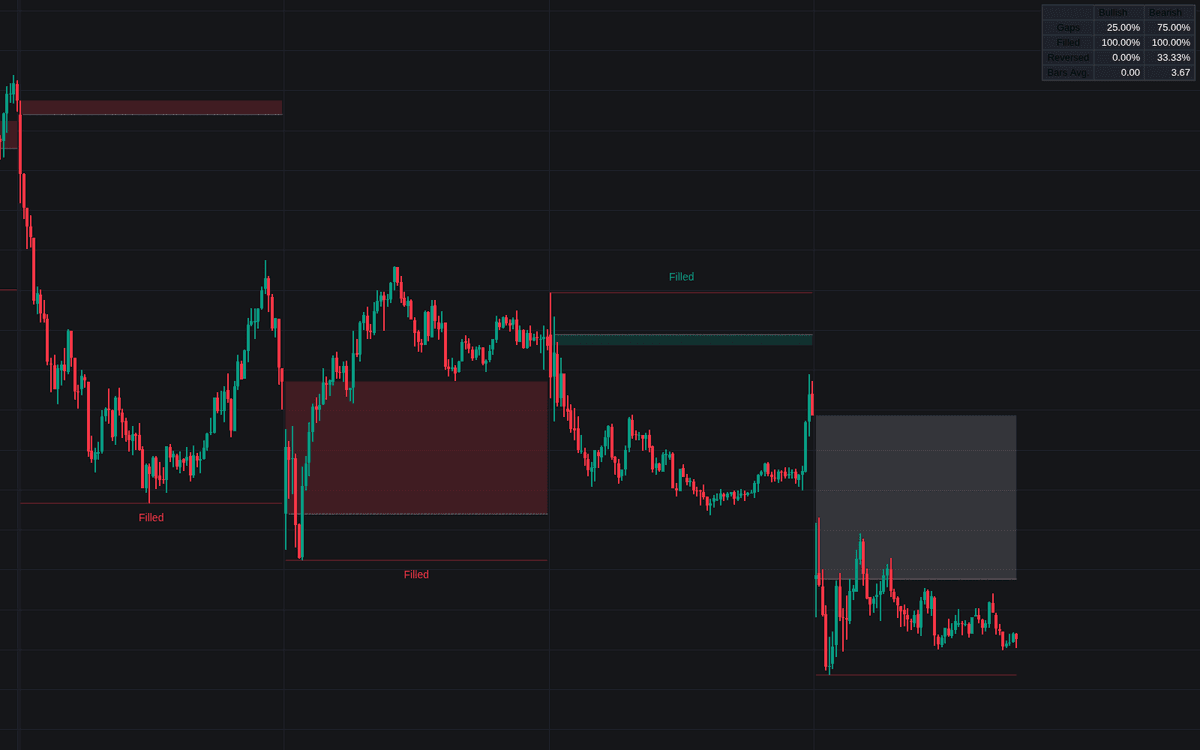

Session Gap Fill watches the handoff between trading sessions. Whenever a session opens away from the previous session's closing price, it marks a bullish gap (open above the prior close) or a bearish gap (open below), then follows each one to record whether price returns to that prior close - the gap-fill event - or leaves the gap standing. What emerges is a statistical picture of how your market treats its opening dislocations.
How to Trade the Session Gap Fill?
- Filled vs unfilled: a quick fill shows the market rejecting the new opening prices, while a gap that stays open signals acceptance of the sentiment shift it expressed. The reaction, not the gap itself, is the information.
- Overlapping vs non-overlapping: overlapping gaps - where the new session's first bar shares price levels with the prior bar - behave differently from clean breaks, and the Gap Type filter lets you study each population on its own.
- Dashboard columns: Gaps (bullish vs bearish share), Filled (fill rate by direction), Reversed (how often a filled gap turns back in the gap's original direction), and Bars Avg. (typical bars until fill).
Session Gap Fill Settings
- Gap Type: analyze all gaps, overlapping only, or non-overlapping only.
- Dashboard / Position / Size: toggle the statistics panel, place it, and scale it.
- Style toggles: visibility and colors for filled bullish, filled bearish, and unfilled gaps, plus the Max Deviation Level and Open Price Level overlays.
Frequently Asked Questions
Free to use
Run it on Vela. Go further with a paid plan.
- Up to 500 strategy alerts, with webhook automation
- Up to 10× the chart history of Free
- Orderflow lookback up to full history
- More Quant usage to customize it, plus extra usage when you need it
- Futures data alongside crypto, stocks, forex and commodities
Also works on

Related indicators
All 3 Gap Fill indicators
.png&w=3840&q=75)
.png&w=3840&q=75)
Run it on Vela. Make it yours with Quant.
Open this indicator free on Vela, our next-generation charting platform. Then ask Quant, our coding agent built into Vela, to retune it or turn it into a backtested strategy of your own.