Session Streaks
 By LuxAlgoOct 29, 2025
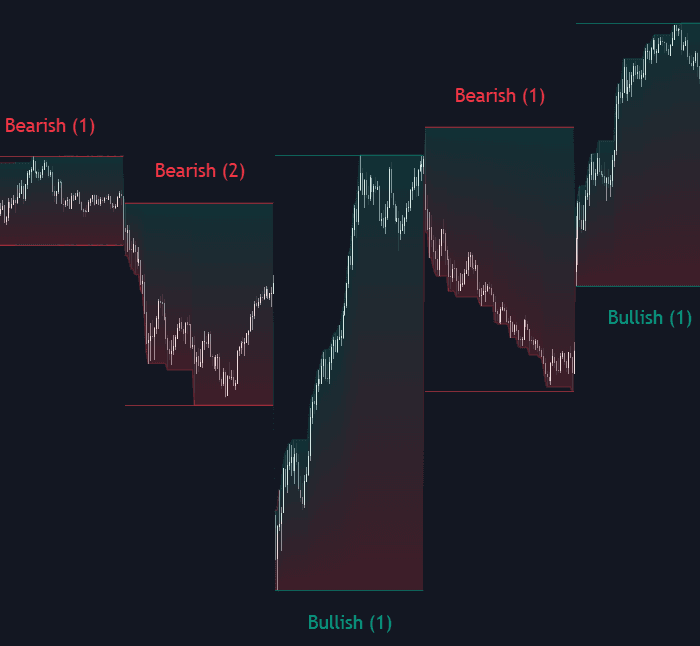

Session Streaks turns the sequence of regular trading sessions into a statistic. A session closing at or above its open is labeled bullish, one closing below is bearish, and the indicator counts how many consecutive sessions have shared the same bias - the streak - while its dashboard compiles how long such streaks have historically run on your chart.
How to Trade the Session Streaks?
- Streaks against the record: if bullish streaks on your symbol have a median length of three sessions and the current run just reached three, the base rates argue for extra alertness to a flip - simple, probability-flavored timing context.
- Median and Mode first: the dashboard's Median resists outlier streaks and its Mode reports the most frequent streak length; together they anchor expectations better than any single dramatic run.
- Gradient coloring: the horizontal gradient shades price by its position inside the session range (green toward the highs, red toward the lows), while the vertical gradient colors relative to the session open - a compact read on session open/close behavior.
On timeframes up to daily, every candle is one session. On weekly or monthly charts the logic adapts, using the final session inside each bar to set that bar's bias, so streak analysis stays consistent at any zoom level.
Session Streaks Settings
- Dashboard / Position / Size: toggle the statistics table and control where and how large it renders.
- Bullish / Bearish Colors + Transparency: theme the session visuals, with transparency from 0 to 100.
- Gradient Type: horizontal (position in range) or vertical (above/below the open).
Frequently Asked Questions
Free on Vela
Run it on Vela. Go further with a paid plan.
- Up to 500 strategy alerts, with webhook automation
- Up to 10× the chart history of Free
- Orderflow lookback up to full history
- More Quant usage to customize it, plus extra usage when you need it
- Futures data alongside crypto, stocks, forex and commodities
Also works on

Related indicators
All 9 Trading Sessions indicators.png&w=3840&q=75)
.png&w=3840&q=75)
Run it on Vela. Make it yours with Quant.
Open this indicator free on Vela, our next-generation charting platform. Then ask Quant, our coding agent built into Vela, to retune it or turn it into a backtested strategy of your own.