Swing Breakout Sequence
 By LuxAlgoOct 23, 2024
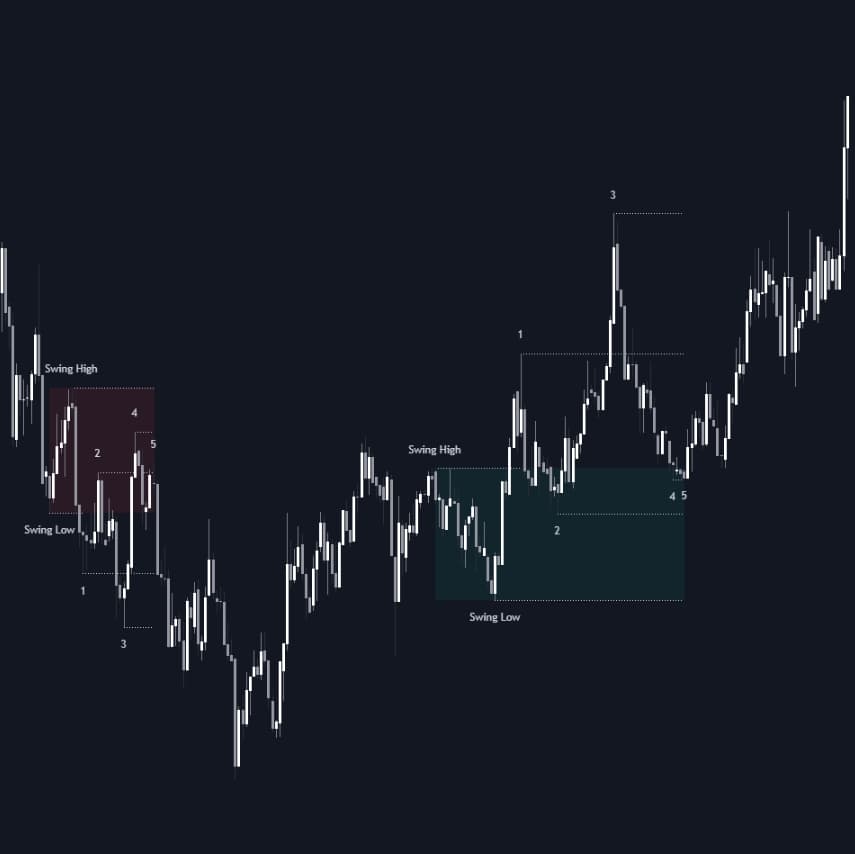

The Swing Breakout Sequence indicator detects a five-point pattern in which two failed breakouts from a swing zone load pressure for a successful third attempt. The sequence turns on a liquidity sweep: after the second failed attempt, price pulls back into the zone to take out the liquidity resting at the first pullback, and a reversal pattern forming there completes the setup. Points, paths, and zones are drawn directly on the chart, built for traders scalping directional price action.
How to Trade the Swing Breakout Sequence?
- Point 1: the first breakout attempt outside the swing zone, where early entrants are often trapped.
- Point 2: the pullback that follows, back inside the zone.
- Point 3: a second attempt beyond Point 1 that also fails.
- Point 4: a deeper pullback targeting the liquidity at Point 2.
- Point 5: a reversal pattern, such as a double top or bottom, printing at Point 4 completes the sequence.
A completed sequence anticipates the third attempt: traders caught offside at Points 1 and 3 tend to flip their positions, and that unwinding can drive the final break of structure out of the zone.
Swing Breakout Sequence Settings
- Swing Length: candles needed to confirm a swing high or low; larger values build zones from more substantial swings.
- Internal Length: candle count for internal highs and lows; keep it at or below Swing Length, with smaller values tracking the minor swings inside the zone.
- Point 4 Beyond Point 2: keeps only sequences where Point 4 extends past Point 2.
- Show Point 5 and Require Equal H/L at Point 5: toggle final-stage detection and tune the double top/bottom threshold, where higher values admit more sequences.
- Show Sequence Path, Show Boxes, Show Lines: control the connecting path, color-coded boxes, and per-point horizontal lines.
Frequently Asked Questions
Free on Vela
Run it on Vela. Go further with a paid plan.
- Up to 500 strategy alerts, with webhook automation
- Up to 10× the chart history of Free
- Orderflow lookback up to full history
- Up to 100,000 monthly credits for Quant to customize it
- Futures data alongside crypto, stocks, forex and commodities
Also works on

Run it on Vela. Make it yours with Quant.
Open this indicator free on Vela, our next-generation charting platform. Then ask Quant, our coding agent built into Vela, to retune it or turn it into a backtested strategy of your own.