Swing Failure Pattern (SFP)
 By LuxAlgoApr 18, 2024
Swing Failure Pattern (SFP) is an indicator on Vela, our next-generation charting platform, written in Pine Script®.
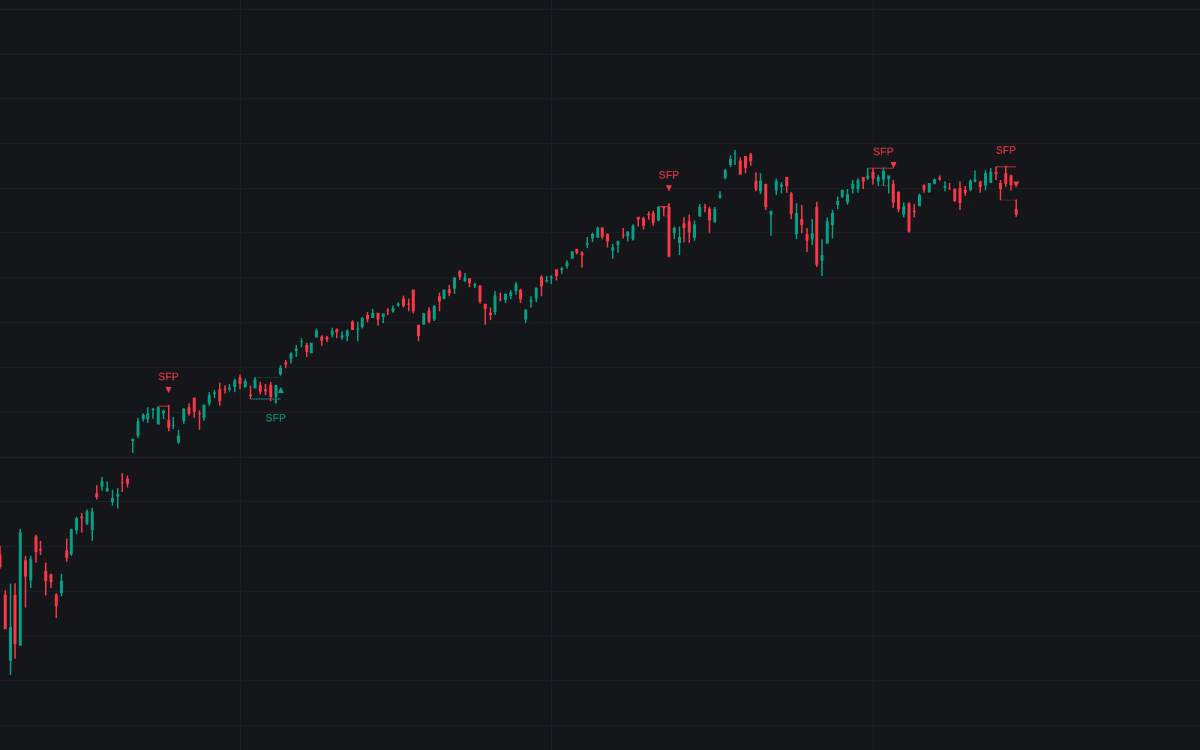

The Swing Failure Pattern (SFP) indicator automatically highlights the swing failure pattern: a candle whose wick trades beyond a recent swing high or low yet closes back inside it, a move often engineered by larger participants generating liquidity before a turn. Each detection gets a label and an accentuated wick line, a confirmation level for validating the reversal, and an optional filter measuring the share of candle volume traded beyond the swing from lower-timeframe intrabar data.
How to Trade the Swing Failure Pattern (SFP)?
- Bearish SFP: a wick above a prior swing high with a close back below it; watch for rotation lower.
- Bullish SFP: a wick below a prior swing low with a close back above it; watch for rotation higher.
- Confirmation level: the highest point between the previous swing and a bullish SFP (the lowest for a bearish SFP). A close beyond it prints a triangle icon confirming the reversal.
- Volume Threshold %: keep SFPs where volume beyond the swing stays under the threshold, limiting excessive liquidity generation, or flip the condition to demand a significant sweep.
Contrarian traders can enter on the SFP itself and use the confirmation level to frame profit targets or stop losses; more patient entries wait for the confirming close.
Swing Failure Pattern (SFP) Settings
- Swings: the swing detection period. Longer settings anchor SFPs to longer-term levels and reduce detection frequency without changing the patterns themselves.
- Bullish SFP / Bearish SFP: show or hide each direction.
- Volume validation: choose 'Volume outside swing < Threshold', '> Threshold', or 'None', then set the Volume Threshold %.
- Auto + multiple / LTF: control the lower timeframe used for intrabar volume; Auto picks the nearest suitable one, and a dashboard can display which is applied.
Frequently Asked Questions
Free to use
Run it on Vela. Go further with a paid plan.
- Up to 500 strategy alerts, with webhook automation
- Up to 10× the chart history of Free
- Orderflow lookback up to full history
- More Quant usage to customize it, plus extra usage when you need it
- Futures data alongside crypto, stocks, forex and commodities
Also works on

Related indicators
Run it on Vela. Make it yours with Quant.
Open this indicator free on Vela, our next-generation charting platform. Then ask Quant, our coding agent built into Vela, to retune it or turn it into a backtested strategy of your own.