Volume Anchored Price Map
 By LuxAlgoFeb 16, 2026
Volume Anchored Price Map is an indicator on Vela, our next-generation charting platform, written in Pine Script®.
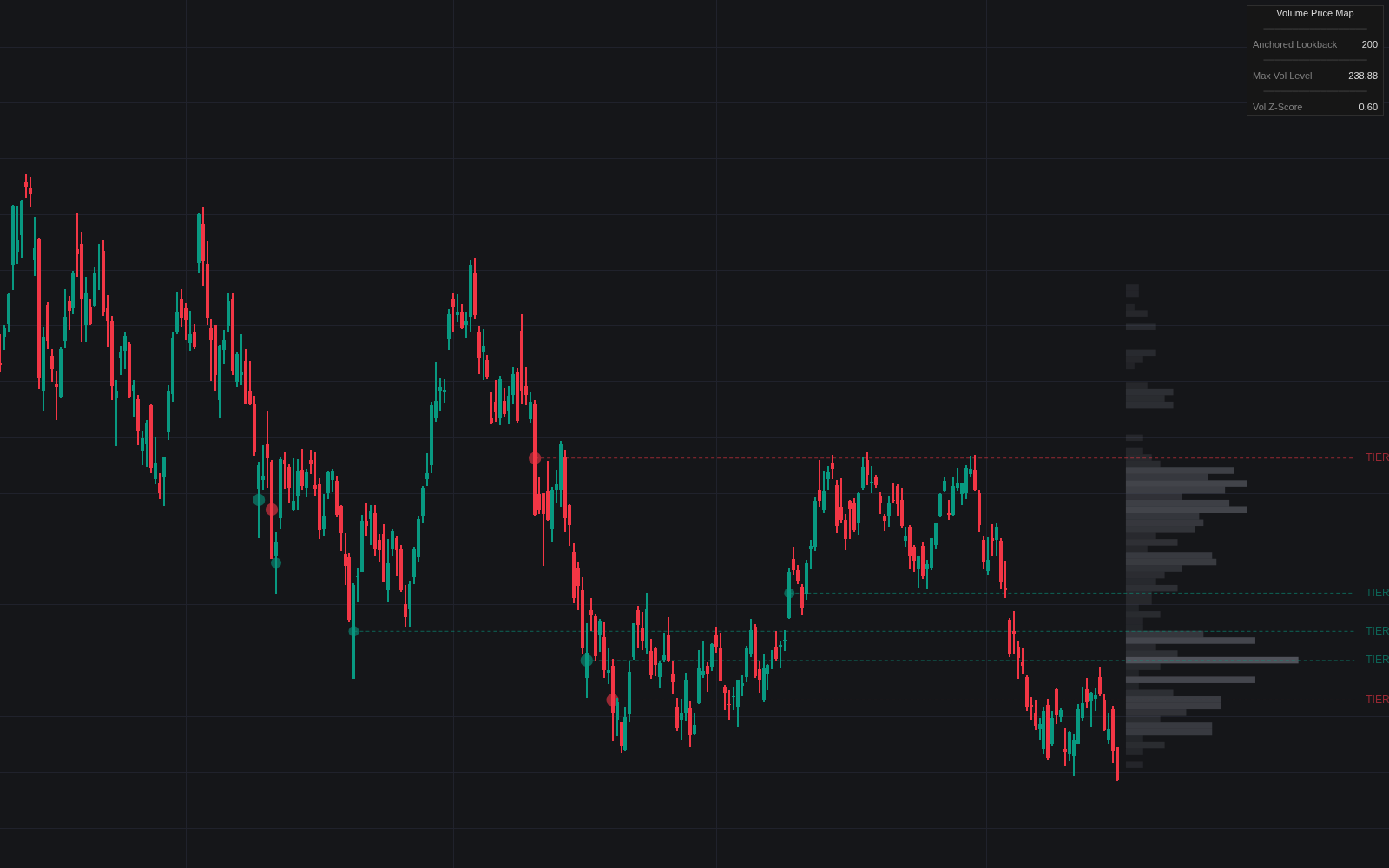

The Volume Anchored Price Map layers three reads of participation into one view: a rolling volume profile drawn as a right-anchored gradient heatmap, volume bubbles that print only when activity is statistically abnormal by Z-score, and dashed anchor levels projected forward from those spikes. Every projected level carries a rank (TIER I beyond six standard deviations, TIER II between four and six, TIER III between two and four), so the chart itself says which liquidity events deserve the most respect.
How to Trade the Volume Anchored Price Map?
- TIER I retests: the map's major structural levels. Anticipate a strong reaction, either a sharp rejection or a high-momentum break.
- Close beyond a TIER level with a fresh bubble: participation confirming the breakout, not price alone.
- Large red bubble after an extended decline: potential capitulation or selling climax; large green bubble into highs: absorption or blow-off risk.
- Wide, bright profile bars: high volume nodes where price turns sticky. Fade moves into them, and expect acceleration through the thin low-volume corridors between them.
TIER levels that align with the widest nodes mark well-traded fair-value zones for pullback entries and structured stops; a deep push into a low-volume area capped by a large bubble sets up rotation back toward the nearest node.
Volume Anchored Price Map Settings
- Lookback Length: the historical window feeding the profile and how far back bubbles and their levels are drawn; bubble Z-scores always use a fixed 200-bar volume average and deviation.
- Price Bins: vertical resolution of the heatmap.
- Bubble Sensitivity (Z-Score): minimum deviation before a bubble prints.
- Project Levels from Bubbles / Max Projected Levels: enables anchor projections and caps how many stay active.
- Enable Dashboard: readout of the lookback window, POC, and current Z-score.
Frequently Asked Questions
Free to use
Run it on Vela. Go further with a paid plan.
- Up to 500 strategy alerts, with webhook automation
- Up to 10× the chart history of Free
- Orderflow lookback up to full history
- More Quant usage to customize it, plus extra usage when you need it
- Futures data alongside crypto, stocks, forex and commodities
Also works on

Related indicators
All 30 Volume Profile indicators
.png&w=3840&q=75)
Run it on Vela. Make it yours with Quant.
Open this indicator free on Vela, our next-generation charting platform. Then ask Quant, our coding agent built into Vela, to retune it or turn it into a backtested strategy of your own.