Best Option-Trading Platform Speed and Fees Compared
Compare options trading platforms by execution quality and total cost, not a single speed number. E*TRADE, Charles Schwab’s thinkorswim, and Interactive Brokers offer different combinations of contract pricing, analysis, and order handling. Public stock-order statistics cannot establish which one fills options fastest.
Begin with Vela, the charting platform we build at LuxAlgo, and Quant to research the underlying and develop clear trading rules. Then use your broker’s options chain, risk analysis, and order ticket to assess the actual contract. Fast order entry is useful only after the trade and its risks are understood.
Quick comparison: costs and execution evidence
Features and fees below were reviewed against official sources in September 2026. This is a practical comparison, not a controlled options-execution benchmark or a promise of future fills.
| Platform | Online U.S. options pricing | Useful capability | What to verify |
|---|---|---|---|
| E*TRADE / Power E*TRADE | $0 base plus $0.65 per contract; $0.50 for qualifying active clients | Options analysis and paper trading | Quarterly trade qualification, contract surcharges, and order-specific execution |
| Charles Schwab / thinkorswim | $0 base plus $0.65 per contract | Risk Profile and paperMoney simulation | Closing-fee exceptions, account permissions, and actual fill quality |
| Interactive Brokers | U.S. options rates vary by plan, premium, and monthly volume; $1 minimum per order | Routing choices and portfolio risk tools | Applicable commission tier, third-party charges, data, and routing settings |
Compare both sides of the trade and every leg. A low per-contract rate can be outweighed by an order minimum, additional fees, or a worse execution price.
Research first: Vela and Quant
Set up the underlying stock or ETF in a Vela workspace. Review trend, volatility, nearby levels, and volume before deciding whether an options structure fits the idea. A multi-chart layout can help compare timeframes; select the intended chart before applying a study or script.
Quant is our coding agent. Describe specific price-based rules, review the Code, and Run the strategy. For example: “Enter long after a close above the previous 20-bar high, excluding the current bar, and exit after a close below the previous 10-bar low. Make both lengths adjustable.”
In the strategy workflow, examine trade results and drawdown with realistic commission and slippage assumptions. A backtest with zero trading costs can overstate the usefulness of a frequently trading rule. Test more than one period and inspect individual trades rather than selecting only the most attractive total return.
Use the indicator library for chart studies that make your conditions easier to evaluate; Library tools open on Vela, not inside a broker’s platform.
A native price-chart test does not reproduce historical option premiums, implied volatility, assignment, or multi-leg fills. Evaluate those separately. Quant’s research workflow also does not establish a broker’s execution latency or automatically submit orders to the brokers compared here.
What execution speed actually measures
A broker can measure speed from order receipt, routing, exchange acknowledgment, first fill, or final fill. Your experience also includes the time spent entering the order, network transmission, and platform updates. These intervals are not interchangeable.
E*TRADE’s execution-quality page, for example, reports selected stock orders in share-size categories. Its speed definition measures the interval from routing to an execution venue until a fill report returns. Those stock statistics should not be relabeled as options-contract execution times.
Before comparing two reported numbers, check:
- Instrument: stocks, single-leg options, or complex option orders.
- Order type: market, marketable limit, or resting limit.
- Sample: quantity, liquidity, trading session, date range, and excluded conditions.
- Clock: when timing begins and ends, and whether it measures the first or complete fill.
- Outcome: execution price, fill rate, partial fills, and cancellation behavior alongside speed.
There is no universal “under 100 milliseconds is ideal” rule for all options orders. A resting limit order may intentionally remain unfilled. A rapid fill at an unattractive price is not automatically preferable to a slower fill that respects your limit.
FINRA’s best-execution rule considers market conditions, transaction size and type, available markets, accessible quotations, and order terms. Speed is part of execution quality, not its complete definition.
1. E*TRADE: compare the discount with your actual activity
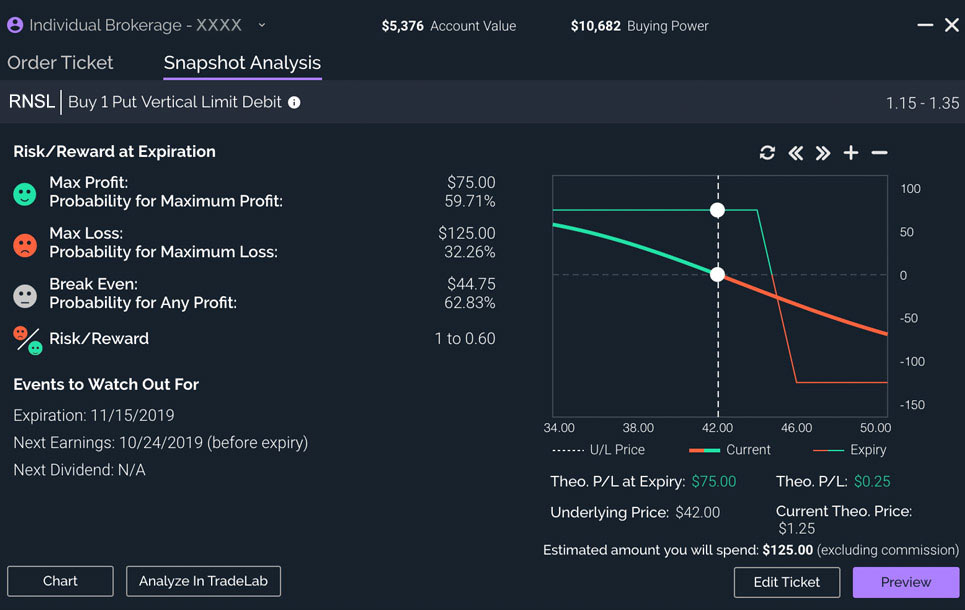
Power E*TRADE includes options risk/reward analysis, charting, and paper trading. These tools can help you rehearse a workflow and understand a proposed position before sending a live order.
The fee schedule lists $0.65 per contract for standard online options orders and $0.50 for clients with at least 30 stock, ETF, or options trades per quarter. The difference is approximately 23.1% of that contract charge, not a 23.1% reduction in every trading cost.
The Dime Buyback program waives contract fees for qualifying buy-to-close orders priced at $0.10 or less. Index surcharges and other applicable fees still need checking. Use current schedules rather than copying old regulatory-fee amounts or assuming an overnight stock-session exception applies to an options order.
E*TRADE’s order-handling disclosure describes the factors considered in routing. It does not guarantee that every order receives price improvement or that E*TRADE is the fastest options broker.
2. Charles Schwab: the current home of thinkorswim
TD Ameritrade is no longer a separate current choice in this comparison. Schwab’s transition information confirms that clients can use the thinkorswim platform suite at Schwab.
The Schwab pricing guide lists $0 online base commission plus $0.65 per options contract. Qualifying buy-to-close transactions priced at $0.05 or less receive a contract-fee waiver. Check applicable charges and account terms for the exact trade.
Use paperMoney to learn the ticket and practice opening, changing, and closing positions. Simulated fills help with familiarity; they do not validate the price or speed of a future live execution.
For risk analysis, Risk Profile models price, time, and volatility scenarios. Checking the potential loss before placing the order matters more than shaving time off an unexamined decision.
3. Interactive Brokers: inspect the complete rate and routing setup
IBKR’s U.S. options schedule distinguishes plans, monthly volume, and option premium. In the lowest IBKR Pro volume tier, rates are $0.65 for premiums of at least $0.10, $0.50 from $0.05 to below $0.10, and $0.25 below $0.05, with a $1 minimum per order. Higher-volume tiers can be lower.
IBKR Lite uses fixed commissions for its first 1,000 U.S. options contracts each month; volume above that receives the Pro U.S. options tiered model. This does not mean that the whole account automatically becomes an IBKR Pro account. Third-party fees and applicable eligibility conditions remain relevant.
For wider portfolio analysis, Risk Navigator supports hypothetical positions and risk scenarios. Confirm the market data, permissions, interface, and routing settings required for your intended workflow. Platform availability is not a promise that every tool or data subscription is identical across devices.
Worked example: a small fill difference can exceed a fee discount
Suppose you open ten standard option contracts and later close all ten, without a special closing waiver:
| Contract charge | Opening | Closing | Round trip |
|---|---|---|---|
| $0.65 per contract | $6.50 | $6.50 | $13.00 |
| $0.50 per contract | $5.00 | $5.00 | $10.00 |
The contract-charge saving is $3, before other fees. A one-cent worse purchase price across ten standard 100-share contracts costs $0.01 × 100 × 10 = $10. That is why a fee discount and execution quality should be assessed together.
This example assumes identical contracts and a 100-share multiplier. Adjusted contracts and other products can differ. It is arithmetic, not evidence that any named broker provides better fills.
A practical platform evaluation
- Define the trade before comparing speed. Record the underlying, contract, quantity, order type, limit, and exit plan.
- Check the live market. Inspect bid, ask, displayed size, and whether the quote is current. A midpoint is a reference, not a promised fill.
- Review all charges. Include both sides, every leg, order minimums, applicable surcharges, data costs, and any financing.
- Use limits deliberately. A limit controls the worst acceptable price but may not fill. A market order prioritizes execution without setting that price boundary.
- Keep evidence from actual fills. Record the quote and time when you submit, the fill details, fees, and modifications. Do not infer a broker-wide ranking from one trade.
Do not add unnecessary trades merely to reach a discount threshold. Additional exposure and transaction costs can exceed the saving. Choose a platform whose workflow, permissions, and support fit the trades you already have a reason to make.
Video: evaluate options risk before execution
This official Trader Talks webcast from Schwab explains thinkorswim Risk Profile. Use it to understand modeled options outcomes before focusing on order speed; it is not an execution-speed benchmark.
FAQs
Which options broker has the fastest execution?
The sources reviewed here do not provide a controlled, like-for-like options-speed ranking. Compare the same product, order type, size, period, and timing definition, and consider execution price and fill rate alongside speed. Stock-order statistics cannot establish options performance.
How much can an active-trader fee discount save?
A reduction from $0.65 to $0.50 saves $0.15 per charged contract, or about 23.1% of that contract charge. Ten contracts opened and later closed save $3 before other fees, assuming both sides receive the rate and no special waiver applies.
Can a Quant backtest prove that an options trade will execute well?
No. Quant can help develop and test price-based rules on Vela, but a chart backtest does not reproduce live options liquidity, historical premiums, assignment, or broker routing. Evaluate the contract and execution workflow separately.
Read next