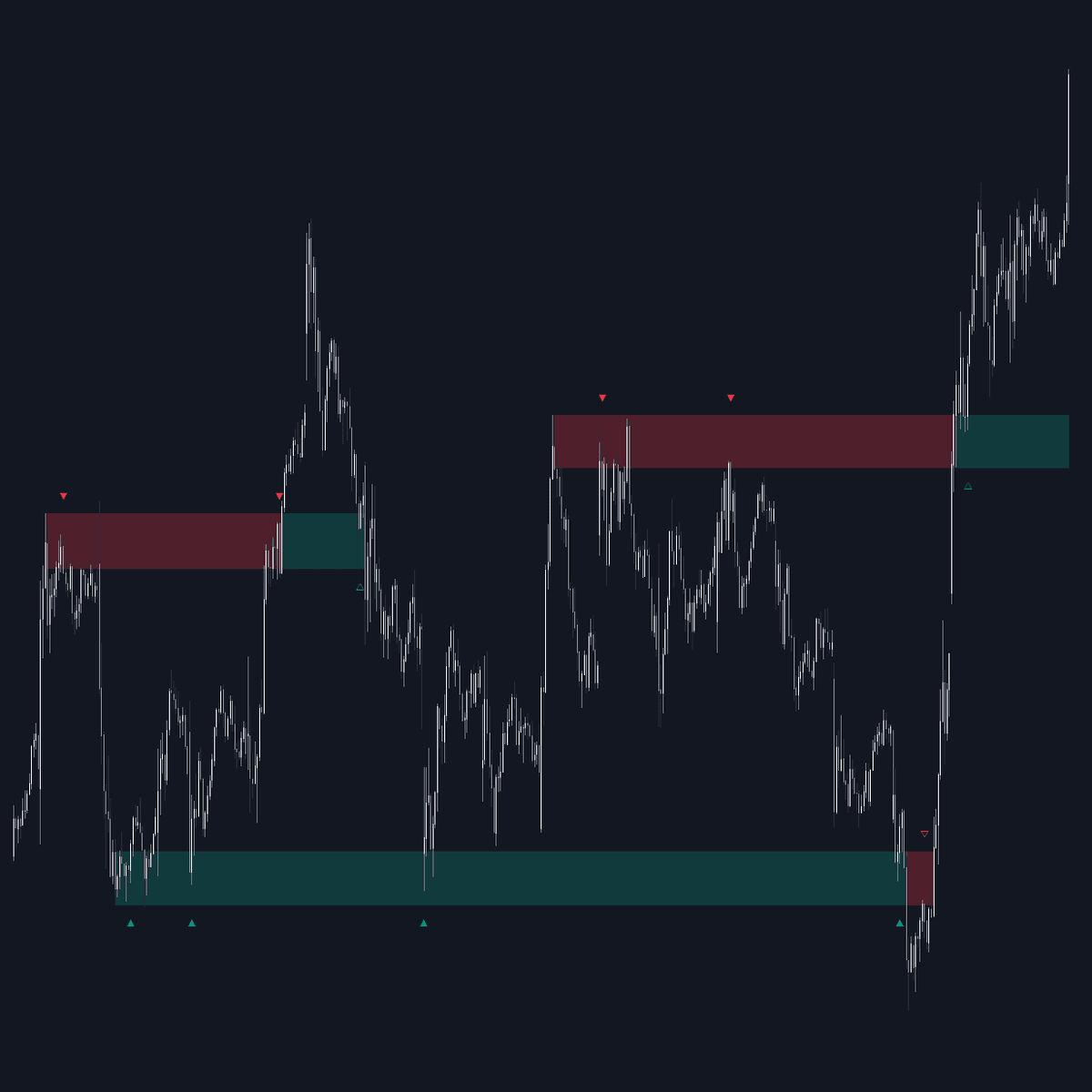
Breakouts with Tests & Retests
By LuxAlgoMay 30, 2024
The Breakouts Tests & Retests indicator is a sophisticated tool designed to identify potential price movements through the detection of swing points, and highlight areas that may prompt trading decisions. As prices form swing points, the indicator marks levels of interest that can display changes in color upon the occurrence of a breakout, aiding traders to spot potential opportunities.
This indicator is tailored for traders seeking to understand and capitalize on market dynamics by offering control over the sensitivity of swing point detection as well as the flexibility to adjust the width of swing areas. These features help in honing in on specific trading strategies to suit different market conditions.
How to Trade the Breakouts Tests & Retests Trading Indicator?
When a Swing point is detected, the indicator creates an area of interest, visualized as green for bullish swings and red for bearish ones. These areas are crucial for recognizing market movements.
A test is identifiable when the opening price is inside this area of interest while the closing price sits above or below it, aligning with the swing's bullish or bearish nature. The test is marked by a visible solid-colored triangle, making it easier to spot.
Should a breakout occur, meaning the price closes in the opposite direction relative to the area, the area changes colors, providing a visual cue of this significant market event.
A retest is identified if the price begins within the swing area and closes outside in the direction of the breakout, highlighted by a hollow triangle. It's important to understand that tests and retests depend primarily on price completion inside and outside the area, disregarding wicks.
Customizing the Area Of Interest Width
This indicator offers customizable width settings for the swing areas, enabling traders to modify the Width quickly to help identify and explore various areas of interest.
A wider setting provided by a higher "Multiple" allows prices to consolidate within these areas for extended durations, potentially leading to more frequent test indications. Similarly, a greater "Width" setting can ensure the permanence of the swing area, offering more retest chances.
Indicator Display and Patterns
This functionality includes settings that let traders control how bullish and bearish patterns appear on their charts, enabling clarity and focus in pattern recognition.
Options include:
- Both, bullish and bearish patterns simultaneously
- Singular, either bullish or bearish pattern
- Exclusively bullish
- Exclusively bearish
Adjusting Test/Retest Labels
The test/retest label display can be refined to showcase the most recent label or wait for a defined number of bars before identifying another test/retest.
Setting the Maximum Number of Bars
Settings allow for limitations on bars for periods without tests/retests, ensuring the area of interest remains pertinent and optimally updated for ensuing swings. An option pulls the area back to the last visible retest, maintaining the accuracy of data.
Configuring Your Indicator Settings
The indicator provides diverse configuration options tailored for a seamless trading experience:
- Display: Manage the display of swing areas, relying on the indicator's default configurations or further detailed guidance from the "Indicator Display and Patterns" section.
- Multiple: This setting affects the swing areas' width.
- Maximum Bars: Define boundaries for inactive test/retest periods.
- Display Test/Retest Labels: Choose between showing all labels or only the successive/last test/retest label.
- Minimum Bars: Set a minimum bar count for subsequent test/retest labeling.
- Set Back To Last Retest: Reposition the area's right boundary to the last test/retest if conditions within "Maximum Bars" are unmet.
Swing Configurations and Style Options
- Swings: Defines the necessary heights for wicks on swings, both to the left and right of a potential swing point.
- Style:
- Choose colors for bullish and bearish periods (both test and retest).
- Set label sizing for better visualization.
FAQ
How do I access the Breakouts Tests & Retests Indicator? You can get access on the LuxAlgo Library for charting platforms like TradingView, MetaTrader (MT4/MT5), and NinjaTrader for free.
What functionality does the Breakouts Tests & Retests Indicator offer to traders? The indicator helps traders detect and assess swing levels for identifying potential breakout and retest conditions in the market, providing users with customizable settings to refine trade strategies.
Can I see both bullish and bearish patterns simultaneously? Yes, the indicator settings allow displaying both patterns at the same time or selecting to focus on either bullish or bearish patterns only.
Free indicator
Get free access to this indicator on the platforms below.
The Library is free. Quant makes it yours.
Pull any concept or indicator into Quant: rebuild it, retune it, or turn it into a backtested strategy of your own.