ultrapremiumultimate
LuxAlgo - Screener (OSC)
 By LuxAlgoFeb 20, 2024
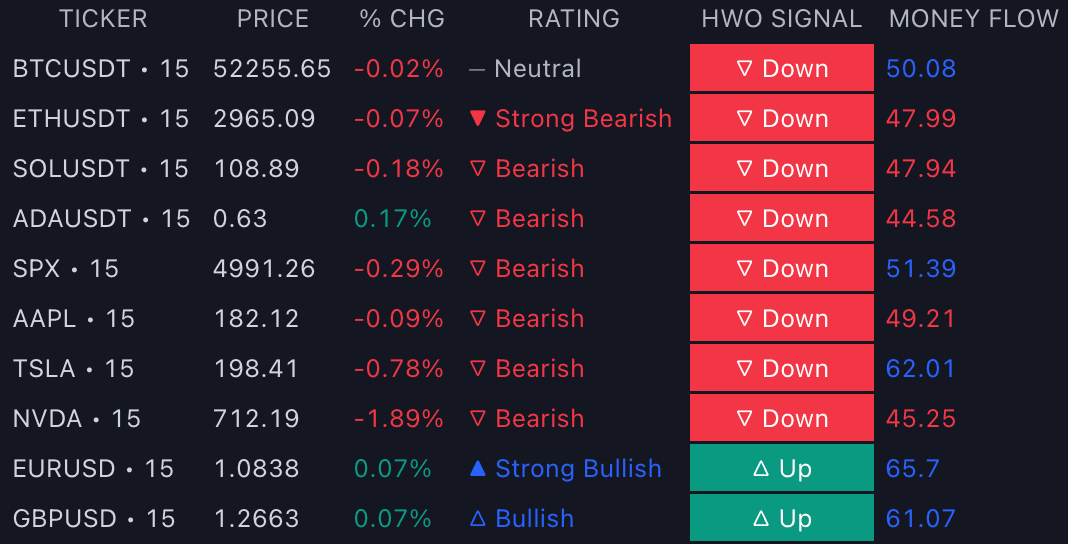
The LuxAlgo® - Screener (OSC) turns the Oscillator Matrix™ toolkit into a watchlist instrument: up to 10 tickers, each on its own timeframe, reporting the oscillator pane's key readings in one table on your chart. It is the momentum trader's scanner: instead of checking ten panes for a divergence or an overbought turn, the table shows where the conditions already exist. Access comes with the toolkit. Having Oscillator Matrix™ automatically grants the OSC screener.
What's Inside the Screener (OSC)?
- Market columns: Price, Volume, %Change, and Change give each row its baseline market data.
- HWO Signal: the most recent HyperWave signal on the ticker, the screener's window into the toolkit's primary oscillator engine.
- Money Flow: the current money flow oscillator value, reading participant activity above or below the 50 line per ticker.
- Overflow: the current Overflow value, flagging excess one-sided liquidity that often precedes reversals.
- HyperWave: the current HyperWave oscillator value, locating each ticker between oversold and overbought territory.
- Reversal: the most recent reversal signal detected on the ticker, minor or major.
- Divergence: the most recent divergence detected between the ticker's price and its HyperWave, real-time divergence coverage across the whole list.
- Confluence: the most recent confluence status, condensing agreement between the toolkit's components into one cell.
- Rating: the five-grade confluence score over enabled elements: ▲ Strong Bullish (over 80% bullish), △ Bullish (60–80%), ― Neutral (40–60%), ▽ Bearish (20–40%), ▼ Strong Bearish (under 20%).
- Filtering: per-element filter dropdowns; option-based elements filter to a precise state while value elements use Above/Below operators, and multiple rules combine, for example Money Flow Above 50 to keep only tickers with bullish participation.
- Sorting: ascending or descending by Rating, Money Flow, or HyperWave, with None preserving the ticker-settings order.
- Placement: a dedicated pane by default with six position choices (Top/Bottom Center, Right, Left), or drag the table directly onto the price chart.
How to Trade with the Screener (OSC)?
- Scan for stretched conditions: sort by HyperWave ascending to surface the most oversold tickers of the list, or descending for overbought candidates approaching exhaustion.
- Qualify with participation: a promising reversal row means more when its Money Flow value confirms. Filter Money Flow Above 50 for longs so the table only shows tickers with bullish liquidity behind them.
- Watch the Reversal and Divergence columns together: a fresh divergence plus a recent reversal signal on the same row is the toolkit's classic confluence pairing, pre-screened across ten markets.
- Let the Rating summarize: when most enabled elements lean one way the Rating grade shows it instantly, making it the fastest first-pass sort for the whole table.
- Align timeframes per ticker: duplicate a symbol across rows with different timeframes to check whether its oscillator picture agrees from intraday to swing resolution before committing on the chart.
Key Settings & Modes
- Tickers: 10 slots with per-row timeframes; defaults include BTCUSDT, ETHUSDT, SOLUSDT, ADAUSDT, SPX, AAPL, TSLA, NVDA, EURUSD, and GBPUSD. Exact ticker/timeframe duplicates are suppressed.
- Screener Elements: enable/disable toggles, colors, and filter dropdowns per element.
- Smart Money Flow group: Main Length and Smooth for the Money Flow calculation.
- HyperWave group: Main Length, Signal & Signal Length, and Divergence Sensitivity.
- Reversals group: Reversal Factor pacing reversal detection.
- Location and Sorting: pane position, sorted element, and ascending/descending direction.
Frequently Asked Questions
The Library is free. Quant makes it yours.
Pull any concept or indicator into Quant: rebuild it, retune it, or turn it into a backtested strategy of your own.