ICT Unicorn Model
 By LuxAlgoJan 23, 2024
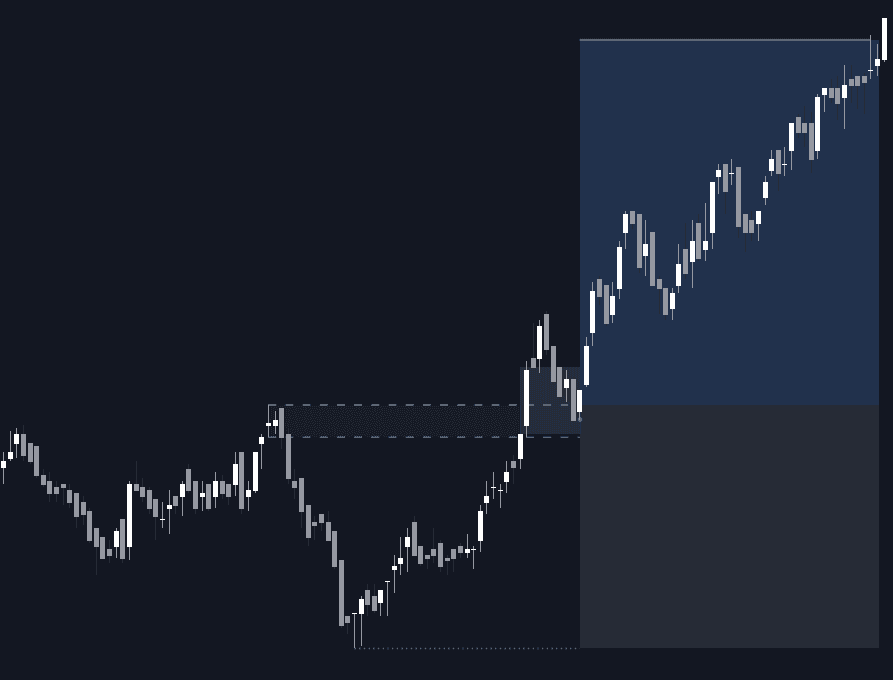
ICT Unicorn Model hunts the unicorn setup, a fair value gap overlapping a breaker block, and validates a pattern only once price successfully re-tests the gap. The bullish case forms as a lower low gives way to a higher high with the FVG sitting on the breaker; the bearish case mirrors it, higher high then lower low. Every confirmed pattern arrives framed for execution: blue target and grey stop Risk/Reward zones are drawn immediately, and a white line marks whichever side resolves.
How to Trade the ICT Unicorn Model?
- Confirmed bullish Unicorn: after the LL-to-HH shift and gap re-test, trade toward the plotted target zone with the stop area defining risk.
- Confirmed bearish Unicorn: the HH-to-LL sequence with a validated gap frames shorts the same way.
- Trailing stop: the optional trailing stop allows exits before the stop zone is hit, useful for partial profit-taking.
- Swing tuning: shorter swing settings surface short-term breakers; longer ones isolate patterns built on bigger structure.
A new detection replaces any unconfirmed pattern in the same direction, while confirmed patterns stay active until target or stop is reached. Context still matters: liquidity, broader conditions and avoiding volatile news periods all sharpen the read.
ICT Unicorn Model Settings
- Swings: the swing lengths used by the ZigZag engine to identify Unicorn structure.
- Combine: lets opposing bullish and bearish patterns coexist instead of clearing the older one, more context in view, with extra chart clutter as the trade-off.
- Risk/Reward: sets the ratio that positions the target zone relative to the stop.
- Trailing Stop: swing lengths that modulate how the trailing stop follows price.
- Bullish and bearish patterns toggle independently, with FVG box and trailing stop colors to match.
Frequently Asked Questions
Free indicator
Get free access to this indicator on the platforms below.

The Library is free. Quant makes it yours.
Pull any concept or indicator into Quant: rebuild it, retune it, or turn it into a backtested strategy of your own.