Paper Trading: How Simulators Prepare You for Live Markets

Paper trading lets you practice trading decisions and order handling with virtual money. It can help you learn a platform, test a routine, and identify weaknesses before risking trading capital. It cannot establish that the same strategy will produce the same fills, behavior, or results in a live account.
The most useful practice has realistic constraints: a relevant account balance, a defined strategy, recorded costs, and the same trading hours you could actually follow. A large simulated profit is less informative if it came from unlimited resets, unrealistic leverage, or decisions made after seeing the next price move.
- Learn mechanics: Place, amend, and cancel simulated orders and check their status.
- Practice decisions: Follow a written entry, exit, and sizing process.
- Measure the limitations: Find out how the simulator handles spreads, fees, liquidity, and order execution.
- Review evidence: Track rule adherence and outcomes instead of treating confidence as proof of readiness.
Use Vela, the charting platform we build at LuxAlgo, and Quant, our coding agent, to research the rules, then rehearse their application in your chosen simulator. Keep a clear distinction between historical backtest results, forward paper trades, and live transactions.
Key Benefits of Paper Trading
Test a Trading Process Without Committing Trading Capital
A simulated account gives you room to explore day trading, swing trading, or longer holding periods without the trades themselves risking real money. It is especially useful for finding practical problems: an unclear signal, a position too large for the intended stop, or an order type you do not fully understand.
Choose one question at a time. For example, compare whether a close-confirmed moving-average entry is practical during the hours you can trade. Keep the exit rule and sizing unchanged while evaluating that question. Changing the entry, target, and position size together makes the result harder to interpret.
Practice also has costs in time and, depending on the service, software or data fees. Choose a simulator because it supports your intended workflow, not because it displays the largest virtual balance or the most impressive features.
Build Platform Familiarity and Repeatable Habits
Rehearse the full order lifecycle. Check the account mode, symbol, side, quantity, order type, time-in-force, and session before submitting. Then verify whether the order is working, rejected, canceled, or executed. When only part of the requested quantity executes, inspect the remaining order and actual position separately.
Practice closing a position and checking for leftover orders. Learn what happens when an order is modified, the session ends, or your connection is interrupted. A chart marker is not a substitute for the order-status display.
These repetitions can support discipline, but a low-stakes environment cannot reproduce every emotional response to a real loss. Record hesitation, chasing, boredom, and rule-breaking during practice without assuming that calm paper trading guarantees calm live trading.
Paper Trading vs. Backtesting and Live Trading
A backtest applies programmed rules to historical data using specified execution assumptions. Historical replay lets you practice decisions as earlier market data is revealed. Forward paper trading records decisions as new market information arrives, with simulated execution. Live trading places real orders through a broker or venue.
These methods answer different questions. A historical backtest can examine many rule-based trades quickly. Forward practice tests whether you can recognize and act on the rules without knowing the outcome. Neither fully reproduces real execution and financial stakes.
| Feature | Paper trading | Live trading |
|---|---|---|
| Capital | Trade gains and losses affect a virtual balance. | Real gains and losses affect the account. |
| Prices | May use live, delayed, or replayed data, depending on the service and mode. | Tradable quotes and available liquidity determine execution opportunities. |
| Fills | Generated by a simulator with its own assumptions and limitations. | Depend on routing, queue position, available size, order rules, and market conditions. |
| Costs | May be modeled, configurable, incomplete, or absent. | Applicable spread, commission, financing, borrow, and other charges affect results. |
| Emotional stakes | Useful for practicing a routine, with no real trading loss from the simulated orders. | Real exposure can change behavior even when the written strategy is unchanged. |
| Resetting | Often possible; resets should be documented. | Losses cannot be erased by resetting the account history. |
It is inaccurate to say every simulator provides instant fills or ignores all costs. Schwab’s paperMoney guide describes trade records and paper commissions. IBKR’s paper-account documentation specifies top-of-book simulated fills, no deep-book access, and differences in complex-order behavior. Read the rules for the exact service you use.
How to Set Up a Useful Trading Simulator
Match the Environment to Your Intended Trading
Begin with the instruments, order types, account currency, and session you expect to use. Check whether the data is live or delayed and whether the simulated account has the required permissions. A funded live account is not evidence that a simulator is more realistic; access requirements and execution modeling are separate questions.
For example, Schwab’s current paperMoney page describes its thinkorswim simulation and account access requirements. Use such provider documentation to confirm availability rather than assuming every app offers the same free access, data, or features.
Set virtual equity close to the amount relevant to your study. If you are planning around $10,000, do not use a $1 million default balance to justify positions that would be impossible in the intended account. If the simulator cannot change the balance, enforce a separate $10,000 practice ledger and buying-power constraint.
Check how the service treats dividends, splits, contract expiration, overnight financing, and short borrow when they matter to your strategy. Record missing items as limitations. Do not quietly count an unavailable short sale or ignore a contract rollover because the software permits it.
Write a Short Practice Plan
Define these items before the first session:
- Market and schedule: Instrument, timeframe, session, and the hours you can participate.
- Entry and exit: Exact trigger, invalidation, target or trailing rule, and when a setup expires.
- Sizing: Cash risk budget, stop distance, unit or contract value, and maximum concurrent exposure.
- Execution assumptions: Fees, spread treatment, slippage estimate, and order-fill rules.
- Pause conditions: Process errors, a predefined loss threshold, unreliable access, or an unmanageable emotional response.
- Review method: Where records are stored and what evidence would justify changing the rule.
A goal such as “achieve a 60% win rate this month” can encourage selective entries or keeping losers open to protect the statistic. A better practice goal is to document every eligible setup and measure adherence to a fixed rule. Profitability still matters, but it should be measured honestly rather than forced to meet a target.
Make Risk and Costs Visible
For an illustrative $10,000 practice account, suppose you choose a $50 planned risk budget for one trade. With a $1 entry-to-stop distance, the pre-cost size is 50 shares. A $2 distance reduces that to 25 shares. This is sizing arithmetic, not a recommended risk percentage.
A stop does not guarantee the planned exit price. Investor.gov’s order guide explains the distinction between market, limit, and stop orders. Test how your simulator handles them and note where that behavior differs from your broker’s live rules.
Small execution differences can reverse a paper result. Suppose a 100-share simulated round trip earns $0.10 per share, or $10 gross. An additional $0.03 per share of adverse execution on each side costs $6. With another $5 in round-trip charges, the adjusted result becomes a $1 loss. These are illustrative costs; use assumptions suited to your instrument and avoid counting spread twice.
Trading Simulator Tutorial
This tutorial from The Duomo Initiative walks through simulator practice. Use it for the mechanics and practice workflow; its platform recommendations and recorded interface should be evaluated against your current needs.
Track and Analyze Your Performance
Keep a Complete Record
Record the date, instrument, direction, setup, decision time, intended entry, simulated execution price, size, stop, exit, costs, and result. Add a note on the information you had at the time and whether you followed the plan. Keep skipped setups and operational errors visible rather than deleting them.
Separate practice accounts and strategy versions. If you reset the simulator, save its history first and label the new run. If you rehearse an already-seen historical period, label that exposure too: remembering what happens next can influence decisions even when you intend to be objective.
Use More Than Win Rate
Review net profit after modeled costs, average win and loss, drawdown, trade count, holding time, and rule adherence. Profit factor is gross profit divided by the absolute value of gross loss; a tiny sample or no losing trades can make it misleading.
For example, 30 wins averaging $20 produce $600, while 20 losses averaging $40 lose $800. That is a 60% win rate with a $200 loss before additional costs. A high hit rate does not establish a profitable strategy.
Measure behavior separately. If 18 of 20 reviewed trades followed every rule, adherence is 90%. Examine the other two even if they made money. The point is to identify whether you can execute the intended process, not to reward an accidental winner.
Use weekly or monthly reviews as organizational checkpoints, not statistical guarantees. Compare results across relevant conditions and examine how much comes from a few outliers. When using an index benchmark, match the period and return basis and account for differences in exposure; an intraday strategy that is usually in cash is not directly comparable to a continuously invested portfolio.
Using LuxAlgo for Research and Paper-Trade Review
Prepare the Chart and the Question
Start on Vela with the instrument, timeframe, and indicators needed for the rule. Use the Library to study an indicator’s definition and settings. A basic, reproducible setup is easier to evaluate than a chart crowded with signals.
The multi-chart layout can help compare context and execution intervals. Confirm the active chart and synchronization settings. If you use orderflow or volume-based indicators, verify coverage for the selected symbol and data feed; capabilities are not identical across every asset.
Indicators such as MACD, RSI, and anchored VWAP answer different price or volume questions. They do not guarantee entry quality. Choose a filter because you have a testable reason for it, and compare the resulting trades with an unfiltered baseline.
Use Quant to Express and Check the Rules
Describe the entry, exit, position sizing, and signal timing to Quant. For example: “Create a research strategy that enters on a completed-bar MACD cross above zero and exits on a specified RSI condition. Make parameters explicit and explain the execution assumptions.” Define the exact indicator version and values instead of leaving key terms ambiguous.
Follow the Quant strategy workflow: inspect the generated code, run it on the chart, and check Inputs and Properties such as order size, capital, commission, and slippage. Asking for code does not automatically validate a strategy or optimize it across all markets.
Use the strategy results and Trades Log to compare individual simulated entries with your intended rules. Check whether a signal uses a completed candle, whether a stop and target can be touched on the same bar, and what fill timing the simulation assumes.
Then test a fixed version forward in your simulator. Keep its paper orders separate from historical backtest trades. A saved Quant run, watchlist, or plotted signal does not by itself mean an order was sent, an alert was enabled, or the paper account was updated.
Review Paper Trades in Journal
LuxAlgo’s Journal supports manual entry, file import, and supported broker connections. Use a clearly identified practice account and a compatible import or manual record for simulated trades. Confirm support before assuming a particular simulator or paper-account connection will synchronize automatically.
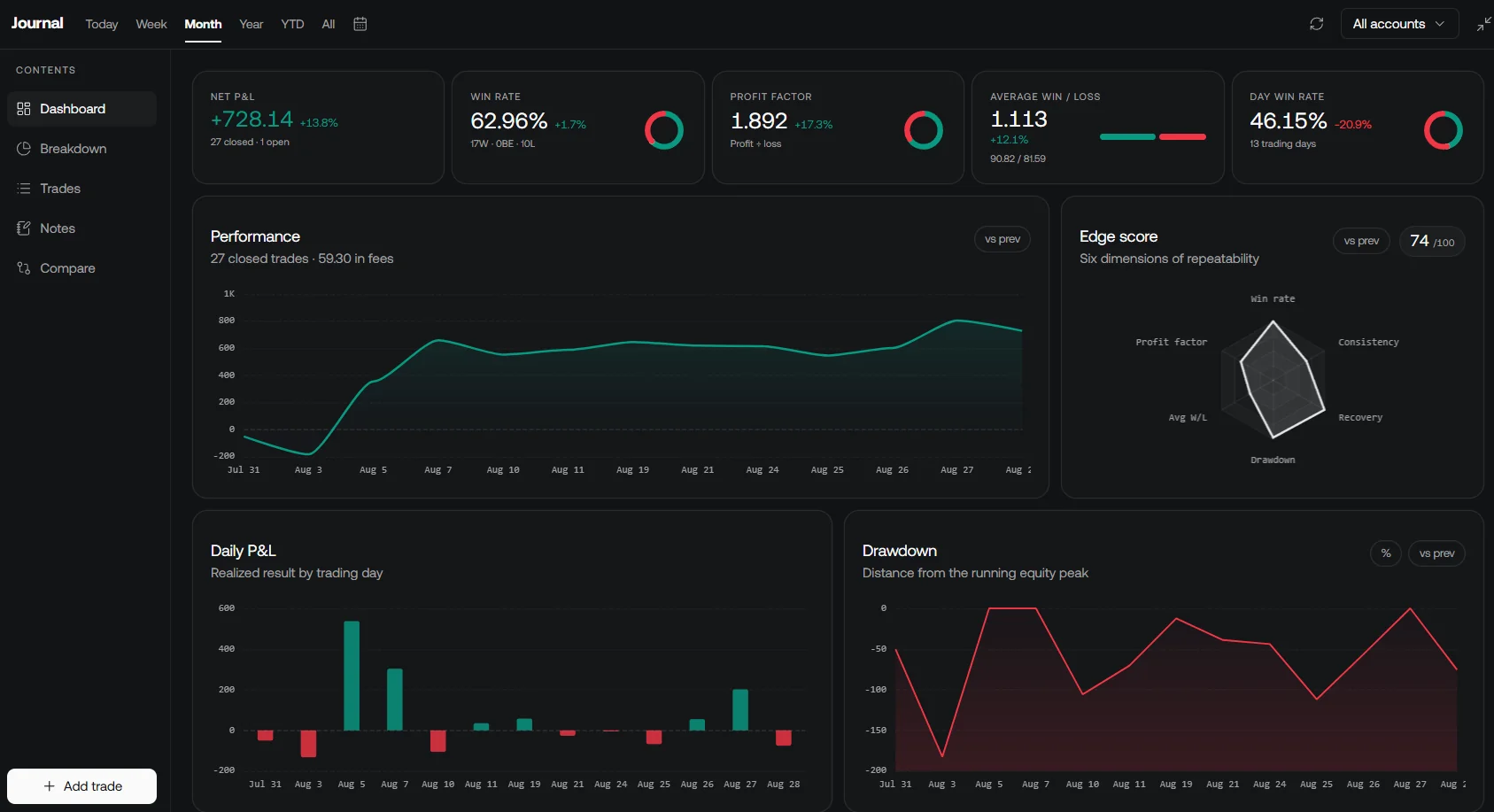
Check account selection, date range, trade count, quantities, fees, and currency before reading the totals. Use Journal notes to capture the setup and decision process. Screenshots and notes are especially useful for explaining why a rule-compliant trade lost or why a winning trade still violated the plan.
Use documentation and community feedback to resolve specific questions. Share the rule and chart context when asking for help, and verify claims independently. Testimonials or another trader’s results cannot validate your simulator settings or establish your own expected performance.
Moving from Paper Trading to Live Markets
Evaluate Readiness Without a Fixed Deadline
No universal account size, win rate, number of practice trades, or number of profitable months makes someone ready. A small account can still be unsuitable for an instrument’s minimum size, margin requirements, or potential gap exposure.
Before considering live trading, check whether you can explain the strategy, operate the order controls, keep complete records, and follow the risk rules through both gains and losses. The evidence should include costs, adverse conditions, and a realistic understanding of what the simulator leaves out.
| Question | Evidence to review | Reason to continue practicing |
|---|---|---|
| Can I operate the platform? | Correct orders, status checks, amendments, cancellations, and position reconciliation. | Repeated side, size, account-mode, or leftover-order mistakes. |
| Can I follow the plan? | Recorded adherence through losing and winning sessions. | Chasing, unplanned averaging, or changing stops to avoid a loss. |
| Do the results survive realistic assumptions? | Costs and execution sensitivity, drawdown, and a range of conditions. | Profits depend on perfect fills, resets, or a handful of selected winners. |
| Can the intended live exposure fit? | Instrument size, account restrictions, available capital, and a defined loss tolerance. | The smallest feasible position exceeds the planned risk. |
Keep the First Live Decisions Controlled
If you choose to trade live, use exposure that fits your circumstances and the instrument’s constraints. Keep the rules stable while you compare actual fills, costs, and behavior with the paper record. Confidence alone is not a reason to scale.
Define a pause condition in advance for unexpected execution, process errors, losses beyond the plan, or emotional reactions that interfere with decisions. Reconcile positions and open orders before stepping away. Returning to simulation to investigate a problem is part of the learning process.
Continue journaling after the transition. Live records may expose costs or behavior that the simulator could not reveal. Test a proposed strategy change separately rather than modifying it impulsively in response to one trade.
Conclusion
Paper trading is most useful when it produces a repeatable process and an honest record. Match the environment to the intended account, document the simulator’s limitations, and measure execution habits as carefully as profits.
Vela, Quant, and Journal can support preparation, rule testing, and review. Combine those tools with disciplined simulator practice while keeping the distinction between hypothetical results and live execution clear.
FAQs
How does paper trading help traders handle emotional challenges in live markets?
It lets traders rehearse rules, pauses, and reviews without real trading losses. That can reveal impulsive habits, but it does not reproduce every reaction to actual financial risk. Keep behavioral notes and reassess those habits if you move to live trading.
What are the main differences between paper trading and live trading that beginners should know?
Paper orders receive simulated fills, while live orders face real liquidity, execution rules, costs, and financial consequences. Simulators vary in how they model fees and execution, so read the provider’s limitations rather than assuming every practice fill is realistic.
How do LuxAlgo's tools make paper trading more effective and prepare traders for live markets?
Vela helps organize analysis, Quant helps express and backtest specified rules, and Journal helps review trade records. Rehearse orders in a suitable simulator, verify any import or connection, and keep backtested, paper, and live results separate.
Read next