Your Backtest Now Shows Which Prop Firm Challenges It Passes
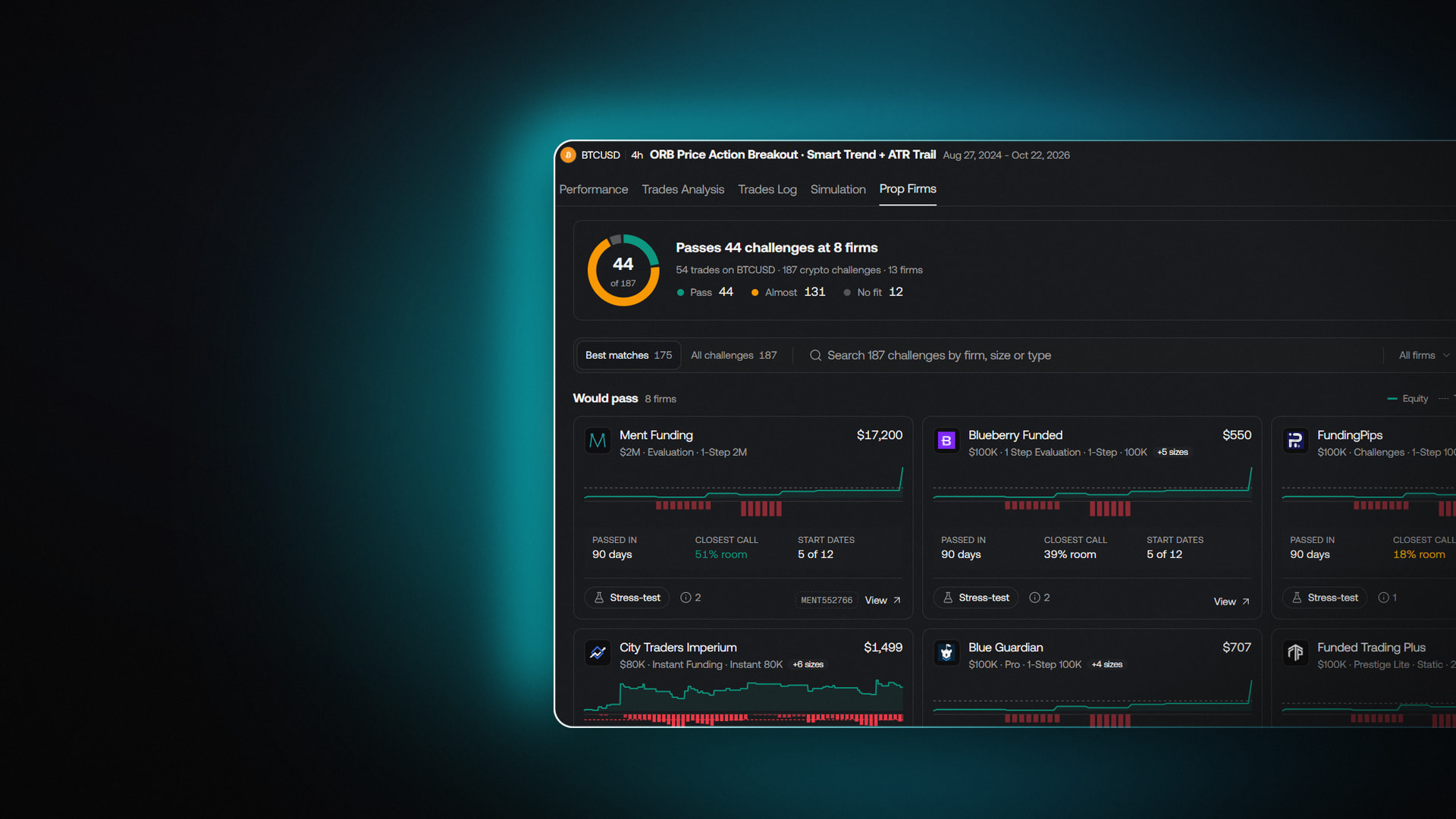
Most traders who look at a prop firm challenge already have a strategy in mind. The hard part is the arithmetic in between: profit targets, daily loss limits, maximum drawdown and time windows, all different from firm to firm and from one account size to the next. Checking a single backtest against a single rulebook by hand takes an afternoon. Checking it against every challenge on the market isn't realistic.
We built a new tab in the backtest viewer on Vela, our next-generation charting platform, that does that work for you. Prop Firms takes your strategy's backtest and shows which prop firm challenges it passes, which it nearly passes, and which it doesn't fit. From any pass, you can run a stress test that puts the result through simulations, so you can see whether the pass held up or came down to luck.
It sits next to the tabs you already use to read a backtest: Performance, Trades Analysis, Trades Log and Simulation. Nothing about how you build or run the strategy changes. You get one more view of the same trades, asked a more specific question.
Every challenge, scored against one backtest
Open a backtest and select the Prop Firms tab. The summary at the top answers the question in one line. In the example below, an ORB Price Action Breakout strategy with a Smart Trend and ATR Trail exit, run on BTCUSD on the 4h chart, produced 54 trades. The tab checked those trades against 187 crypto challenges at 13 firms and reports that the strategy passes 44 challenges at 8 firms.
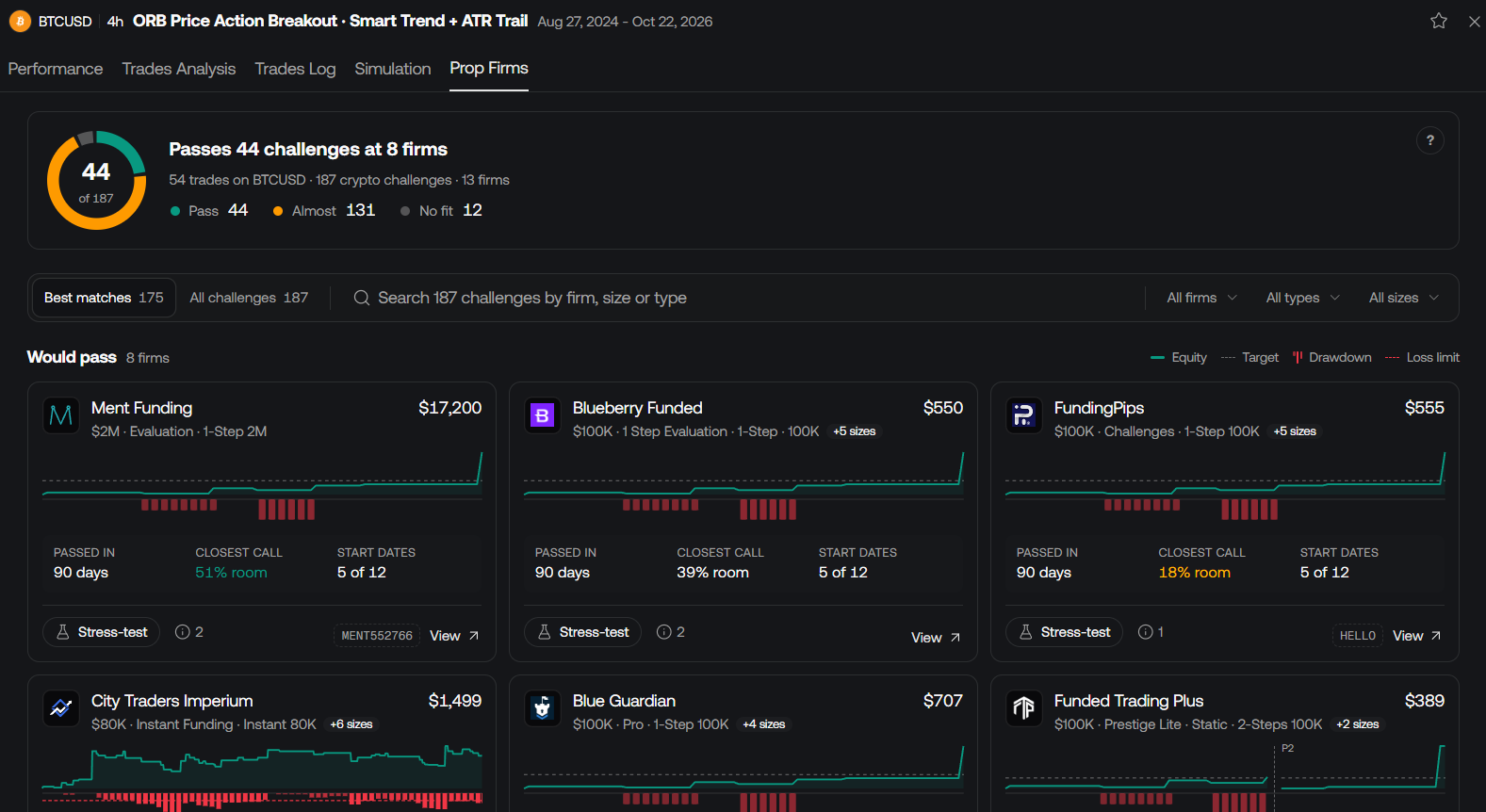
The ring and the counts below it sort every challenge into three groups:
- Pass: the backtest meets the challenge's rules. In the example, 44.
- Almost: the backtest comes close but falls short somewhere. In the example, 131.
- No fit: the challenge doesn't suit the strategy. In the example, 12.
The Almost group is often where the useful work is. A strategy that narrowly misses a challenge may only need a tighter risk setting or a different account size, and you can see that before you change a line of code.
Reading a challenge card
Below the summary, the tab lists the challenges the strategy would pass, grouped by firm. Each card names the firm and the challenge, such as a 1-Step evaluation at the $100K size, and shows its listed price. Where a firm offers the same challenge at other account sizes, the card says how many more are available, so one card can stand in for a whole ladder.
The chart on each card plots your backtest's equity against the challenge's rules. The legend in the top right of the list explains the lines: Equity, the Target, Drawdown and the Loss limit. Drawdown appears as bars beneath the equity line, so you can see where the strategy gave back ground and how close it came to the limit.
Three numbers sit under each chart:
- Passed in: how long the backtest took to meet the challenge, for example 90 days.
- Closest call: how much room was left at the moment the strategy came nearest to breaking a rule. A card reading 51% room was never close. A card reading 18% room passed, but with far less margin.
- Start dates: how many of the tested start dates produced a pass, for example 5 of 12.
Read together, those numbers tell you more than a pass or fail ever could. Two challenges can both show a pass, while one cleared with plenty of room from several starting points and the other squeaked through. Each card also has a View link to the challenge itself, so you can read the firm's current terms directly.
Narrow the list to challenges you'd take
A full catalogue is a lot to scroll, so the tab gives you two views and a set of filters. Best matches shows the challenges that pass or nearly pass, which in the example is 175 of the 187. All challenges shows everything the backtest was checked against.
The search bar takes a firm name, an account size or a challenge type, and the dropdowns on the right filter by firm, by type and by size. A trader who only considers 1-Step evaluations at $100K can get to that shortlist in two clicks, then compare the remaining cards side by side on closest call and start dates rather than on price alone.
In practice, the workflow looks like this:
- Run a backtest of your strategy on Vela at https://vela.luxalgo.com/chart.
- Open the backtest viewer and select the Prop Firms tab.
- Read the summary to see how many challenges pass, nearly pass, or don't fit.
- Filter by firm, type or size to the challenges you'd actually consider.
- Compare closest call and start dates across the shortlist, then stress test the strongest candidates.
Stress test a pass before you pay for it
A backtest is one path through history. The trades happened in one order, from one starting point, and a challenge pass built on that single path can be fragile. A strategy that passed because its two best trades arrived in the first week may look very different if they had arrived at the end.
That's what the Stress-test button on every card is for. It runs simulations on the backtest to check whether the pass held up or came down to luck. If the challenge still passes across the simulations, the result rests on more than one fortunate sequence of trades. If the pass falls apart, you learned that from a test rather than from a challenge fee.
Take the example strategy. Three firms show a pass on a $100K 1-Step challenge, each passed in 90 days and each from 5 of 12 start dates. On the surface, they look equivalent. The closest call says otherwise: 51% room on one, 39% on another, 18% on the third. Stress testing the 18% card is the natural next step, because a thin margin is exactly the kind of result simulations can confirm or expose.
Research, not prophecy
The Prop Firms tab works on the same principle as everything else in the backtest viewer: evidence before capital. It tells you, with data, how your strategy's history lines up against a challenge's rules. It doesn't tell you what the market will do during your challenge, and a pass in a backtest is not a pass on a funded account. Backtesting is research, not prophecy.
Used that way, it changes the order of decisions. Instead of picking a firm and then hoping a strategy fits, you start from the strategy you trust and see which challenges suit it. Strategies can come from anywhere on the platform: one you wrote yourself, one Quant, our coding agent, built and backtested for you, or a strategy built from an indicator in the LuxAlgo Library. Whichever it is, the same backtest now answers one more question.
Firm rules and prices change, so treat the card as a starting point and confirm the terms on the firm's own page through the View link before you buy.
Try it on your own strategy
The Prop Firms tab is live in the backtest viewer now. Open a chart at https://vela.luxalgo.com/chart, run a backtest of any strategy, and select Prop Firms to see which challenges it passes. Then stress test the ones you're considering, and decide with the full picture in front of you.
Read next