Elliott Wave
 By LuxAlgoMar 6, 2023
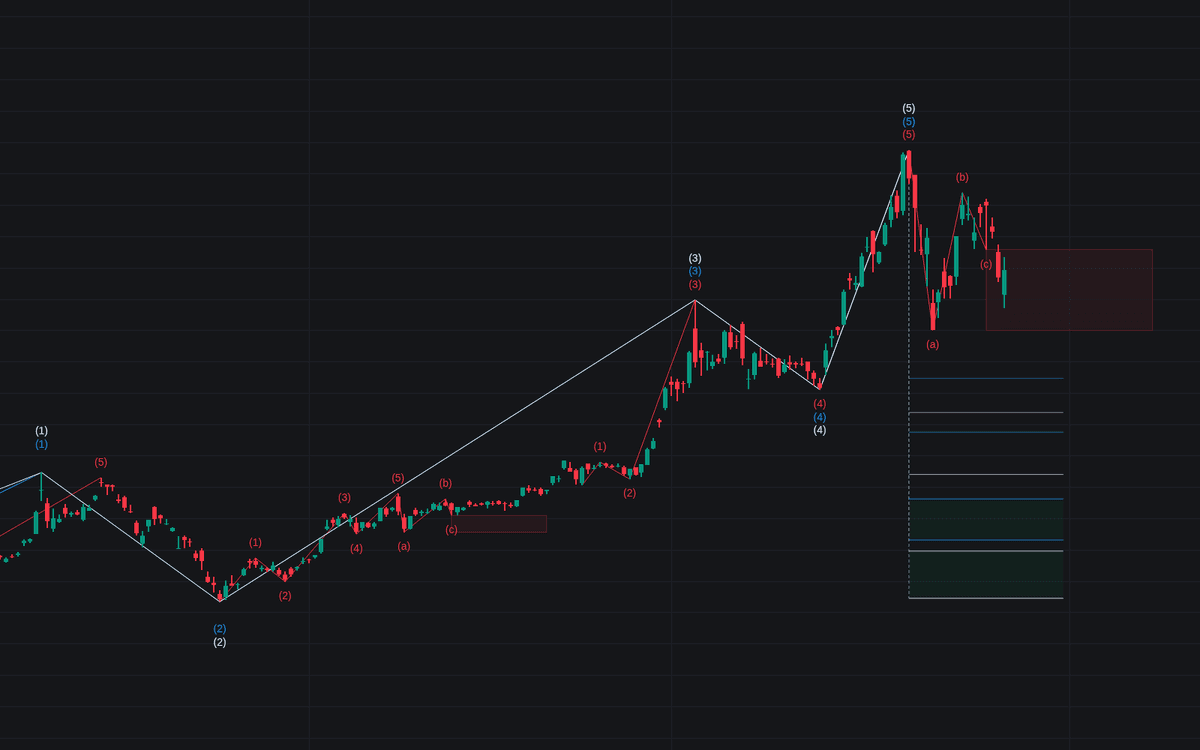

Elliott Wave detects and labels wave counts automatically, marking five-wave impulses (1–5) and three-wave corrections (A–C) as they develop from zigzag pivots, then drawing Fibonacci retracements where a correction may rebound. The counts stay honest: patterns that break the rules are visibly struck. Invalidated motive counts turn dotted, corrective ones dashed, and a red cross prints when the pattern's lower box is breached.
How to Trade the Elliott Wave?
- Confirmed 5-wave pattern (1 → 5): a completed motive sequence, which can itself be read as a larger Wave 1 in the next degree.
- Fibonacci zones after the count: the script's retracement lines mark areas where the corrective phase might turn.
- Rule violations: Wave 2 retracing past Wave 1's origin or Wave 4 overlapping Wave 1's territory invalidates the count. A struck pattern is information, not noise.
- New extremes: when Wave 5 outgrows Wave 3, the pattern's highest point updates, and colored circles flag fresh highs against the drawn levels.
Pivots come from the ZigZag engine, so the source and length settings decide how much movement earns a label. The result is a running count under Elliott Wave theory without hand-labeling a single swing.
Elliott Wave Settings
- High: uses the high, the close, or the maximum of open/close as the upper pivot source.
- Low: uses the low, the close, or the minimum of open/close.
- ZigZag Length: how many neighboring bars must confirm a pivot. With length 10, a pivot high requires the ten preceding highs to sit lower. Larger values yield fewer, larger waves.
Frequently Asked Questions
Free on Vela
Run it on Vela. Go further with a paid plan.
- Up to 500 strategy alerts, with webhook automation
- Up to 10× the chart history of Free
- Orderflow lookback up to full history
- Up to 100,000 monthly credits for Quant to customize it
- Futures data alongside crypto, stocks, forex and commodities
Also on other platforms
Get free access to this indicator elsewhere.

Run it on Vela. Make it yours with Quant.
Open this indicator free on Vela, our next-generation charting platform. Then ask Quant, our coding agent built into Vela, to retune it or turn it into a backtested strategy of your own.