Mitigation Blocks
 By LuxAlgoMay 18, 2026
Mitigation Blocks is an indicator on Vela, our next-generation charting platform, written in Pine Script®.
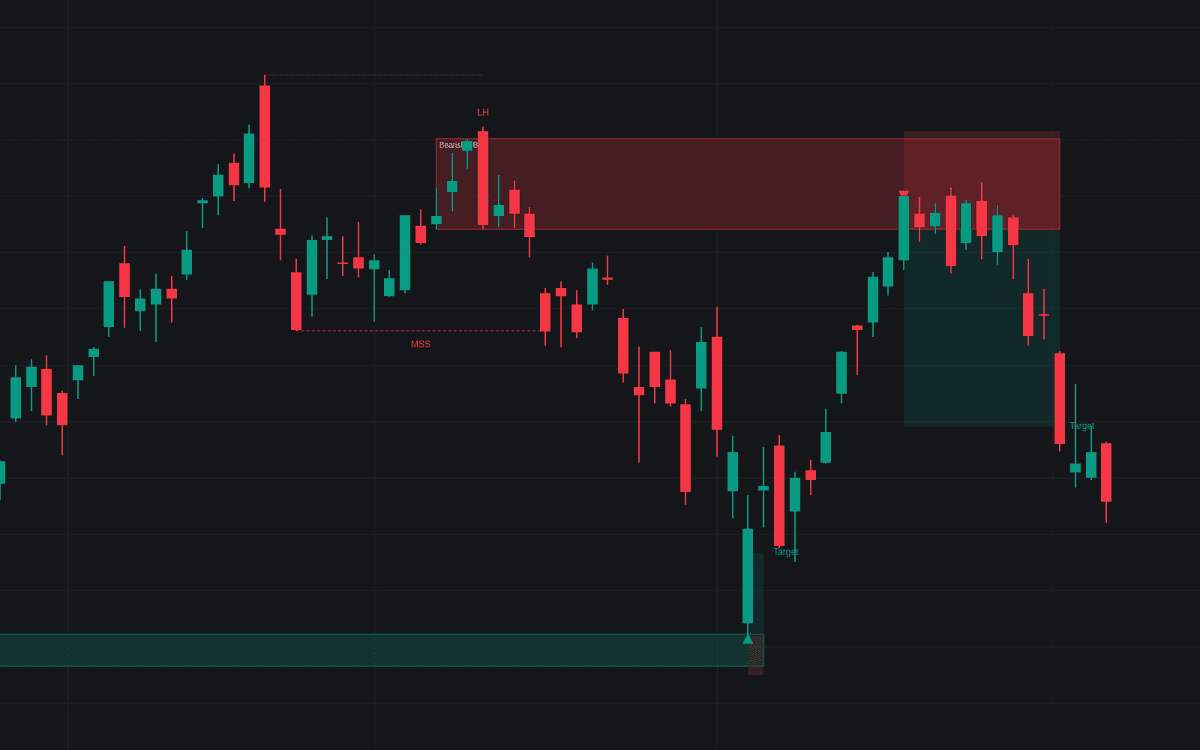

Mitigation Blocks identify specific price zones where a previous trend failed to continue its momentum, subsequently signaling a potential shift in market structure. By isolating order blocks that failed to create a new high or low but were later breached during a Market Structure Shift (MSS), the indicator helps traders identify areas of supply and demand likely to act as support or resistance upon a retest. This tool provides a systematic way to visualize order flow imbalances, allowing for more disciplined entries and defined risk management strategies when price returns to these zones.
How to Trade the Mitigation Blocks?
The indicator automatically detects sequences where a reference extreme is followed by a failed swing and a subsequent breakout. To use it effectively, focus on the "first return" to these zones, as this is where the order flow imbalance is most likely to be active.
When a block forms, the indicator highlights a zone on the chart. Wait for price to pull back into this box. If the feature is enabled, the tool will project an entry, a stop loss, and a target based on your configured risk/reward ratio. For a bullish setup, look for price to find support at the block after a confirmed break above a previous high. For bearish setups, look for resistance at the block after a break below a previous low. Because these blocks are based on structural failure, they are often considered high-probability areas for continuation or reversal. It is recommended to use the provided stop-loss options to protect your capital, as price returning deep into a block can sometimes invalidate the setup.
Mitigation Blocks Settings
Detection
- Swing Length: Determines how many bars on each side a swing high or low must dominate. A higher value requires more significant swings, filtering out minor market noise.
- Break Displacement (ATR): Sets the minimum body size of the candle required to confirm a break of structure. Increasing this helps filter out false breakouts.
- Block Boundaries: Allows you to choose between drawing the block based on the full range of the candles or only their bodies.
- Max Candles In Block: Defines how many consecutive opposing candles are included in the block zone.
- Max Bars To First Return: Sets the expiration time for a block. If price does not return to the zone within this window, the block is considered inactive.
- Show Breaker Cases: Marks, with a gray "Sweep: breaker" label, the sequences whose final swing swept the reference extreme before the structure break; these are breaker cases, so no zone or return trade is drawn for them.
Return Trade
- Stop: Choose between placing the stop loss beyond the block itself for a tighter exit or beyond the failed swing for a wider, more conservative buffer.
- Stop Buffer (ATR): Adjusts the padding applied to your stop loss using an ATR multiplier.
- Target (R): Defines your profit target as a multiple of your risk.
- Show Return Trade: Toggles the display of the trade entry, stop, and target visuals upon the first retest.
Display
- Show Sequence: Visualizes the reference extreme, the failed swing, and the structural break line.
- Max Live Blocks Per Side: Limits the number of active blocks shown on the chart to prevent clutter.
Style
- Bullish/Bearish: Allows customization of the colors used for the mitigation block zones.
Frequently Asked Questions
Free to use
Run it on Vela. Go further with a paid plan.
- Up to 500 Custom Alerts, with webhook automation
- Up to 10× the chart history of Free
- Orderflow lookback up to full history
- More Quant usage to customize it, plus extra usage when you need it
- Futures data alongside crypto, stocks, forex and commodities

Related indicators

Run it on Vela. Make it yours with Quant.
Open this indicator free on Vela, our next-generation charting platform. Then ask Quant, our coding agent built into Vela, to retune it or turn it into a backtested strategy of your own.