Tradervue: Trade Analytics Breakdown

Tradervue helps you review executed trades through imports, journaling, charts, and performance reports. LuxAlgo combines chart research and custom strategy development with Quant, our coding agent, and now also includes an account-based journal within our charting platform, Vela. The useful comparison is how each platform supports your complete research and review process, rather than assigning one to beginners and the other to advanced traders.
This review covers current plans, import methods, reporting limits, and a practical workflow from a trading idea to recorded results. Features and standard prices were reviewed September 8, 2026. Neither a backtest nor a journal score establishes future profitability.
Quick Comparison Table
| Task | Tradervue | LuxAlgo |
|---|---|---|
| Review executed trades | Dedicated journal, trade charts, tags, and reports | Journal alongside Vela, with dashboard and trade review |
| Develop a custom strategy | Use journal observations to formulate a hypothesis | Ask Quant to generate code, inspect it, and run a simulation |
| Bring in trading records | File imports and broker sync where supported | Manual journal accounts, recognized exports, and available broker connections |
| Collaborate | Trade sharing and mentor workflows | Journal stays private when a chart workspace is shared |
| Choose a starting point | Prioritize importing and analyzing your actual trading history | Prioritize chart research, editable strategy code, and integrated review |
How Professional Traders Use Tradervue
Tradervue’s official December 29, 2022 walkthrough demonstrates how traders use the platform for review. It is still linked from the current getting-started guide. Use it for workflow orientation; interface details and trial offers in the video are historical, so check current plan information before subscribing.
1. Tradervue Platform Analysis
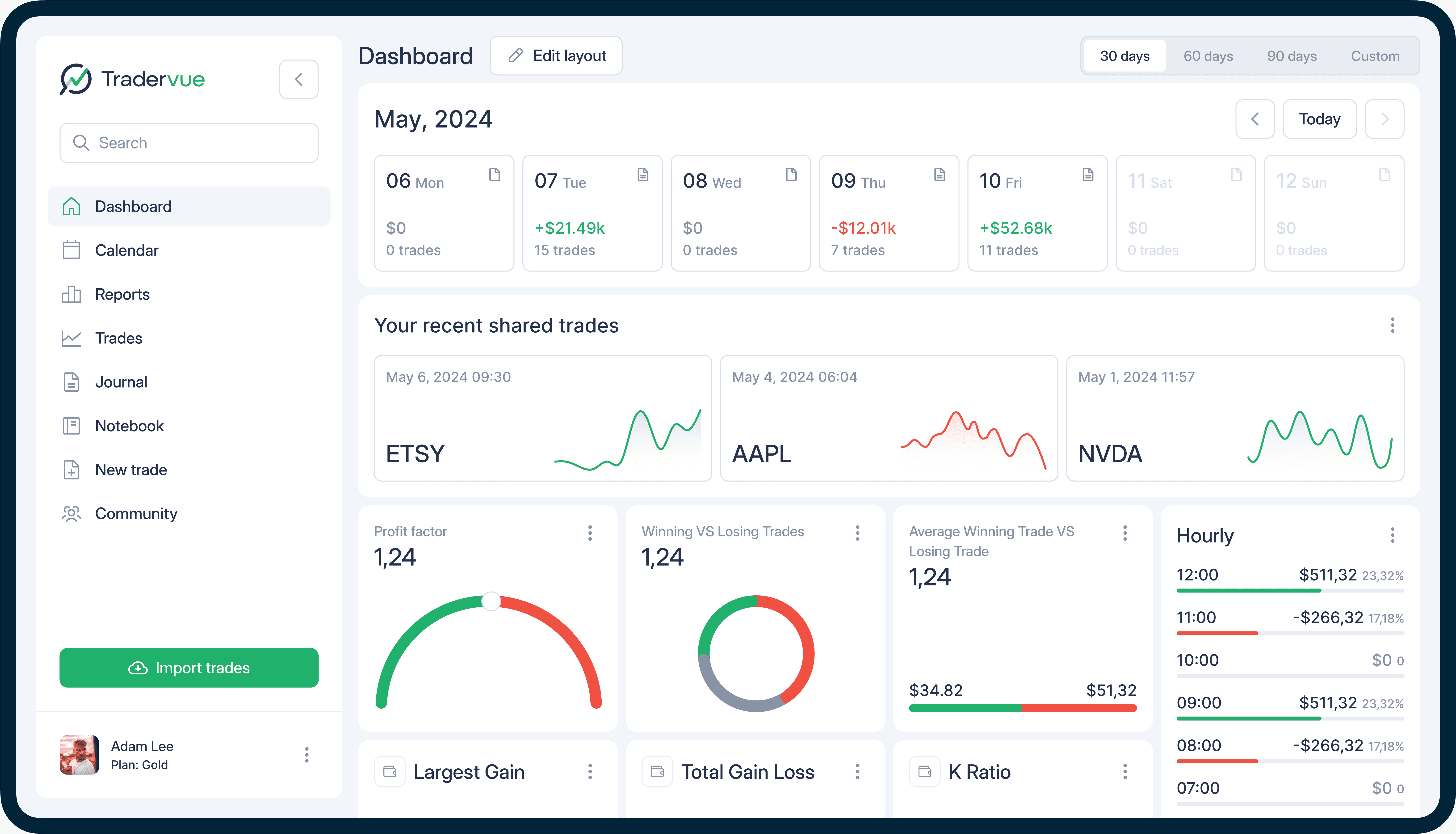
Core Analytics and Trade Imports
Tradervue brings trading records into a journal where you can inspect executions, add notes, tag setups, and review performance. Its supported-brokers page is the right place to check your exact broker and export format. A supported file importer is not the same as an automatic broker connection.
The import-method guide separates Standard Import from Broker Sync. Standard Import requires exporting and uploading records periodically. Broker Sync retrieves records through a supported connection; availability and update timing depend on the integration. Avoid describing every supported broker as automatically synchronized in real time.
After the first import, reconcile several trades with the broker statement: quantities, entry and exit times, direction, fees, and open positions. Multiple executions may be grouped into one logical trade. If the source lacks execution times, precise intraday analysis is limited even when the overall profit or loss can be reconstructed.
Reports That Answer Different Questions
Tradervue’s report guide covers overview, tag, instrument, day/time, price/volume, and advanced reports. Start with one question and a consistent date range. Repeatedly searching dozens of filters until one looks profitable can produce a misleading pattern from a small sample.
| Report or metric | Useful question | Interpretation check |
|---|---|---|
| Overview and win/loss | Is performance driven by frequent small wins or a few large outcomes? | Compare win rate with average win, average loss, and sample size |
| Tags and comparisons | Which setups or behaviors differ? | Apply tags consistently and compare similar periods |
| Day and time | When are results strongest or weakest? | Check timezone, execution-time quality, and trade count |
| Risk reporting | How did returns compare with planned initial risk? | Use valid risk values and identify excluded trades |
| Exit analysis | Could the final exit have improved within the modeled constraints? | Treat the result as hindsight analysis |
| Liquidity reports | How did adding or removing liquidity relate to outcomes? | Check the imported fees and venue assumptions |
Risk, Fees, and Exit Analysis
Risk reporting requires Gold and uses the initial risk entered for a trade. For example, 100 shares with a planned stop $0.50 from entry imply $50 of initial risk; a $100 gross gain is 2R before costs. Only trades with initial risk set enter R-mode reports, so an incomplete risk field can change the sample being analyzed.
Commission and fee tracking also requires Gold. Imported costs are used when the broker supplies them; estimates can be configured when necessary. Compare gross and net results consistently. A positive gross result can become negative after fees, and an estimate should not be mistaken for a reconciled actual charge.
Exit analysis is available on Gold for stocks, futures, and forex. It evaluates moving the final exit execution or group of executions within documented time and risk constraints, rather than assuming the whole position could have been sold at the perfect price. Use it to generate an exit hypothesis, then test that hypothesis on other trades.
Liquidity reports require Gold and suitable broker data. Tradervue infers liquidity behavior from ECN fees and rebates, assuming a fee for removing liquidity and a rebate for adding it. Other fee arrangements can make that inference unreliable. This is execution analysis, not a broad measure of market liquidity.
Trading Development and Collaboration
Use tags to distinguish setup, market context, and behavior: for example, breakout, opening session, and early exit. Record the intended entry and exit before the outcome is known, then add a separate post-trade review. This reduces the temptation to rewrite the rationale around a winning or losing result.
Tradervue also supports notes, shared trades, and mentoring. Choose deliberately what to share, and compare feedback with your own rules and records. Testimonials can describe an individual’s experience, but do not demonstrate that journaling caused improved returns or funding success.
Pricing Structure
The current paid-plan page lists Silver at $29.95 monthly and Gold at $49.95 monthly. Both list unlimited trade imports, trading accounts, mentoring connections, and broker sync where supported. Gold adds exit analysis, potential P&L analysis, and commissions/fees support; the documentation above explains other Gold-specific reports.
The free-plan quota guide states 30 imported logical trades per calendar month, not 100. This counts trades imported during the month, rather than trades executed during it, and refers to grouped trades rather than individual fills. Silver and Gold remove that quota. Paid trials renew by charging the card unless the account is switched to Free before the trial ends.
2. LuxAlgo Platform Analysis
Chart Research and Quant
LuxAlgo’s Vela provides a browser workspace for charts, drawing tools, indicators, and market research. With Quant, our coding agent, turn a journal observation into explicit, editable code. Describe the entry, exit, position size, and risk rules instead of asking for a generally “better” strategy.
Example: suppose your journal suggests that you exit trend trades too early. Ask Quant to compare your defined exit with a close below a specified moving average, while keeping the entry rule and size unchanged. Review Code, sign in, and click Run. Inspect several simulated trades before evaluating the summary, and avoid repeatedly changing the exit until the development sample looks attractive.
Use the strategy viewer to review the Trades Log, drawdown, net profit, and trade count. Set commission and slippage, use standard price bars, and evaluate a separate period. A backtest tests a model of your rules; your journal records what happened in actual or paper execution. Differences can arise from discretion, data feeds, missed trades, costs, and fills.
The Journal Inside Vela
The LuxAlgo Journal is included on every plan for signed-in users. Open Journal beside Panels to review trading records next to the chart, then maximize it for a dashboard. Journal accounts, fills, and notes belong to your account across workspaces, and are not included when you share a workspace.
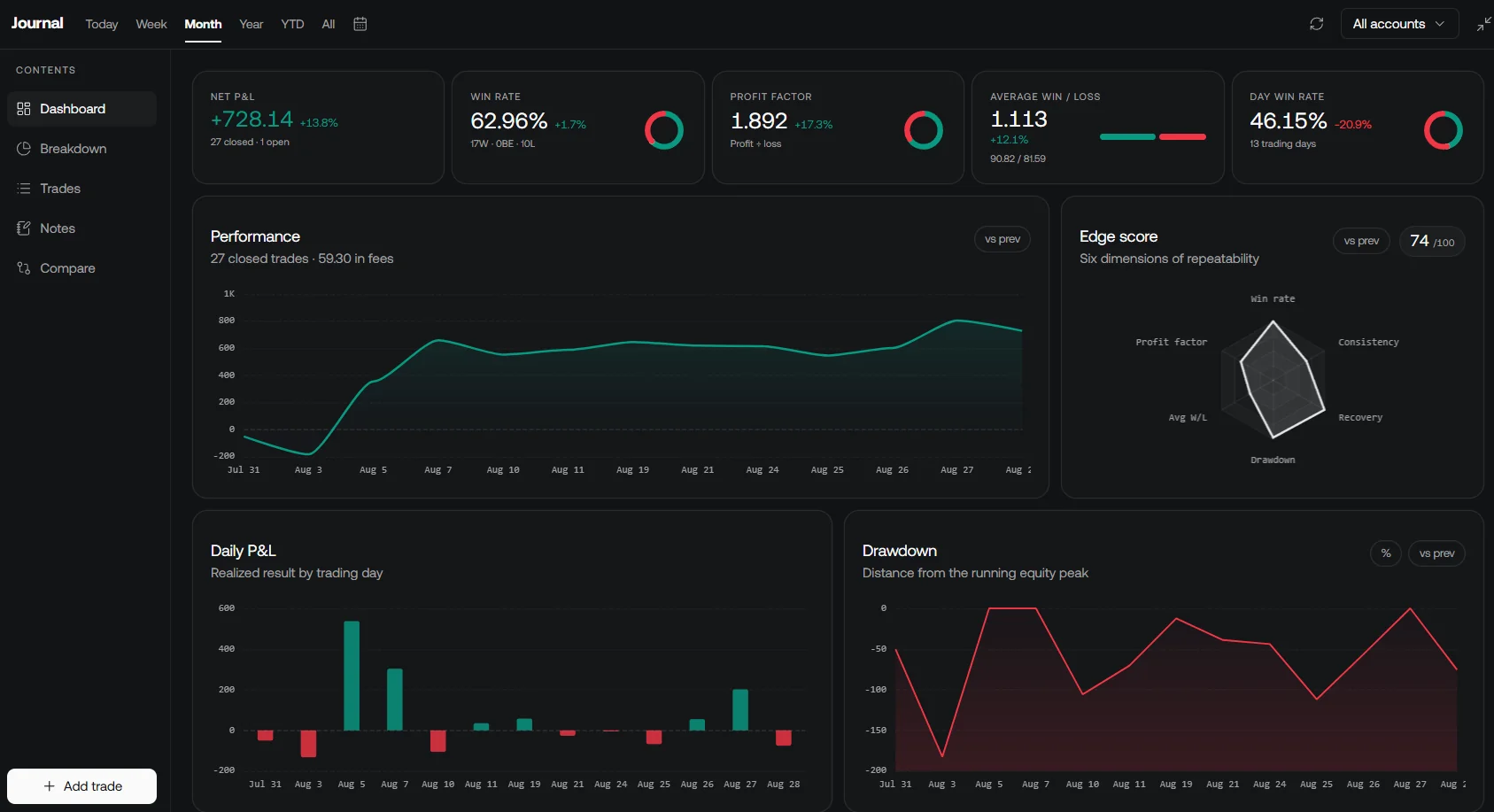
The account guide describes manual accounts, file imports, and broker connections when available on your account. Recognized exports include Tradervue. CSV, TXT, and HTML files up to 2 MB are accepted, and the import reports inserted, already-journaled, and skipped fills. Supported broker accounts refresh daily, with an immediate Refresh option.
To evaluate a move from Tradervue, first keep a copy of your original records. Tradervue’s CSV export is available to Silver and Gold subscribers from the Trades section. Import a representative sample into a separate LuxAlgo journal account and compare dates, quantities, fees, and totals. Do not assume that every note, screenshot, tag, or grouping choice transfers identically merely because a file is recognized.
LuxAlgo also offers a separate open-source Trade Journal for users who want to run the application themselves. It provides trading records and analytics with supported imports and broker sync. That self-hosted project has its own setup and maintenance requirements; it should not be confused with the journal built into Vela.
Other LuxAlgo Products
The open-source Broker SDK and Trade Relay address separate integration and execution workflows. A journal import is not an instruction to place an order, and a strategy simulation is not live execution. Review supported brokers, environments, and configuration before using an execution connector.
LuxAlgo Pricing Structure
The current pricing page distinguishes standard month-to-month charges from annual billing. Temporary introductory discounts are excluded below.
| LuxAlgo plan | Standard monthly billing | Standard annual total | Annual equivalent / month |
|---|---|---|---|
| Free | $0 | $0 | $0 |
| Essential | $39.99 | $299.88 | $24.99 |
| Premium | $67.99 | $479.88 | $39.99 |
| Ultimate | $119.99 | $719.88 | $59.99 |
| AI Ultra | $229.99 | $1,439.88 | $119.99 |
Free offers a limited Quant allowance alongside charting and journal access. Paid tiers increase credits, chart layouts, history, and other limits. The lower annual equivalents should not be labeled monthly subscription prices. Choose a tier around the specific analysis you need rather than an assumed experience level.
Platform Strengths and Limitations
Tradervue is a strong fit when you want a dedicated hosted journal, established report categories, and mentor review. Its usefulness depends on complete imports and the reports available on your plan. Gold matters if you require net P&L, risk-based reporting, or detailed exit and liquidity analysis.
LuxAlgo is a strong fit when you want chart research, custom indicators, strategy code, and journal review in one platform. It can also complement an existing Tradervue account: investigate a hypothesis with Quant, then evaluate subsequent execution in the journal you already use. Keep simulated and executed trades clearly separated.
Summary and Recommendations
- Start with one representative set of trades and reconcile it before trusting any dashboard.
- Choose a journal around your broker, required reporting, costs, and review habits.
- Use tags and notes consistently, and compare like-for-like date ranges and gross or net results.
- Turn a recurring observation into an explicit rule with Quant, then test it outside the period that suggested it.
- Review whether you followed the rule in later trading; a better-looking historical chart is not the final outcome.
References
- Tradervue: paid plans
- Tradervue: free import quota
- Tradervue: import methods
- Tradervue: risk reporting
- Tradervue: exit analysis
- Tradervue: liquidity reports
- Tradervue: commission tracking
- Tradervue: exporting trades
- LuxAlgo: integrated Journal
- LuxAlgo: journal accounts and imports
- LuxAlgo: strategies with Quant
- LuxAlgo: open-source Trade Journal
Read next