Replay any chart, then trade it, free.
Vela replays any chart you open on every plan, minute charts included, where TradingView’s free plan replays daily bars and up and starts minute history at Essential.
Quick answer
Replay is on every Vela plan with a free account: pick a start bar on any chart, minute charts included, play it forward, and trade it with Buy and Sell on a replay account of its own, with a results card when it ends. On TradingView, Bar Replay on the free Basic plan covers daily bars and up; minute history starts at Essential, with 180 days.
Bar replay, plan by plan
Free plan first, on both. Vela from its plan limits, TradingView from its pricing page, both checked November 3, 2026. No prices: they change.
| Velaby LuxAlgo | FreeIncluded | EssentialIncluded | PremiumIncluded | UltimateIncluded | AI UltraIncluded |
|---|---|---|---|---|---|
| TradingViewfrom its pricing page | Basic · freeNot included | Essential180 days | Plus365 days | PremiumAll | UltimateAll |
TradingView: “Historical data by the minute” in its Bar Replay rows. Daily bars and up replay in full on every TradingView plan.
| Velaby LuxAlgo | FreeIncludedwith a results card | EssentialIncludedwith a results card | PremiumIncludedwith a results card | UltimateIncludedwith a results card | AI UltraIncludedwith a results card |
|---|---|---|---|---|---|
| TradingViewfrom its pricing page | Basic · freeIncluded | EssentialIncluded | PlusIncluded | PremiumIncluded | UltimateIncluded |
Where TradingView is ahead
- TradingView replays all minute data on Premium and Ultimate, second bars from Premium, and 7 days of ticks on Ultimate.
- Daily bars and up replay in full on every TradingView plan, Basic included.
- Trading inside a replay on Vela counts in US dollars, so for now it works on symbols priced in dollars and dollar pairs such as EURUSD.
How to do it in Vela
Press Replay
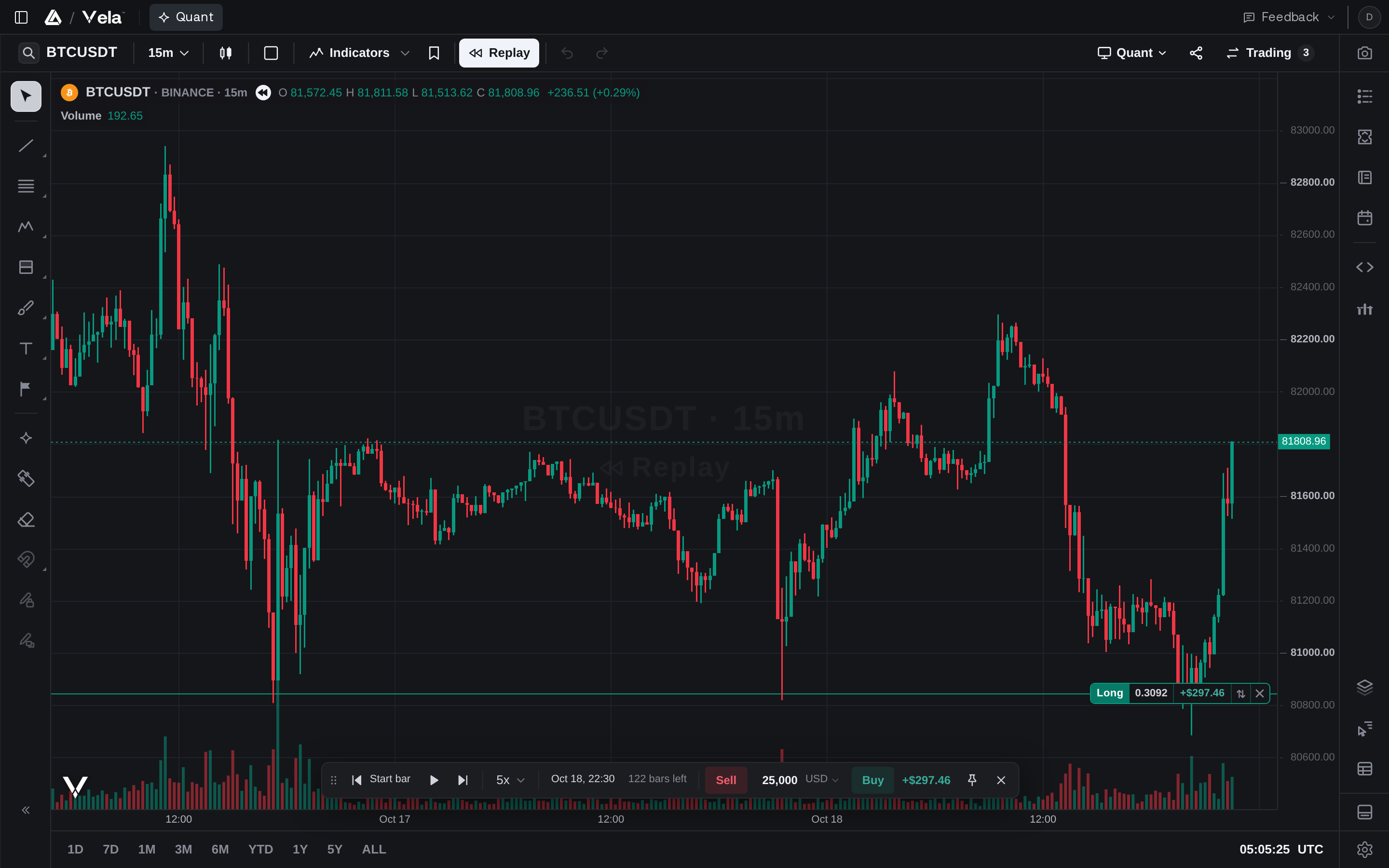
Open any chart, press Replay and pick the start bar. Everything after it stays hidden until the replay reaches it.
Play it forward
Playback starts at 5x. Change the speed from the replay bar, pause with Space, step with Shift and the right arrow, and switch timeframes without losing your place.
Trade it as it plays
Buy and Sell sit on the replay bar, on an account of its own that starts at $100,000. Drag a stop loss and take profit out of the position’s line.
Read the results card
Net P&L, the equity curve, win rate, profit factor, expectancy and every trade, the moment the replay ends.
Questions
Is TradingView Bar Replay free?
On Vela, Replay is free on every plan, minute charts included, with a free account. On TradingView, Bar Replay and trading inside it are on every plan, but on the free Basic plan the replay covers daily bars and up: minute history starts at Essential, with 180 days.
Can I practice trading in replay?
Yes. Buy and Sell sit on the replay bar, stops and targets drag out of the position’s line, and each replay trades its own account from $100,000, with a results card when it ends.
Does replay work on multiple charts?
Yes. Replay a layout of up to 16 charts and they all move on one clock: the finest timeframe sets the pace.
Can I replay second or tick charts?
Vela replays the charts it opens. TradingView replays second bars on Premium and Ultimate and 7 days of ticks on Ultimate.
More TradingView limits, answered
- Free plan limitsVela Free against TradingView Basic, limit by limit.
- Indicator limitNo cap on the indicators and strategies one chart runs.
- Alerts limitUnlimited Price Alerts that run until you end them.
- Footprint chartsFootprint charts on every plan, from real bid and ask prints.
- Volume profile and TPOSession, rolling and visible-range profiles, and TPO, on Free.
- Multiple charts16 charts in one tab, linked, on every plan.
- Vela vs TradingViewEvery row, charts to plans, with TradingView’s wins marked.
- Switch from TradingViewWatchlists, layout and Pine Script® code, moved in minutes.
Vela sources · checked November 3, 2026
TradingView sources · checked November 3, 2026
The easiest charts you’ll ever switch to.
Free to start, no credit card: open a chart and see it for yourself.
LuxAlgo is an independent company and is not affiliated with, sponsored by, or endorsed by TradingView, Inc. Vela™ is a trademark of LuxAlgo Global, LLC. Vela runs Pine Script® through the independently developed PineTS engine and is not affiliated with, sponsored by, endorsed by, or in any way officially associated with TradingView, Inc. “Pine Script”, “TradingView” and “Lightweight Charts” are trademarks or registered trademarks of TradingView, Inc. Third-party details are taken from the vendors' public documentation and may change; corrections are welcome at LuxAlgo.