16 charts per tab and unlimited Price Alerts, free.
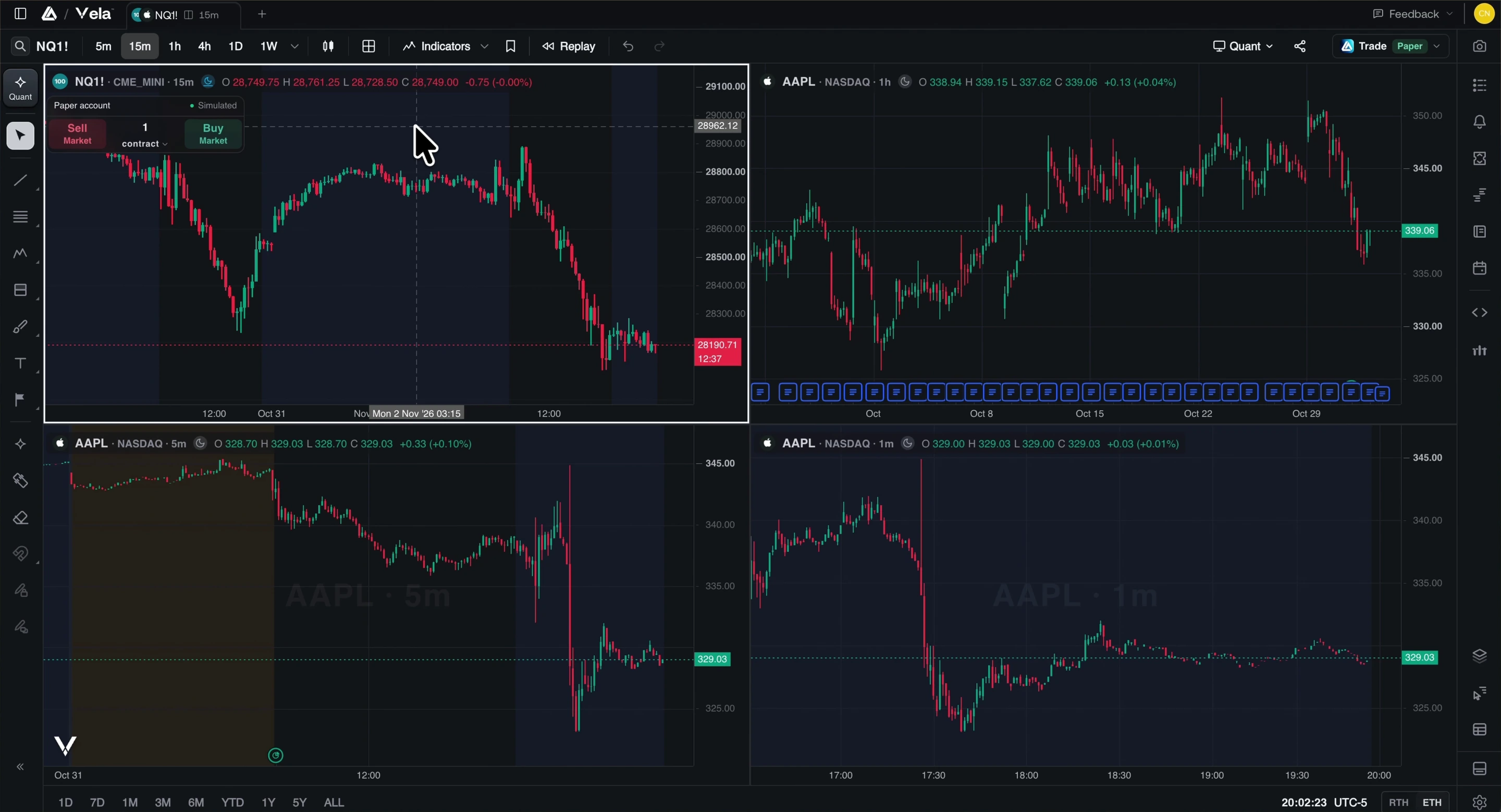
Vela, our next-generation charting platform, puts 16 charts per tab, unlimited tools per chart, unlimited Price Alerts and the Orderflow suite on its free plan, where TradingView’s free Basic plan stops at 1 chart, 2 indicators and 3 price alerts.
Quick answer
Vela Free opens 16 charts per tab with unlimited tools per chart, unlimited Price Alerts and 5 Custom Alerts, footprint, TPO and volume profiles built from real trades, Replay, and a $100,000 paper account, with no credit card. On TradingView’s free Basic plan the limits are 1 chart per tab, 2 indicators per chart, 3 price alerts that expire after a month, no technical alerts, 1 saved layout, and no footprint, TPO or volume profile.
The free plans, limit by limit
Free plan first, on both. Vela from its plan limits, TradingView from its pricing page, both checked November 3, 2026. No prices: they change.
| Limit | Vela Free | TradingView Basic | Matched on TradingView |
|---|---|---|---|
| Charts per tab | Vela Free16 | TradingView Basic1 | Matched on TradingViewUltimate (16) |
| Tools per chart | Vela FreeUnlimited | TradingView Basic2 indicators | Matched on TradingViewNo plan: 50 on Ultimate |
| Price Alerts | Vela FreeUnlimited | TradingView Basic3 | Matched on TradingViewNo plan: 1,000 on Ultimate |
| Alerts on indicators and strategies | Vela Free5 Custom Alerts | TradingView BasicNot included | Matched on TradingViewEssential (20) |
| How long alerts run | Vela FreeUntil you end them | TradingView Basic1 month | Matched on TradingViewPremium |
| Footprint charts | Vela FreeIncluded, 1 day lookback | TradingView BasicNot included | Matched on TradingViewPremium |
| TPO charts | Vela FreeIncluded | TradingView BasicNot included | Matched on TradingViewPremium |
| Volume profiles | Vela FreeIncluded | TradingView BasicNot included | Matched on TradingViewEssential |
| Saved layouts | Vela Free10 saved workspaces | TradingView Basic1 saved layout | Matched on TradingViewPlus (10) |
| Historical bars | Vela Free5,000 | TradingView Basic5,000 | Matched on TradingViewBasic |
| Symbols per watchlist | Vela Free10 | TradingView Basic30 | Matched on TradingViewTradingView is ahead |
TradingView values from its plan comparison table. “Matched on TradingView” is the lowest TradingView plan that reaches Vela Free’s number.
Where TradingView is ahead
- A watchlist holds 30 symbols on TradingView Basic. On Vela Free it holds 10, with as many watchlists as you like; paid plans hold 500.
- TradingView has iOS and Android apps on every plan, 110+ drawing tools to Vela’s 66, and 150+ exchanges from 50+ countries.
- TradingView trades live through selected brokers. Orders on Vela fill on paper.
How to do it in Vela
Open Vela
Vela runs in the browser and as a free desktop app for macOS, Windows and Linux. Create a free account: no credit card.
Split the tab
Open Layout in the topbar and pick a grid, up to 16 charts in one tab, then link symbol, interval or crosshair across them.
Set your alerts
Right-click the price scale for a Price Alert, as many as you need, and press the bell on any indicator for a Custom Alert.
Bring TradingView with you
The switch moves your watchlists from a file, your layout from a screenshot, and your Pine Script® code by paste, running through PineTS.
Questions
What are the limits of TradingView’s free plan?
On Vela, the free plan has 16 charts per tab, unlimited tools per chart, unlimited Price Alerts and 5 Custom Alerts. TradingView’s free Basic plan, checked November 3, 2026, allows 1 chart per tab, 2 indicators per chart, 3 price alerts that expire after 1 month, no technical alerts, 1 watchlist of 30 symbols, 1 saved chart layout and 5,000 historical bars, with no volume profile, TPO or footprint and no Bar Replay on minute charts.
Is Vela really free?
Yes. Vela is free to start with no credit card: 16 charts per tab, unlimited tools per chart, unlimited Price Alerts and 5 Custom Alerts, the Orderflow suite built from real trades with 1 day of lookback, Replay, a $100,000 paper account, hundreds of free indicators from the LuxAlgo Library, and Quant, our coding agent. Paid plans add lookback, history, Custom Alerts, live CME futures data and the full Library.
Where is TradingView’s free plan ahead?
A TradingView Basic watchlist holds 30 symbols to Vela Free’s 10. TradingView also has iOS and Android apps, more drawing tools, markets on 150+ exchanges, and live trading through selected brokers, where orders on Vela fill on paper.
Is TradingView Premium worth it for footprint charts and alerts?
On Vela, footprint and TPO charts and unlimited Price Alerts come with the free plan, and alerts run until you end them. On TradingView, volume footprint and TPO start at Premium, which also removes alert expiry, so a trader who needs only those features can start on Vela Free and compare.
Can I use Vela and TradingView side by side?
Yes. Nothing on Vela touches your TradingView account. Import a watchlist, open your layout from a screenshot, and run both while you decide.
More TradingView limits, answered
- Indicator limitNo cap on the indicators and strategies one chart runs.
- Alerts limitUnlimited Price Alerts that run until you end them.
- Footprint chartsFootprint charts on every plan, from real bid and ask prints.
- Volume profile and TPOSession, rolling and visible-range profiles, and TPO, on Free.
- Multiple charts16 charts in one tab, linked, on every plan.
- Bar replayReplay minute charts and trade them, on every plan.
- Vela vs TradingViewEvery row, charts to plans, with TradingView’s wins marked.
- Switch from TradingViewWatchlists, layout and Pine Script® code, moved in minutes.
Vela sources · checked November 3, 2026
TradingView sources · checked November 3, 2026
The easiest charts you’ll ever switch to.
Free to start, no credit card: open a chart and see it for yourself.
LuxAlgo is an independent company and is not affiliated with, sponsored by, or endorsed by TradingView, Inc. Vela™ is a trademark of LuxAlgo Global, LLC. Vela runs Pine Script® through the independently developed PineTS engine and is not affiliated with, sponsored by, endorsed by, or in any way officially associated with TradingView, Inc. “Pine Script”, “TradingView” and “Lightweight Charts” are trademarks or registered trademarks of TradingView, Inc. Third-party details are taken from the vendors' public documentation and may change; corrections are welcome at LuxAlgo.