Triple Top/Bottom
 By LuxAlgoFeb 12, 2026
Triple Top/Bottom is an indicator on Vela, our next-generation charting platform, written in Pine Script®.
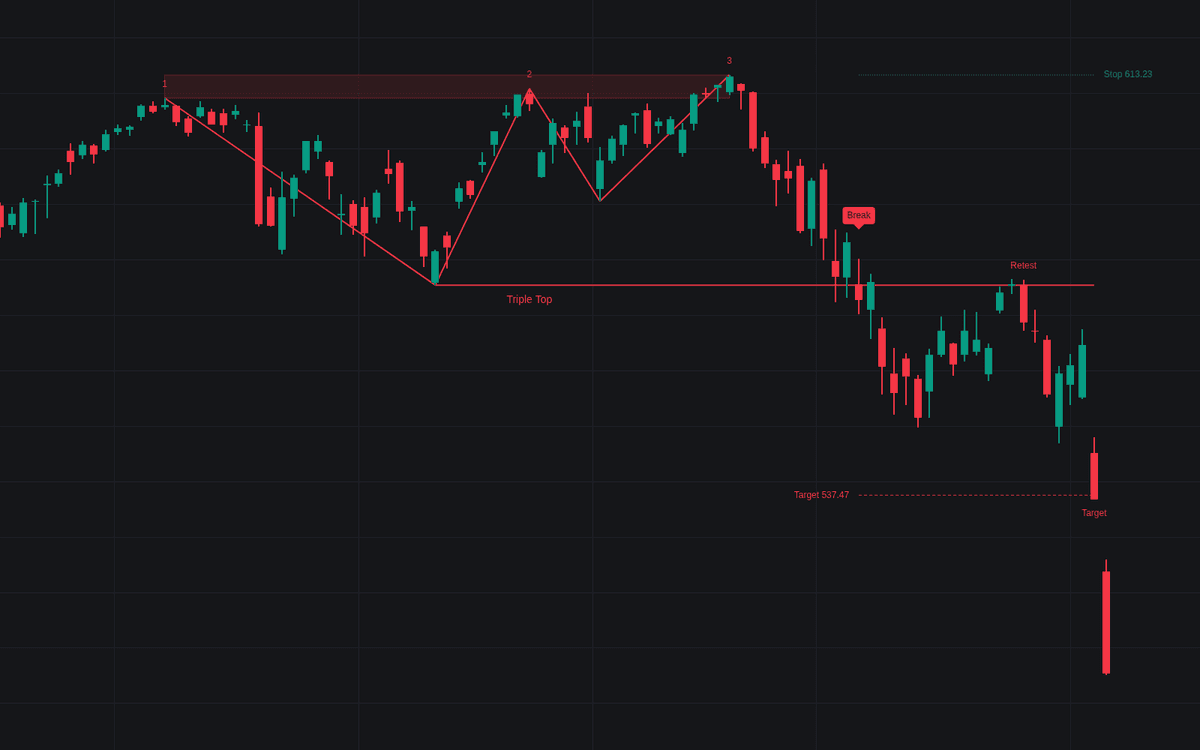

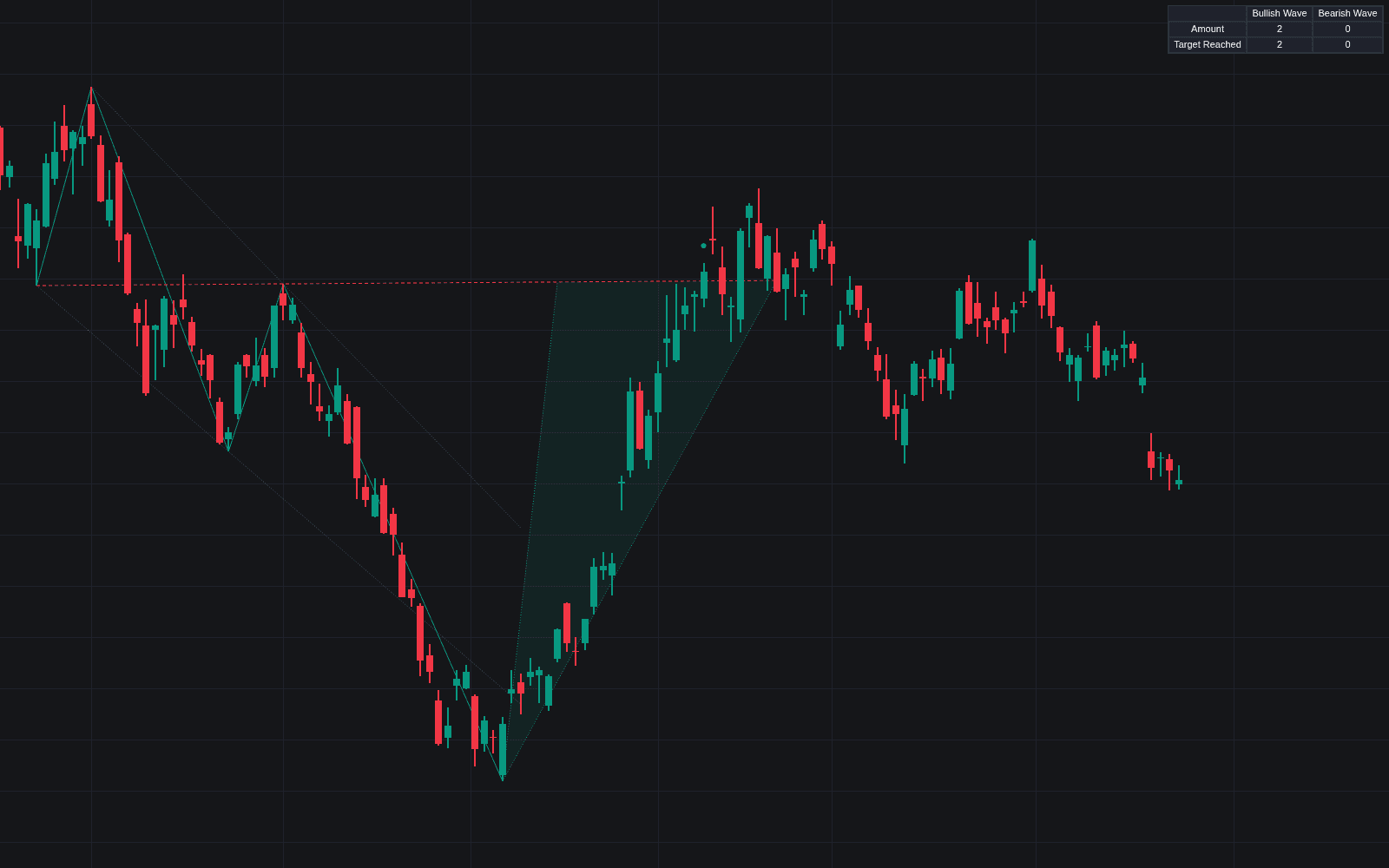
Triple Top/Bottom is a pattern recognition tool that identifies classic reversal formations by monitoring three distinct tests of a specific price level. By filtering for prior trends and volume dynamics, this indicator helps traders distinguish between simple consolidation and a meaningful shift in market sentiment. It provides automated detection of these formations, clear visualization of confirmation levels, and dynamic tracking of potential price targets and stop loss locations to assist with trade planning.
How to Trade the Triple Top/Bottom?
The indicator works by identifying three peaks for tops or three troughs for bottoms that cluster within a specified tolerance range. A pattern is considered valid only when the price breaks the neck level, also known as the confirmation level, following the third test.
- For a Triple Top: Look for a bearish reversal after an established uptrend. Entry typically occurs once the price closes definitively below the confirmation level, with the initial stop loss placed near the third peak.
- For a Triple Bottom: Look for a bullish reversal following a significant downtrend. Entry is triggered upon a close above the confirmation level, with the stop loss set below the third trough.
- Use the measured target feature to define potential profit objectives. Always monitor for retests of the broken level, as price often returns to the breakout point to confirm the new trend direction.
Because the indicator automatically tracks the progress of these patterns, you can see in real time whether the breakout is successful, if the target has been reached, or if the structure has failed due to price reclaiming the confirmation level.
Triple Top/Bottom Settings
Pattern Detection
- Swing Length: The number of bars a high or low must dominate to be considered a confirmed swing.
- Level Tolerance: The maximum allowable spread between the three tests, measured in multiples of the Average True Range.
- Minimum Reaction: The minimum pullback required between tests to ensure they are distinct, measured in ATR units.
- Test Spacing: Sets the fewest bars between consecutive tests and the most bars from the first test to the third.
- ATR Length: The period used for calculating the Average True Range, which scales the sensitivity of the pattern.
Prior Trend & Volume
- Require Prior Trend: If enabled, ensures the pattern appears after a significant move, preventing the indicator from flagging standard sideways ranges.
- Prior Trend Window: The number of bars scanned to calculate the price move leading into the pattern.
- Minimum Prior Move: Sets the threshold for how large the preceding trend must be relative to the ATR.
- Require Fading Test Volume: Optionally filters for patterns where volume decreases with each subsequent test.
Completion
- Decisive Break Buffer: An optional multiplier to ensure a clean breakout through the confirmation level.
- Completion Window: The maximum bars allowed after the third test for the breakout to occur.
- Closes Back Inside for Failure: Defines how many consecutive closes back across the confirmation level constitute a failed signal.
- Post-Break Watch: The duration the indicator tracks the pattern after a successful breakout.
- Measured Target: Projects the pattern height from the confirmation level as the price objective; turning it off also stops target-hit tracking.
Style
- Show Tested Level: Toggles the shaded band representing the price area where the tests occurred.
- Show Event Labels: Displays visual markers for targets, stops, and retests.
Frequently Asked Questions
Free to use
Run it on Vela. Go further with a paid plan.
- Up to 500 Custom Alerts, with webhook automation
- Up to 10× the chart history of Free
- Orderflow lookback up to full history
- More Quant usage to customize it, plus extra usage when you need it
- Futures data alongside crypto, stocks, forex and commodities

Related indicators
Run it on Vela. Make it yours with Quant.
Open this indicator free on Vela, our next-generation charting platform. Then ask Quant, our coding agent built into Vela, to retune it or turn it into a backtested strategy of your own.