Volatility Breakout
 By LuxAlgoOct 9, 2026
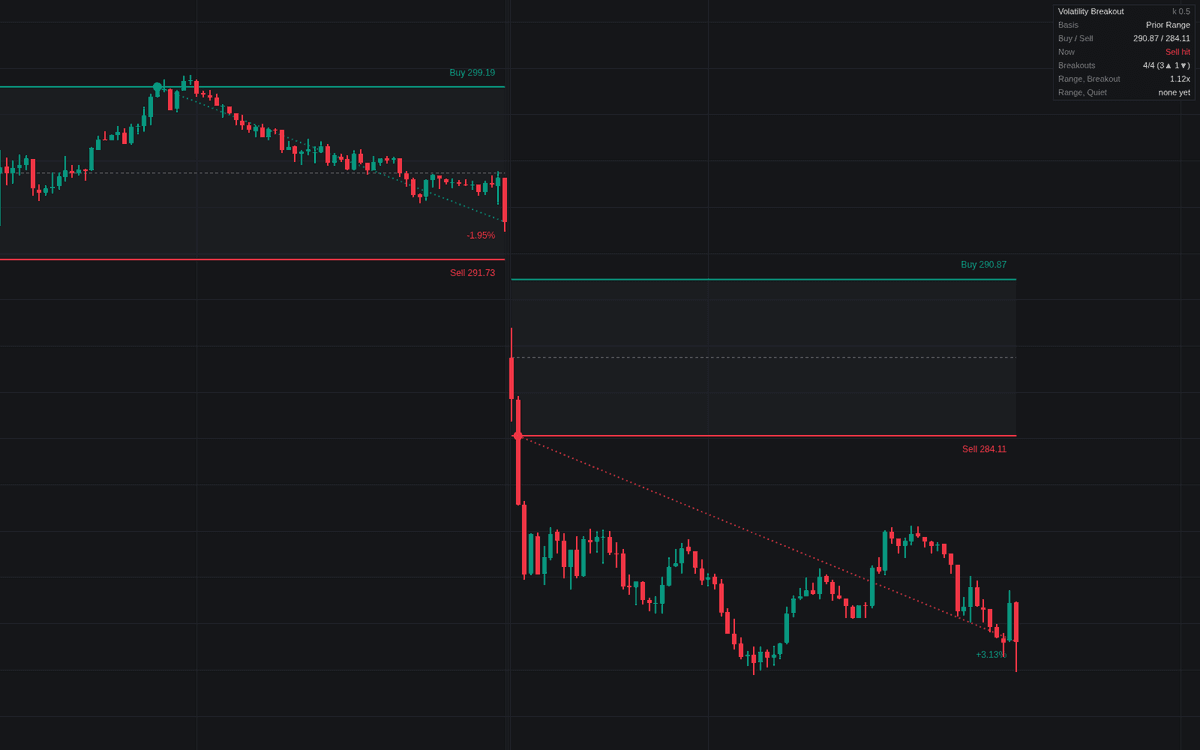

Volatility Breakout is a systematic technical tool designed to identify and capitalize on periods of sudden price expansion. By anchoring triggers to specific timeframes and calculating volatility based on historical range patterns, the indicator helps traders anticipate significant market moves following periods of consolidation. It effectively separates periods of quiet market behavior from breakout phases, providing clear levels to monitor for entry and trade management.
How to Trade the Volatility Breakout?
To use the indicator effectively, observe the relationship between the price and the plotted upper and lower triggers. These levels are derived from the open price of a selected timeframe, adjusted by a volatility multiplier. A breakout occurs when the price pushes through these thresholds, signaling that the market is beginning a potential trend move.
Traders often look for the "contraction" signal, which indicates that volatility has compressed significantly. By selecting a contraction filter, you can isolate periods where the market is primed for a move, historically favoring the start of an expansion. Once a trigger is hit, the indicator simulates a trade entry. You can manage these positions using the built-in exit rules, which include closing at the end of the period, at the next open, or using a profitable open criteria to maximize gains while controlling risk. Always consider the trend filter to ensure trades align with the broader market momentum.
Volatility Breakout Settings
Trigger Levels
- Period: Selects the timeframe to anchor the open price and trigger calculations.
- Range Basis: Defines the metric for measuring volatility, such as the prior period's range, true range, or Crabel Stretch.
- Multiplier (k): Adjusts the sensitivity of the triggers; lower values allow for earlier entries, while higher values require stronger confirmation.
- Basis Length: Sets the number of periods used for calculating averages for specific basis types.
Setup Filter
- Contraction Filter: Filters signals to only occur following low-volatility periods like NR4, NR7, or Inside Periods.
- Trend Filter: Restricts trades to the direction of the long-term trend, filtering out signals that move against it.
Trades
- Show Trades: Toggles the display of entries, stops, and performance data on the chart.
- Exit Rule: Determines how trades are closed, including options like Period Close or First Profitable Open.
- Stop (x Basis): Sets the distance for protective stops as a multiple of the chosen range basis.
- Max Hold: Limits the duration of an active trade to a specified number of periods.
Dashboard & Style
- Show Dashboard: Toggles a real-time table displaying current triggers and historical range statistics.
- Position & Size: Configures the layout and scaling of the dashboard elements.
- Colors: Customizes the visual styling of triggers, zones, and trade markers.
Frequently Asked Questions
Free on Vela
Run it on Vela. Go further with a paid plan.
- Up to 500 strategy alerts, with webhook automation
- Up to 10× the chart history of Free
- Orderflow lookback up to full history
- Up to 100,000 monthly credits for Quant to customize it
- Futures data alongside crypto, stocks, forex and commodities

Run it on Vela. Make it yours with Quant.
Open this indicator free on Vela, our next-generation charting platform. Then ask Quant, our coding agent built into Vela, to retune it or turn it into a backtested strategy of your own.