Swing Structure Scanner
 By LuxAlgoDec 26, 2024
Swing Structure Scanner is an indicator on Vela, our next-generation charting platform, written in Pine Script®.
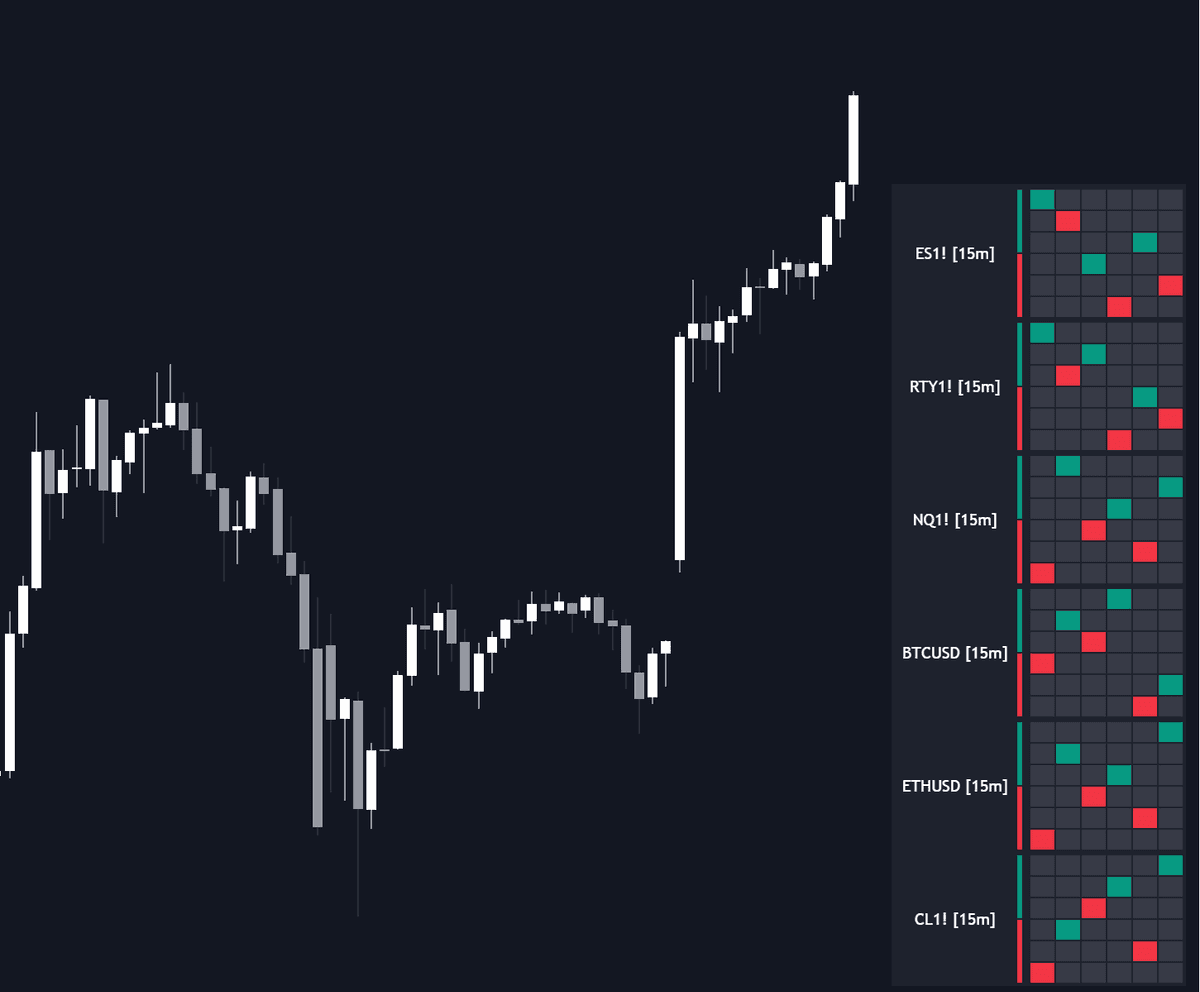

The Swing Structure Scanner condenses swing structure into a dashboard of live graphs, retrieving swing points from up to six tickers and timeframes simultaneously. Each graph positions the latest swings relative to previous ones from a high/low-only perspective, so structural shifts anywhere on the panel stand out (a market quietly printing higher lows, a timeframe rolling over into lower highs) while you stay on a single chart.
How to Trade the Swing Structure Scanner?
- Higher lows forming: on any graph suggest an emerging uptrend or a breakout scenario worth watching.
- Lower highs forming: the mirror read, with supply leaning on every rally.
- Cross-ticker confluence: several symbols shifting structure together strengthens the case on each of them.
- Higher-timeframe stacking: load one symbol across several timeframes to check whether structure agrees from intraday upward.
- Hover a swing point: for an instant readout of its exact price level.
The scanner is a monitoring layer rather than an on-price overlay: it tells you which chart deserves attention next, and the swing points it plots update live as each feed evolves.
Swing Structure Scanner Settings
- Swing Length: the length used to calculate each swing structure.
- Swing Display Lookback: how many swing point pairs each graph shows.
- Symbols: the ticker and timeframe assigned to each displayed graph.
- Vertical Display: stacks graphs vertically (the default); turn it off to lay them out side by side in a row.
- Scaling Factor: adjusts the overall size of the display.
Frequently Asked Questions
Free to use
Run it on Vela. Go further with a paid plan.
- Up to 500 strategy alerts, with webhook automation
- Up to 10× the chart history of Free
- Orderflow lookback up to full history
- More Quant usage to customize it, plus extra usage when you need it
- Futures data alongside crypto, stocks, forex and commodities
Also works on

Related indicators
All 17 Swing Structure Grammar indicators
.png&w=3840&q=75)
Run it on Vela. Make it yours with Quant.
Open this indicator free on Vela, our next-generation charting platform. Then ask Quant, our coding agent built into Vela, to retune it or turn it into a backtested strategy of your own.