HTF Swing Structure Signals
 By LuxAlgoJul 22, 2026
HTF Swing Structure Signals is an indicator on Vela, our next-generation charting platform, written in Pine Script®.
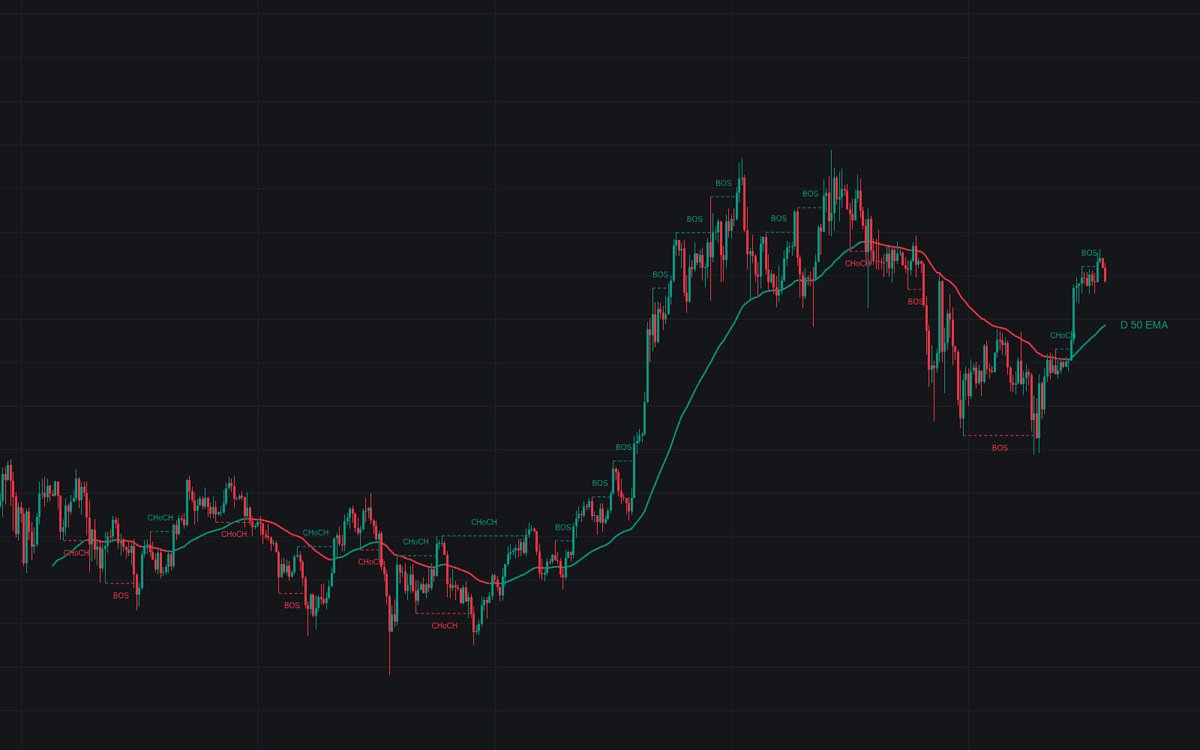

HTF Swing Structure Signals turns swing structure into a rule-based pullback framework. It labels Break of Structure (BOS) and Change of Character (CHoCH) events from pivot-detected swings, colors them by an exponential moving average calculated on a higher timeframe (gray when against it), and, when a CHoCH fires in the direction of that bias, draws an active 50% retracement level and signals the touch.
How to Trade the HTF Swing Structure Signals?
- BOS / CHoCH labels: with-trend breaks and potential character changes, marked as swings give way.
- HTF EMA bias: price above the higher timeframe EMA emphasizes bullish structure; below it, bearish, so you avoid fighting the primary trend.
- Dotted line + 50% level: drawn after a trend-aligned CHoCH; the retracement zone where a pullback entry is staged.
- Triangle signal: prints when price touches the active 50% level in the direction of the HTF bias.
Levels expire once touched or once a chosen bar limit elapses, so only fresh setups stay on the chart. Pairing local structure with a higher timeframe filter is multi-timeframe structure alignment in practice: the EMA sets direction, the break sets the moment, the 50% level sets the price.
HTF Swing Structure Signals Settings
- Higher Timeframe: sets the bias EMA's timeframe (Daily, 4-hour, and so on).
- EMA Length: bars used in the moving average calculation.
- MS Pivot Period: swing sensitivity for BOS and CHoCH detection.
- Fib Pivot Period: currently has no effect on the plotted levels; each 50% level is measured from the extreme between the broken MS pivot and the breakout bar.
- Max Bars for Fib to Disappear: how long an untouched level stays active before expiring.
- Require Counter-Trend BOS for Setup: demands a prior counter-trend break before a new trend-aligned setup validates.
Frequently Asked Questions
Free to use
Run it on Vela. Go further with a paid plan.
- Up to 500 strategy alerts, with webhook automation
- Up to 10× the chart history of Free
- Orderflow lookback up to full history
- More Quant usage to customize it, plus extra usage when you need it
- Futures data alongside crypto, stocks, forex and commodities
Also works on

Related indicators
All 17 Swing Structure Grammar indicators
Run it on Vela. Make it yours with Quant.
Open this indicator free on Vela, our next-generation charting platform. Then ask Quant, our coding agent built into Vela, to retune it or turn it into a backtested strategy of your own.