Decision Trees
 By LuxAlgoJun 9, 2026
Decision Trees is an indicator on Vela, our next-generation charting platform, written in Pine Script®.
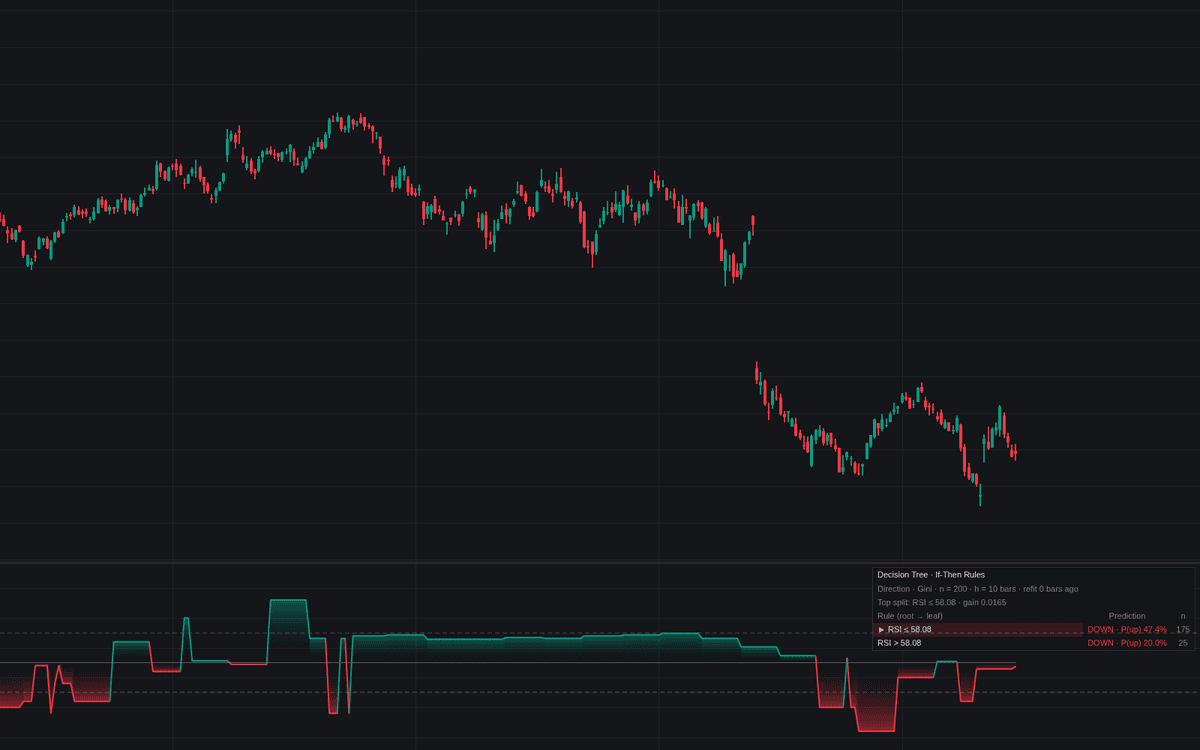

Decision Trees brings decision trees to the chart as a genuine CART implementation. Each retrain grows a depth-limited tree on the most recent window, labeled by what close did over the following bars; the live bar routes down it and the leaf's prediction plots as an oscillator: P(up) around 50% for Direction, a percent return around zero for Forward Return, and a non-negative volatility reading for Forward Volatility. The rules table is the heart: one row per leaf with its conditions, an arrow on the live bar's row.
How to Trade the Decision Trees?
- Prediction above the center: the routed leaf favors upside; center crossings fire the Bullish and Bearish Flip alerts.
- High-confidence guides: on the Direction target, dashed 70%/30% levels isolate the strongest readings for gating other strategies.
- Read the active rule: the arrowed row says why the model leans as it does; if they look like noise, treat the signal that way.
Training uses only closed bars whose forward horizon is realized, no lookahead. The build sits in the Library's machine-learning family.
Decision Trees Settings
- Target (default Direction (Up/Down)): classification, or regression on Forward Return % / Forward Volatility %.
- Impurity Measure (default Gini): split rule for Direction; regression uses variance.
- Prediction Horizon (bars) (default 10), Training Window (samples) (default 200), Retrain Every (bars) (default 10): labeling, sampling, and refit cadence.
- Maximum Depth (default 3) and Minimum Leaf Size (default 20): the readability stopping rules.
- Minimum Gain (default 0) and Split Candidates (default 24): pre-pruning and threshold search granularity.
- High-Confidence Level % (default 70): the dashed guides and alerts.
- Features: RSI (Length 14), Relative Volume (Length 20), Rate of Change % (Length 10), Stochastic %K (Length 14), ATR % (Length 14), all on by default with toggles.
- Show Rules Table (default on) plus location, size, colors.
Frequently Asked Questions
Free to use
Run it on Vela. Go further with a paid plan.
- Up to 500 Custom Alerts, with webhook automation
- Up to 10× the chart history of Free
- Orderflow lookback up to full history
- More Quant usage to customize it, plus extra usage when you need it
- Futures data alongside crypto, stocks, forex and commodities

Related indicators
Run it on Vela. Make it yours with Quant.
Open this indicator free on Vela, our next-generation charting platform. Then ask Quant, our coding agent built into Vela, to retune it or turn it into a backtested strategy of your own.