Gap Rules Interaction
 By LuxAlgoJun 17, 2026
Gap Rules Interaction is an indicator on Vela, our next-generation charting platform, written in Pine Script®.
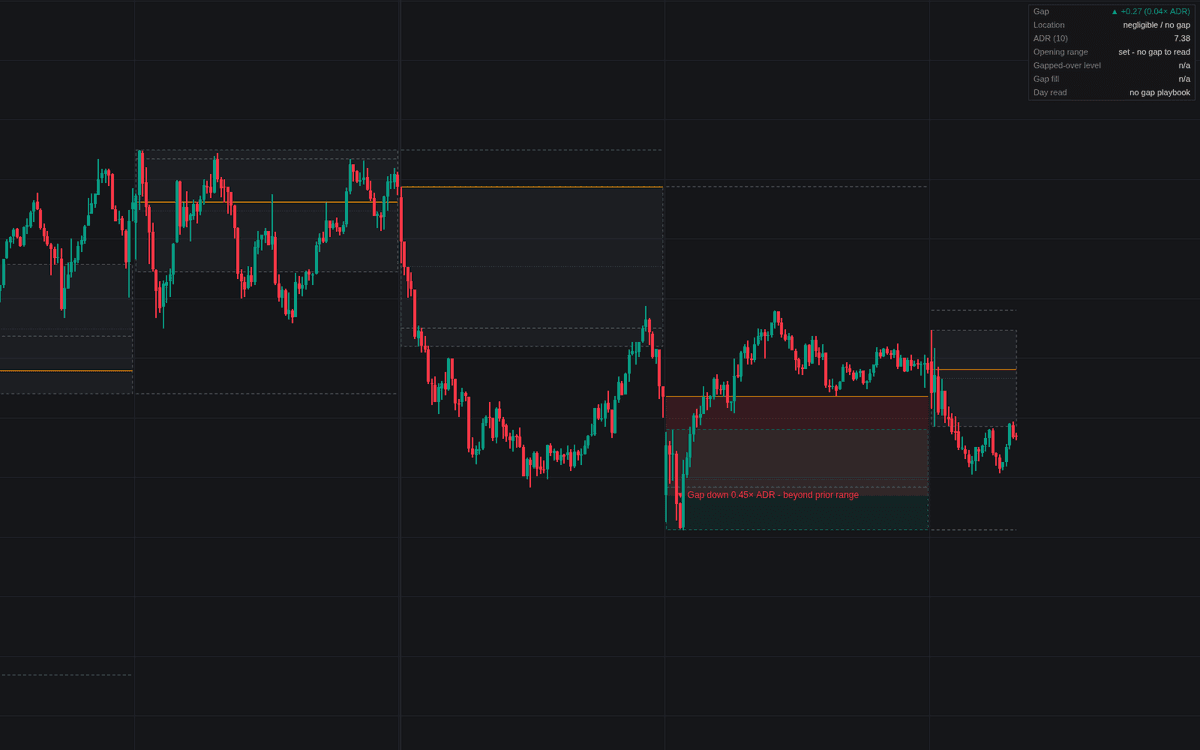

Gap Rules Interaction reads the opening gap the way session traders actually use it, in the first faithful chart build of gap rules interaction. Each session's gap is sized against the recent average daily range and classed as negligible, inside the prior day's range or beyond it; the prior high, low and close stay drawn as reference, the gap zone is boxed, and the opening range forms, locks, and declares itself for or against the gap. A dashboard rolls the layers into a single day read.
How to Trade the Gap Rules Interaction?
- Opening range read: a range built entirely beyond the gapped-over level is acceptance; forming back through it into prior territory is rejection. Both are alerted at lock-in.
- Continuation alignment: gap beyond the prior range, price holding the opening range's gap-side half, no re-entry through the gapped-over level. These are gap-and-go conditions, alerted once per session.
- Fade alignment: price back inside accepted territory rotating toward the prior close, risk framed at the opening-range extreme.
- Fill and negation: touching the prior close is a full fill; closing through it negates the gap's structure, imbalance back to balance.
Gap Rules Interaction Settings
- Custom Session (default off) with its window (default 0930-1600): measure everything inside a session, recommended on futures and extended-hours charts.
- Sessions Shown (default 5): sessions keeping their drawings.
- Average Daily Range Length (default 10): the gap-sizing baseline.
- Negligible Gap Threshold (default 0.1): gaps under this fraction of the ADR get no playbook.
- Opening Range Duration (Minutes) (default 30): use a timeframe at or below it.
- Display: Prior High / Low, Prior Close (Gap Fill Level), Gap Zone, Opening Range, Gap Classification Label and Dashboard (all on); Event Markers (off).
Frequently Asked Questions
Free to use
Run it on Vela. Go further with a paid plan.
- Up to 500 Custom Alerts, with webhook automation
- Up to 10× the chart history of Free
- Orderflow lookback up to full history
- More Quant usage to customize it, plus extra usage when you need it
- Futures data alongside crypto, stocks, forex and commodities

Related indicators
Run it on Vela. Make it yours with Quant.
Open this indicator free on Vela, our next-generation charting platform. Then ask Quant, our coding agent built into Vela, to retune it or turn it into a backtested strategy of your own.