Tri-star
 By LuxAlgoApr 19, 2026
Tri-star is an indicator on Vela, our next-generation charting platform, written in Pine Script®.
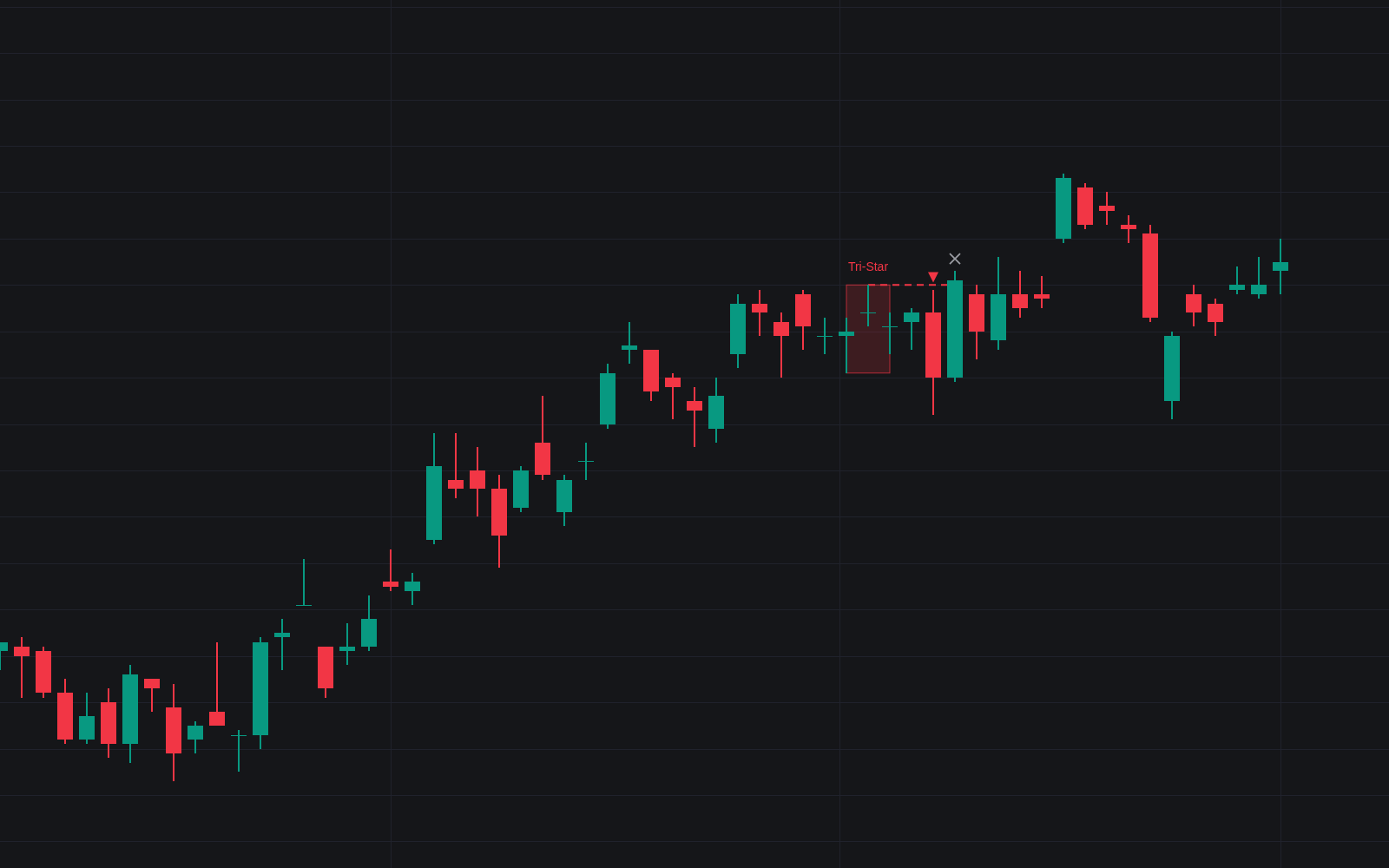

Tri-star hunts one of the rarest candlestick reversals with matching strictness. Three consecutive doji must each pass two body tests, the last candle before them must close on the trend side of a moving average, and the middle doji must gap beyond its neighbors, the defining feature of the tri-star, before a label, box and dashed stop line appear. Every strict pattern is then tracked forward to a confirming close, a timeout or an invalidation.
How to Trade the Tri-star?
- Pattern completes: the third doji seals the signal (conviction has drained from the trend), a caution flag, not yet an entry.
- Confirmation: a decisive close beyond the third doji inside the confirmation window prints a triangle; the middle doji's extreme provides the stop.
- Invalidation: a close accepted beyond the middle doji extreme reinstates the prior trend and crosses the setup out, even after confirmation.
- Loose variant: optionally flags three doji stalling at an extreme without the clean gap, a milder note for confluence, drawn lighter and without stop tracking.
Tri-star Settings
- Maximum Doji Body % (default 5): body ceiling as a share of the bar's range. Anything larger is a spinning top.
- Maximum Body vs Average (default 0.25) x SMA (default 14): each body must also stay under this multiple of the average real body.
- Gap Basis (default Real Bodies): the classical body-gap star rule; Full Candles (incl. Wicks) demands a shadow-inclusive gap.
- Detect Loose Tri-Stars (default off): adds the gapless variant.
- Trend SMA Length (default 50): average establishing the preceding advance or decline.
- Confirmation Window (Bars) (default 3): bars allowed for the confirming close.
- Style: Highlight Pattern Candles (on) and Stop / Invalidation Level (on).
Frequently Asked Questions
Free to use
Run it on Vela. Go further with a paid plan.
- Up to 500 Custom Alerts, with webhook automation
- Up to 10× the chart history of Free
- Orderflow lookback up to full history
- More Quant usage to customize it, plus extra usage when you need it
- Futures data alongside crypto, stocks, forex and commodities

Related indicators
Run it on Vela. Make it yours with Quant.
Open this indicator free on Vela, our next-generation charting platform. Then ask Quant, our coding agent built into Vela, to retune it or turn it into a backtested strategy of your own.