Tweezer Top/bottom
 By LuxAlgoJun 10, 2026
Tweezer Top/bottom is an indicator on Vela, our next-generation charting platform, written in Pine Script®.
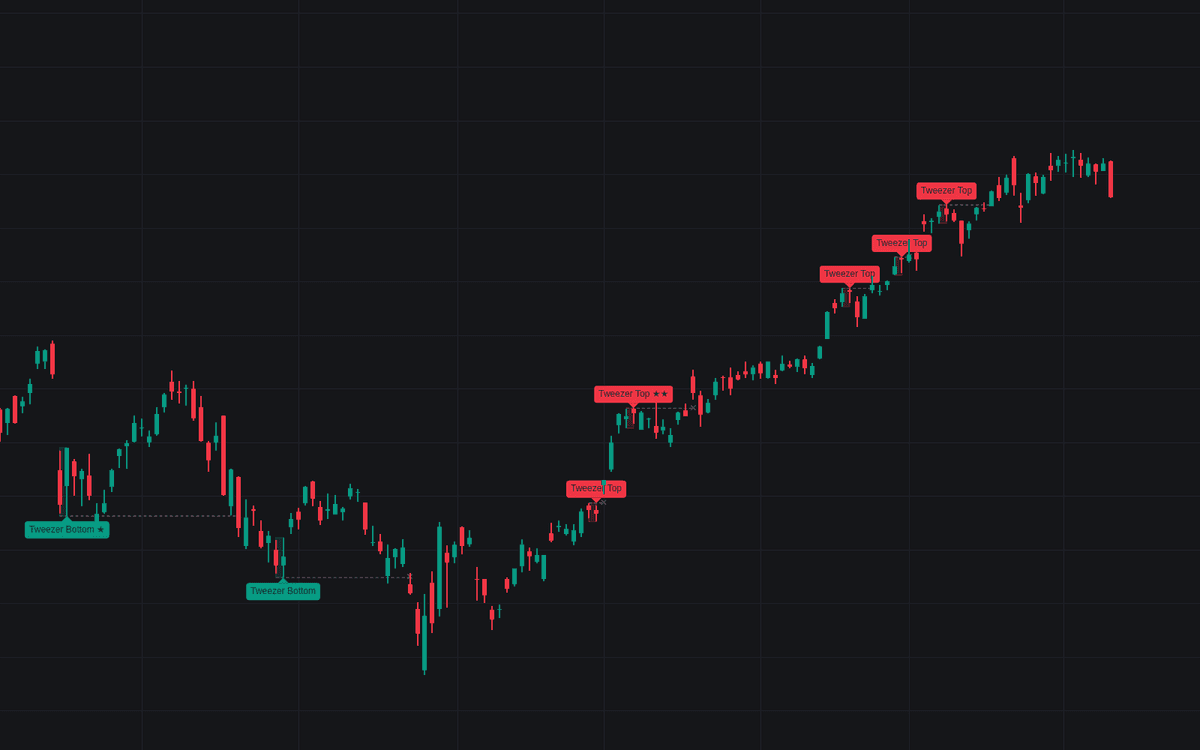

Tweezer Top/bottom finds the two-candle rejection and then grades it: bare matched extremes are everywhere on a chart. A tweezer registers when consecutive candles (or separated by up to two, if allowed) print highs or lows within a tick- and volatility-scaled tolerance after a qualifying move, the second candle closing counter-trend by default. Each detection carries a starred confluence score and its matched extreme becomes a live level.
How to Trade the Tweezer Top/bottom?
- Starred patterns first: ★★ tweezers combine a rejection wick with tested support or resistance; Minimum Confluence Score silences everything below the bar you set.
- Matched level lines: the shared extreme extends right as the price the pattern rests on. While it holds, the thesis holds.
- Invalidation: a candle settling past the matched level dashes the line and marks ✕. The level failed; both sides carry alerts.
Tweezer Top/bottom Settings
- Tolerance (Ticks) (default 2) and Tolerance (ATR Fraction) (default 0.10): the two match tolerances. The larger applies; ATR Length (default 14) drives the volatility side.
- Allowed Gap Candles (default 0): 0 keeps the strict form; 1-2 accept the looser separated form.
- Second Candle Filter (default Counter-Trend Close): Any, Counter-Trend Close, or Opposite Colors.
- Require Preceding Move (default on) with Move Lookback (Bars) (default 10) and Minimum Net Move (ATR) (default 1.0): demands a move into the pattern with the matched extreme as the window extreme.
- Minimum Confluence Score (default 0), Rejection Wick (× Body) (default 2.0), Swing Pivot Length (default 5) and S/R Proximity (ATR) (default 0.25): the grading layer.
- Active Levels per Side (default 3): matched levels that keep extending; style: Pattern Labels, Highlight Pattern Candles, Matched Level Lines, Mark Invalidation (all on).
Frequently Asked Questions
Free to use
Run it on Vela. Go further with a paid plan.
- Up to 500 Custom Alerts, with webhook automation
- Up to 10× the chart history of Free
- Orderflow lookback up to full history
- More Quant usage to customize it, plus extra usage when you need it
- Futures data alongside crypto, stocks, forex and commodities

Related indicators
Run it on Vela. Make it yours with Quant.
Open this indicator free on Vela, our next-generation charting platform. Then ask Quant, our coding agent built into Vela, to retune it or turn it into a backtested strategy of your own.