Weinstein Stage Analysis
 By LuxAlgoOct 9, 2026
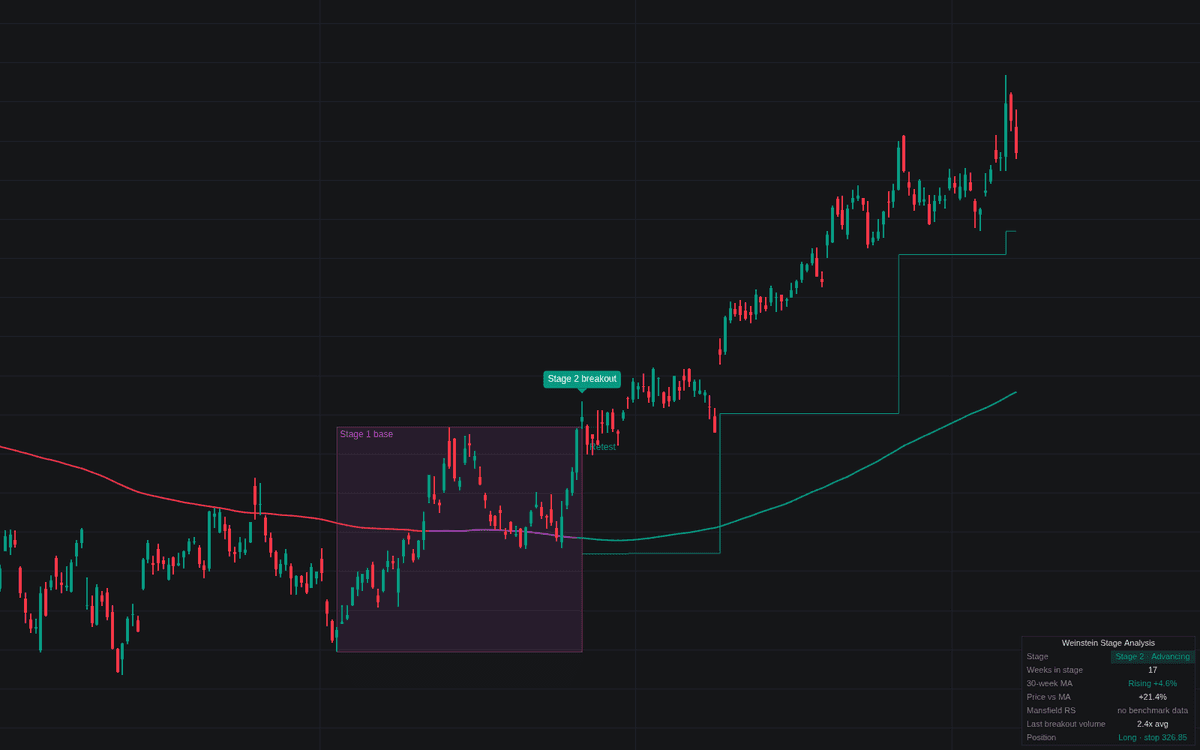

The Weinstein Stage Analysis is a comprehensive tool built to identify the four distinct phases of a security's life cycle. By analyzing price action in relation to a long term moving average, it allows traders to differentiate between basing (Stage 1), advancing (Stage 2), topping (Stage 3), and declining (Stage 4). This systematic approach helps investors focus on market leaders in uptrends and avoid capital exposure during major downturns.
How to Trade the Weinstein Stage Analysis?
The core of this method relies on trend following. The most favorable environment for long positions is Stage 2, which is confirmed when price breaks above a resistance level established during a Stage 1 base while the moving average is rising. Traders typically look for high volume on these breakouts to confirm buying conviction.
To manage risk, the indicator provides automatic stop levels based on recent correction extremes. When trading long in Stage 2, these stops can be trailed behind confirmed pivot lows. Conversely, Stage 4 signifies a breakdown below support, serving as a warning to avoid the asset or initiate short positions.
The Mansfield Relative Strength feature acts as a secondary filter. By ensuring the asset is outperforming a chosen benchmark, traders can prioritize assets with high institutional demand. Additionally, the retest feature provides a second entry opportunity; if price breaks out but then pulls back to verify the previous resistance as new support without falling back into the base, it can offer a lower risk entry point.
Weinstein Stage Analysis Settings
Moving Average
- MA Length (weeks): Defines the primary trend filter, set to 30 weeks by default.
- MA Type: Choose between Simple, Exponential, or Weighted moving averages.
- MA Color: Toggles the moving average color between stage based coloring or slope based coloring.
- Slope Lookback (weeks): Determines the time window to measure the percentage change of the moving average.
- Flat Band %: Sets the percentage threshold used to define a flat moving average.
Stage Rules
- Minimum Base (weeks): The duration a base must last before a breakout can be considered valid.
- Range Lookback (weeks): Establishes the anchor points for range detection.
- Require Breakout Volume: When enabled, filters out Stage 2 entries if volume does not meet the specified multiple of the average.
Mansfield Relative Strength
- Benchmark: Selects the market index used for comparative analysis.
- Mansfield RS Length (weeks): The lookback period for calculating relative strength performance.
- Require Positive RS for Stage 2: Forces the indicator to only signal Stage 2 breakouts if the asset is currently outperforming the benchmark.
Trade Management
- Trades: Selects the active mode (Long and Short, Long Only, or Off).
- Initial Stop Lookback (weeks): The time frame used to determine the initial stop level placement.
- Trail Behind Corrections: Automates the movement of stop orders based on confirmed pivot points.
Frequently Asked Questions
Free on Vela
Run it on Vela. Go further with a paid plan.
- Up to 500 strategy alerts, with webhook automation
- Up to 10× the chart history of Free
- Orderflow lookback up to full history
- Up to 100,000 monthly credits for Quant to customize it
- Futures data alongside crypto, stocks, forex and commodities

Run it on Vela. Make it yours with Quant.
Open this indicator free on Vela, our next-generation charting platform. Then ask Quant, our coding agent built into Vela, to retune it or turn it into a backtested strategy of your own.