Centerline Regime
 By LuxAlgoOct 9, 2026
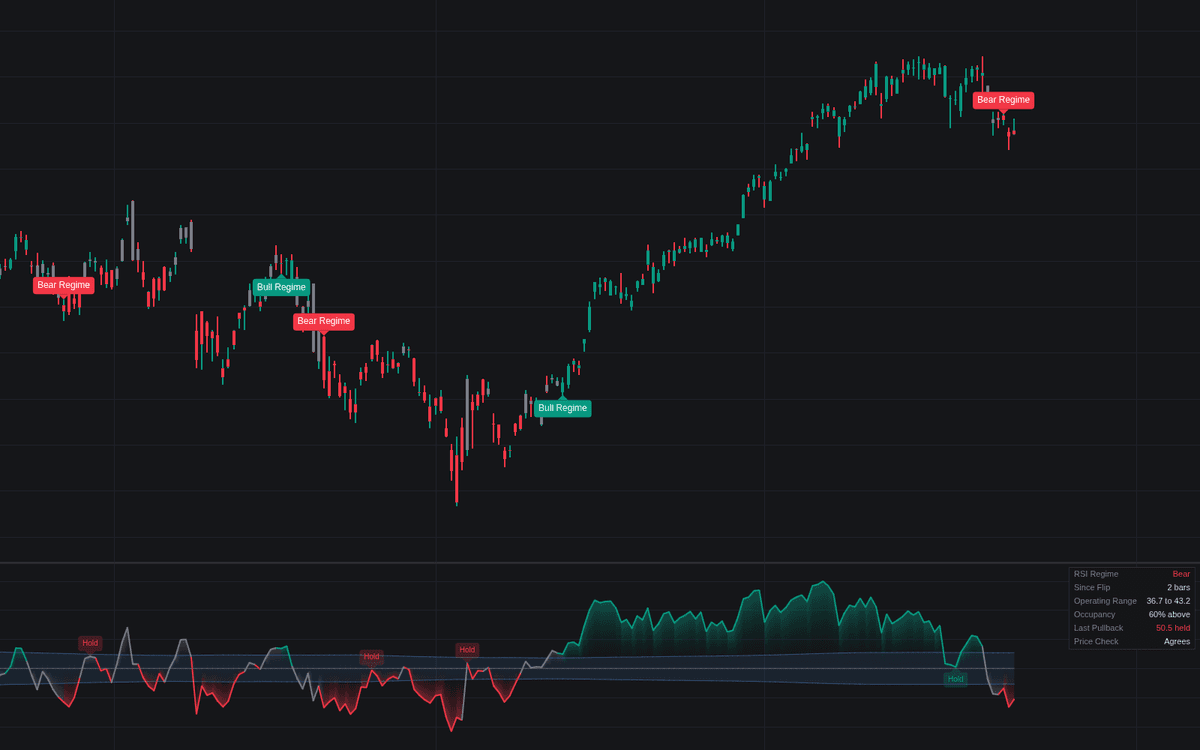

The Centerline Regime is a sophisticated trend-following tool that categorizes market momentum by evaluating the position of popular oscillators relative to their central equilibrium. By employing a dynamic neutral zone, this indicator filters out minor fluctuations, allowing traders to distinguish between significant shifts in momentum and market noise. It provides a structured framework for identifying bullish and bearish regimes, highlighting confirmation points and potential trend continuation signals that traditional oscillators often fail to isolate.
How to Trade the Centerline Regime?
The indicator works by defining a neutral band around an oscillator midline (such as 50 for RSI or 0 for MACD/CCI). A regime flip only triggers when the oscillator sustains its position outside this band for a user-defined number of closes, preventing false signals in ranging markets.
- Identifying Trends: When the oscillator breaks above the upper edge of the neutral band and sustains that position, a bull regime is signaled. Conversely, a drop below the lower edge indicates a bear regime. Wait for the label to appear on the chart as confirmation before looking for entries in the direction of the trend.
- Midline Holds: These are key continuation signals. A midline hold occurs when the oscillator, having established a strong regime, pulls back toward the neutral band but finds support or resistance at the midline before continuing in the direction of the dominant trend. These moments often provide high-probability opportunities to add to existing positions.
- Evaluating Conflicts: The dashboard includes a price check feature that warns you if the current regime disagrees with the price relative to a fast-moving average. If you see a conflict, it suggests that momentum is likely weakening, which may be a signal to tighten stops or reduce exposure.
Centerline Regime Settings
Oscillator
- Oscillator: Select the momentum tool used to define the regime (RSI, Stochastic, CCI, CMO, TSI, ROC, or MACD).
- Source: The data input for the oscillator calculation.
- Length: The primary lookback period for the chosen oscillator.
- MACD/TSI Inputs: Specialized lengths to configure the sensitivity of the MACD or True Strength Index options.
Regime
- Neutral Band: Toggle between Adaptive (scaled to historical volatility) and Fixed (custom unit-based) modes to define the width of the neutral zone.
- Adaptive/Fixed Width: Adjusts the sensitivity of the neutral band. A wider band requires stronger momentum for a regime flip.
- Swing Window: The number of bars used to calculate the adaptive band width and the occupancy statistics.
- Confirmation Closes: Determines how many consecutive bars the oscillator must remain outside the band to confirm a new regime.
- Price Check EMA: The EMA length used to compare the trend regime against actual price action for potential conflicts.
Midline Holds
- Show Midline Holds: Toggles the display of pullback signals that represent momentum-side continuations.
- Minimum Stretch: The distance the oscillator must travel beyond the midline before a pull-back can qualify as a valid hold.
Style
- Color Candles by Regime: Paints candles based on the current detected trend, graying them out during contested periods.
- Regime Flip Labels: Toggles the labels on the chart that mark the exact moment a new trend is confirmed.
Dashboard
- Show Dashboard: Enables a data table providing real-time stats including time in the current regime, the operating range, and the percentage of time spent above the midline.
Frequently Asked Questions
Free on Vela
Run it on Vela. Go further with a paid plan.
- Up to 500 strategy alerts, with webhook automation
- Up to 10× the chart history of Free
- Orderflow lookback up to full history
- Up to 100,000 monthly credits for Quant to customize it
- Futures data alongside crypto, stocks, forex and commodities

Run it on Vela. Make it yours with Quant.
Open this indicator free on Vela, our next-generation charting platform. Then ask Quant, our coding agent built into Vela, to retune it or turn it into a backtested strategy of your own.