High Tight Flag
 By LuxAlgoOct 9, 2026
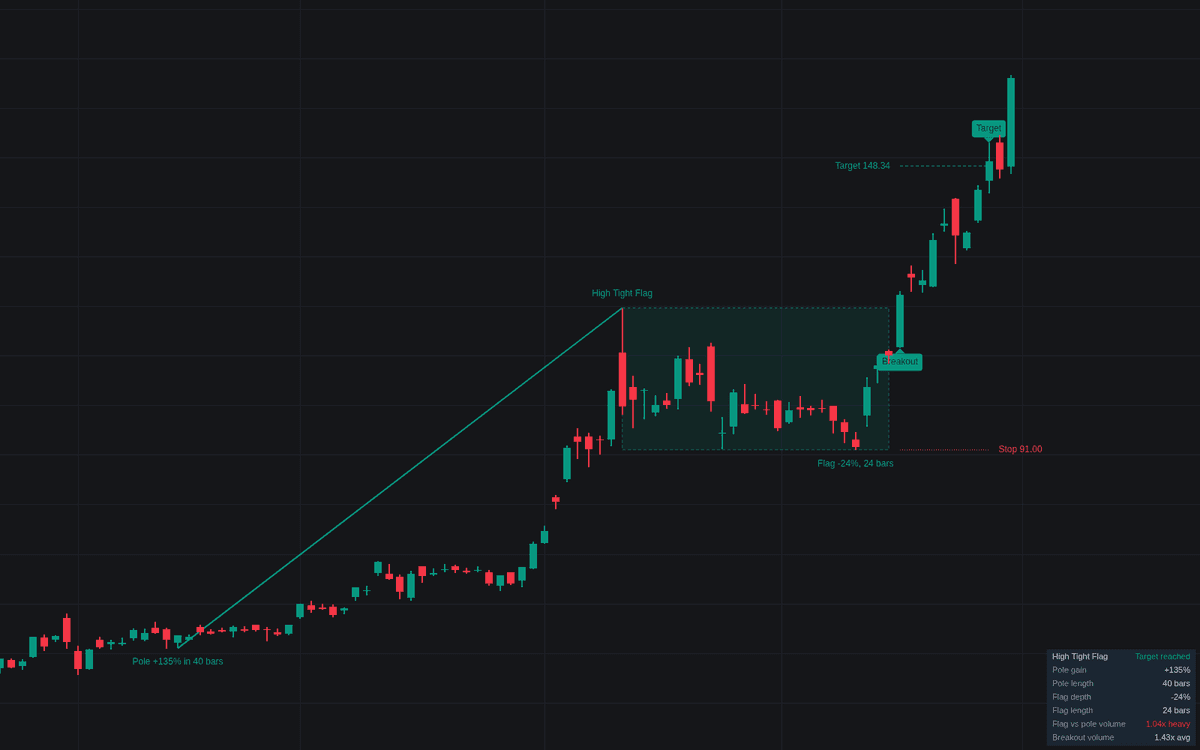
High Tight Flag is an advanced technical analysis tool designed to identify explosive momentum patterns characterized by a rapid, near-doubling move followed by a brief, shallow consolidation. By isolating these high-velocity setups, the indicator helps traders detect potential continuation patterns where strong buying pressure takes a short pause before resuming its upward trend. It provides visual confirmations of the pole and flag structure, identifies precise breakout levels, and calculates trade management objectives to assist in systematic decision-making.
How to Trade the High Tight Flag?
The primary objective when using this indicator is to identify high-momentum stocks or assets that are building energy after a sharp price increase. A valid setup consists of two distinct phases: the pole and the flag. The pole represents the initial surge, while the flag represents the consolidation phase.
Traders should monitor the indicator for a "Flag Forming" signal, which indicates that the price is consolidating within a defined range after the initial move. Once the flag is identified, look for a decisive breakout above the flag high. The indicator includes a specific pivot level that acts as the entry trigger; a strong close above this level, ideally accompanied by a significant expansion in volume, serves as the primary signal to consider a long position.
Risk management is built into the indicator through the "Flag Low" level, which acts as a stop-loss reference. If the price fails to sustain the momentum and closes below this support level, it typically signals that the pattern has broken down. For target setting, users can project the height of either the flag or the entire pole from the breakout point, allowing for objective-based profit taking. Always observe the "Failure Closes" setting, as it alerts you if the price reverts back into the flag range, which often invalidates the strength of the breakout.
High Tight Flag Settings
Pole
- Minimum Pole Gain (%): The percentage gain required from the lowest low of the pole window to the pole high.
- Maximum Pole Length (bars): The maximum number of bars allowed to complete the initial pole structure.
Flag
- Flag Length (bars): The minimum and maximum number of bars the consolidation must last to be considered a valid flag.
- Maximum Flag Depth (%): The deepest allowed percentage correction from the pole high.
- Require Flag Volume Dry-up: If enabled, this requires average flag volume to remain lower than average pole volume, signaling reduced selling pressure.
Breakout
- Pivot Margin (%): A small buffer added above the flag high to ensure the breakout is decisive before triggering.
- Breakout Volume Confirmation: Whether to require the breakout candle to have volume significantly higher than the average.
- Volume Average Length: The number of bars used to calculate the average volume for comparison.
- Breakout Volume Multiplier: The factor by which breakout volume must exceed the average volume.
Trade Levels
- Measured Target: Defines the objective projection, either based on the flag height or the full pole height.
- Failure Closes Back Inside: The number of consecutive closes back below the pivot level that will cause the system to mark the trade as failed.
- Post-Breakout Watch (bars): The duration for which the indicator monitors the trade for a target, stop, or failure signal.
Dashboard
- Show Dashboard: Toggles the display of real-time statistics regarding the active or most recent flag pattern.
- Location/Size: Configures the positioning and text scale of the dashboard overlay.
Style
- Confirmed/Stop/Pending Colors: Defines the visual color scheme for active, stopped, or pending pattern elements.
- Keep Voided Flags: If enabled, keeps drawings of invalidated patterns on the chart in a dimmed state.
Frequently Asked Questions
Free on Vela
Run it on Vela. Go further with a paid plan.
- Up to 500 strategy alerts, with webhook automation
- Up to 10× the chart history of Free
- Orderflow lookback up to full history
- Up to 100,000 monthly credits for Quant to customize it
- Futures data alongside crypto, stocks, forex and commodities

Run it on Vela. Make it yours with Quant.
Open this indicator free on Vela, our next-generation charting platform. Then ask Quant, our coding agent built into Vela, to retune it or turn it into a backtested strategy of your own.