High-wave Candle
 By LuxAlgoMay 22, 2026
High-wave Candle is an indicator on Vela, our next-generation charting platform, written in Pine Script®.
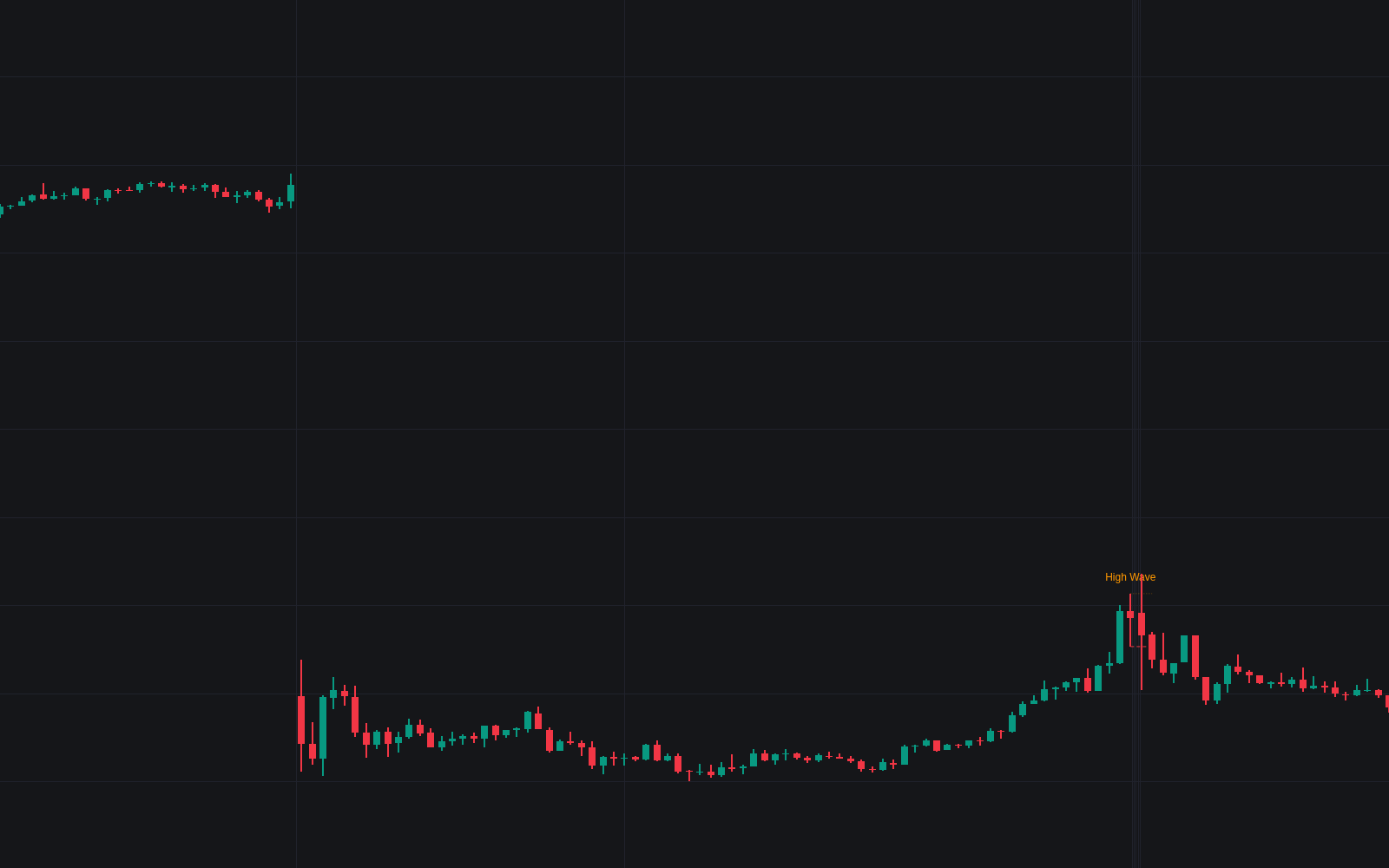

High-wave Candle detects the market's loudest indecision bar (violent excursions both ways, a close back near the open) and turns each one into a tradable bracket, the library's first dedicated build of the high-wave candle. Both shadows must be long against the body and against the recent average range, separating the shape from one-sided rejection candles and from milder indecision bars. Detections label in a neutral color, and the candle's extremes extend forward as dashed brackets until a close escapes one side.
How to Trade the High-wave Candle?
- Label prints: heavy two-sided trade with no winner, a statement about energy, not direction, with alerts on detection.
- Bracket resolves up: a close above the candle's high decides the recorded fight to the upside; the broken side takes the directional color while the other dims.
- Bracket resolves down: the mirrored close below the low, with its own alert.
- After an extended trend: with a context filter active, only candles following a sustained run are marked, usually a prompt to tighten stops, not reverse.
High-wave Candle Settings
- Average Range Length (default 20): the recent-bar yardstick the shadows are measured against.
- Min Shadow / Body (default 2) and Min Shadow / Average Range (default 0.6): both excursions must clear both hurdles.
- Max Body % of Range (default 25) and Min Body % of Range (default 5): bodies below the floor are left to the long-legged doji.
- Body Center Tolerance % (default 20): keeps the body near mid-range, rejecting one-sided shapes.
- Context Filter (default Any) with Trend Basis Length (default 50) and Min Trend Bars (default 10): restrict detections to post-trend locations.
- Require High Volume (default disabled) with High Volume Multiplier (default 1.5) and Volume Average Length (default 20).
- Show Range Bracket (default enabled) and Show Last Brackets (default 8), plus label, highlight and trend-basis toggles.
Frequently Asked Questions
Free to use
Run it on Vela. Go further with a paid plan.
- Up to 500 Custom Alerts, with webhook automation
- Up to 10× the chart history of Free
- Orderflow lookback up to full history
- More Quant usage to customize it, plus extra usage when you need it
- Futures data alongside crypto, stocks, forex and commodities

Related indicators
Run it on Vela. Make it yours with Quant.
Open this indicator free on Vela, our next-generation charting platform. Then ask Quant, our coding agent built into Vela, to retune it or turn it into a backtested strategy of your own.