Spinning Top
 By LuxAlgoJun 14, 2026
Spinning Top is an indicator on Vela, our next-generation charting platform, written in Pine Script®.
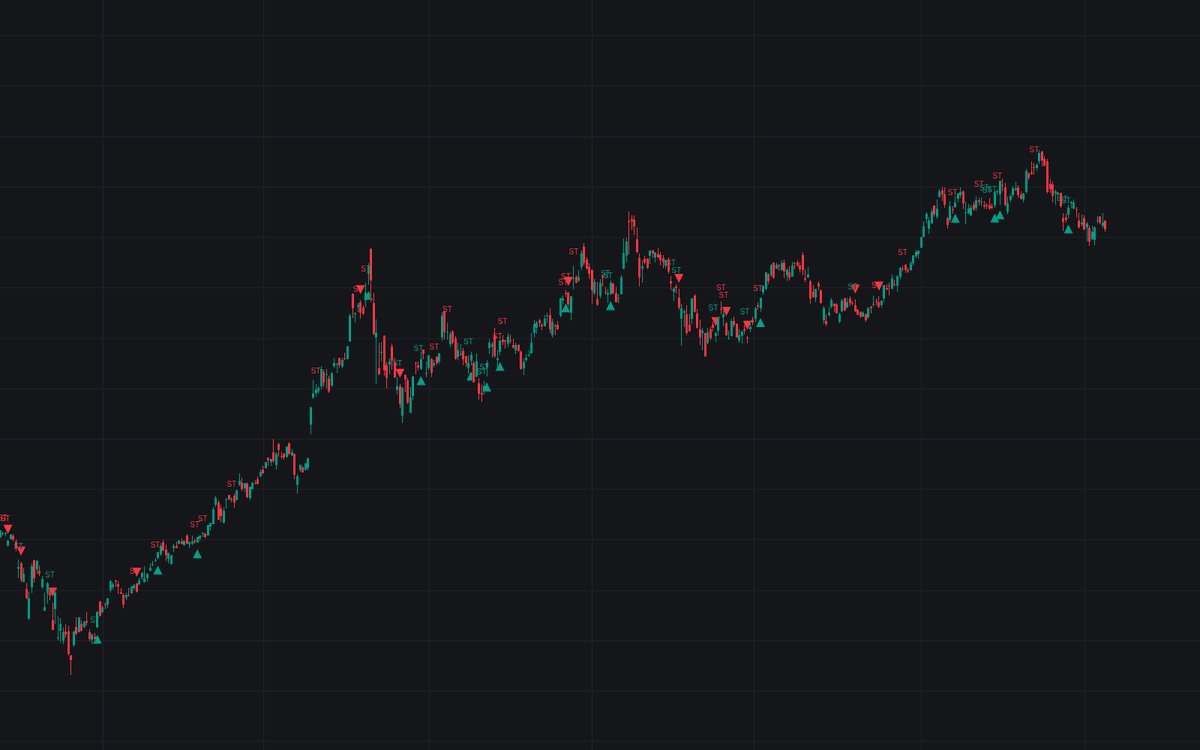

Spinning Top applies a measurable rule set to the candle every trader recognizes but scanners disagree on, the definitive clean detector for the spinning top. A qualifying bar needs a real body inside the size band, both shadows longer than that body by the required ratio, and a body midpoint inside the central portion of the bar's range; each hit is tagged ST, colored by its trend context, with a tooltip quoting its body and shadow proportions.
How to Trade the Spinning Top?
- After an advance: a spinning top above the trend SMA (bear-colored) marks momentum stalling. Watch the next candle for exhaustion or continuation.
- After a decline: below the SMA (bull-colored), the same shape reads as selling pressure pausing, a potential stabilization.
- Resolution markers: a triangle prints when a following close clears the pattern's high or low inside the resolution window. The direction of that close is the information.
- In range: neutral-colored tops are routine noise; the Context Filter can hide them.
The pattern itself is a pause, never a direction call. The resolving candle supplies the direction.
Spinning Top Settings
- Maximum Body Size % (default 33): largest real body allowed as a share of the bar's range.
- Minimum Body Size % (default 5): bodies at or below this are treated as doji and skipped.
- Shadow / Body Ratio (default 1): each shadow must exceed the body times this ratio: 1 is the textbook rule.
- Body Centering Band % (default 33): confines the body midpoint to the middle share of the range.
- Context Filter (default Any), Trend SMA Length (default 20) and Show Trend SMA (default off): which contexts are marked, how the prevailing trend is defined, and whether that SMA is drawn.
- Resolution Window (bars) (default 1) with Resolution Markers (default on): how many candles may resolve the standoff.
- Style: Color Pattern Candles (default off), Label Size (default Tiny).
Frequently Asked Questions
Free to use
Run it on Vela. Go further with a paid plan.
- Up to 500 Custom Alerts, with webhook automation
- Up to 10× the chart history of Free
- Orderflow lookback up to full history
- More Quant usage to customize it, plus extra usage when you need it
- Futures data alongside crypto, stocks, forex and commodities

Related indicators
Run it on Vela. Make it yours with Quant.
Open this indicator free on Vela, our next-generation charting platform. Then ask Quant, our coding agent built into Vela, to retune it or turn it into a backtested strategy of your own.