Liquidity Delta Profiler
 By LuxAlgoMay 4, 2026
Liquidity Delta Profiler is an indicator on Vela, our next-generation charting platform, written in Pine Script®.
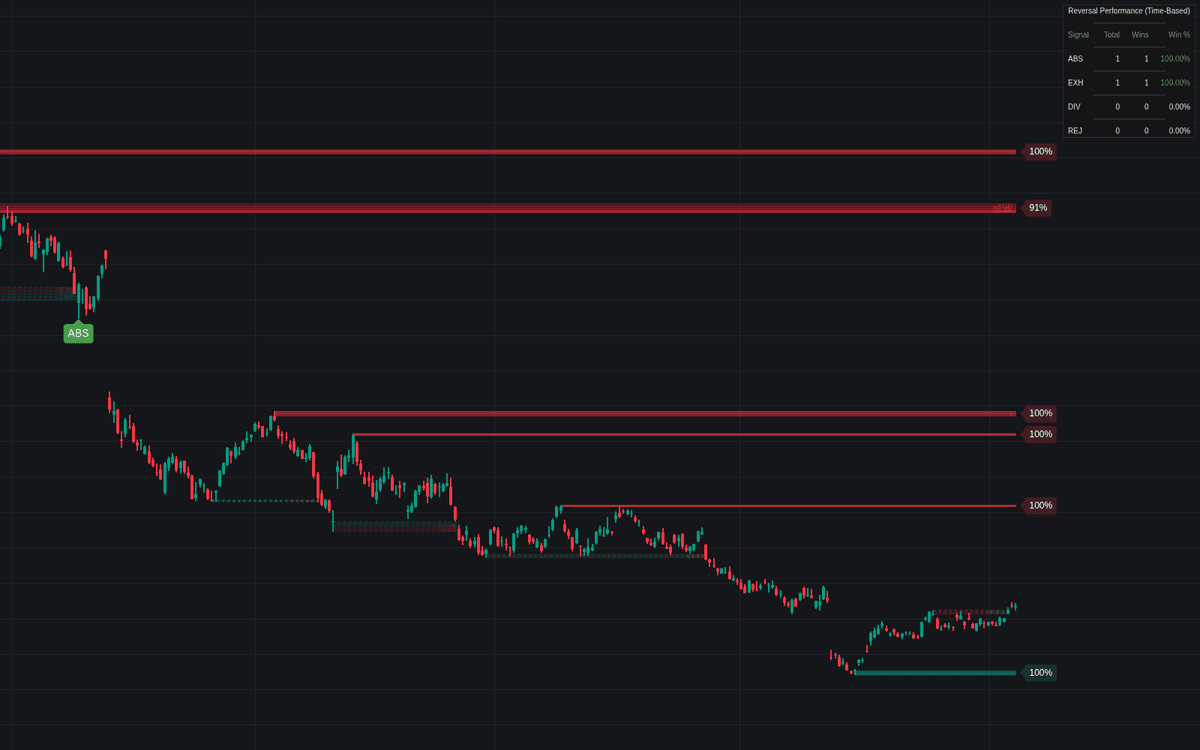

Liquidity Delta Profiler draws the liquidity map and then looks inside it. Swing highs seed buy-side liquidity (BSL) zones and swing lows seed sell-side (SSL) zones, where stops, breakout orders, and trapped positions cluster. Each zone is split into four quadrants, and a slice-by-slice delta profile colors every quadrant by who was more aggressive there, with opacity scaling to the imbalance.
How to Trade the Liquidity Delta Profiler?
- BSL/SSL zones: anticipate sweeps and reactions where resting orders cluster; a breakout attempt that fails at a zone is the classic reversal setup.
- Delta inside the zone: price sweeping a BSL zone while strong sell delta builds near its top suggests sellers absorbing the move. A bearish reversal may be developing.
- Reversal bubbles: four sweep-signal types (absorption, exhaustion, divergence, and snapback rejection) print as bubbles with hoverable tooltips.
- Zone Health: the label estimates remaining liquidity as volume is consumed; a fresh zone carries more potential impact than a nearly spent one.
The dashboard scores each signal type over time: a win reverses within the Eval Window and holds onside for the Hold Time, filtering out sweeps that only leave a wick.
Liquidity Delta Profiler Settings
- Pivot Length: the lookback/lookforward for swing detection. Shorter surfaces more zones, longer sticks to major structure.
- Max Zones per Type: caps active and historical zones kept on the chart.
- Show Swept Zones / Filter Overlapping Zones: keep breached zones visible (dashed) and, when zones overlap, keep only the most extreme one (the highest for BSL, the lowest for SSL).
- Zone Volume Capacity: average-volume multiplier for how much a zone can absorb before reading as consumed.
- Enable Reversal Detection / Show Zone Decay: toggle the signal bubbles and the health labels.
- Eval Window (Bars) and Hold Time (Bars): the dashboard's reversal wait and required in-profit hold.
Frequently Asked Questions
Free to use
Run it on Vela. Go further with a paid plan.
- Up to 500 strategy alerts, with webhook automation
- Up to 10× the chart history of Free
- Orderflow lookback up to full history
- More Quant usage to customize it, plus extra usage when you need it
- Futures data alongside crypto, stocks, forex and commodities
Also works on

Related indicators
All 7 Delta Profile indicators.png&w=3840&q=75)
.png&w=3840&q=75)
Run it on Vela. Make it yours with Quant.
Open this indicator free on Vela, our next-generation charting platform. Then ask Quant, our coding agent built into Vela, to retune it or turn it into a backtested strategy of your own.