Malaysian SnR
 By LuxAlgoOct 9, 2026
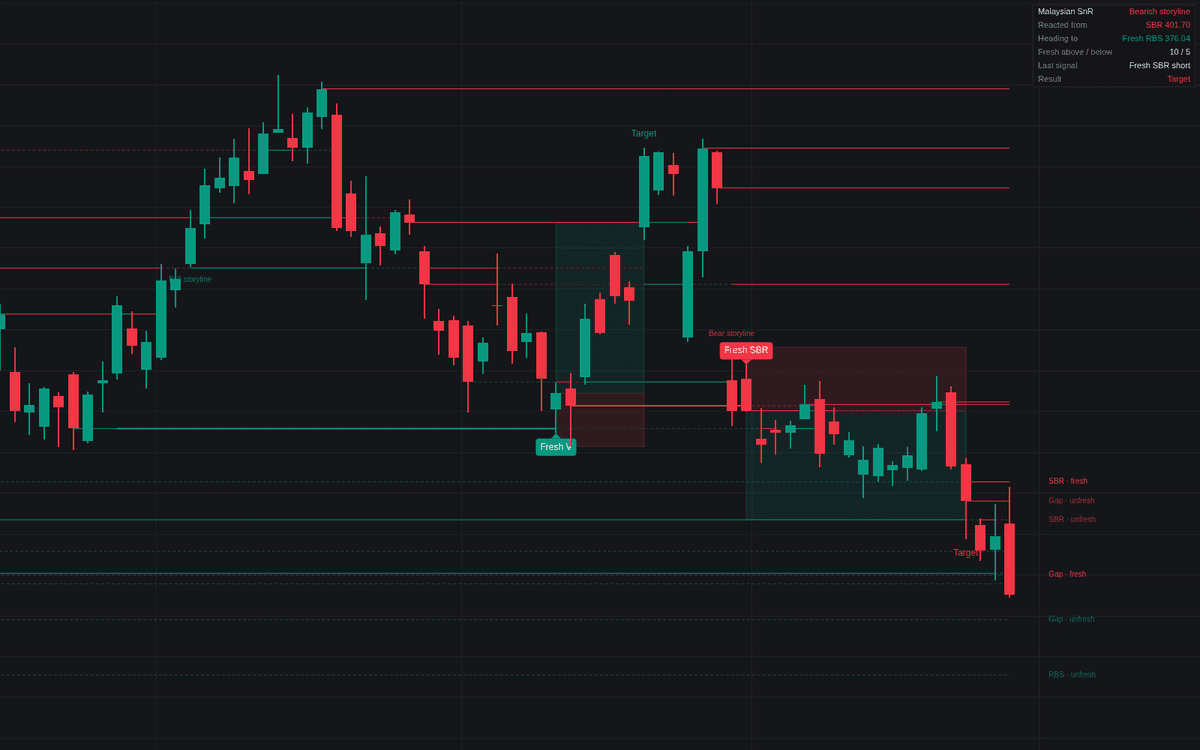

The Malaysian SnR is a comprehensive support and resistance mapping tool that automates the identification of supply and demand zones based on line chart turns and price gaps. By tracking level freshness and identifying "storyline" trends based on higher-degree market structures, the indicator provides traders with clear, actionable zones for potential price reactions, helping to filter out market noise and focus on high-probability technical levels.
How to Trade the Malaysian SnR?
To trade with this indicator, first observe the "storyline" output provided by the dashboard. A bullish storyline suggests prioritizing fresh support levels for long entries, while a bearish storyline suggests focusing on fresh resistance levels for short entries. When price approaches a fresh level, wait for a wick touch that closes back on the original side of the level. If the "Require Rejection Candle" setting is enabled, ensure the candle confirms the reversal by closing in the direction of the intended trade. Protective stops are placed beyond the level or the wick touch, utilizing an ATR based buffer to account for market volatility. The system automatically identifies the next fresh level in the trade direction as a potential target, providing a structured risk to reward objective.
Malaysian SnR Settings
Levels
- Line Chart Turn Length: Defines the number of bars on each side of a price pivot required to mark a support or resistance level.
- Gap Levels: Toggles the display of levels formed by price gaps between consecutive candles of the same color.
- Minimum Gap (ATR): Sets the minimum distance required for a price gap to be registered as a level, measured in 14 bar ATR multiples.
- Maximum Body Crosses: Determines how many times a level can be closed through by a candle body before it is considered spent and retired from the map.
- Level Lifetime (Bars): Specifies the maximum age of a level in bars before it is automatically removed.
Storyline
- Storyline Turn Length: Adjusts the lookback period for the larger degree line chart used to establish the overall market bias.
- Trade With the Storyline Only: When enabled, the indicator only highlights trades that align with the current bullish or bearish storyline.
Trade Plan
- Show Trades: Toggles the automated trade planning visualizers, including entry, stop, and target zones.
- Trade Gap Levels: If active, allows the indicator to trigger trade setups from identified gap levels.
- Require Rejection Candle: Ensures that the signal candle closes in the direction of the trade before a setup is confirmed.
- Stop Buffer (ATR): Adjusts the distance for the protective stop relative to the level or wick touch.
- Minimum Reward (R): Sets the minimum required risk to reward ratio for a trade to be considered valid.
- Fallback Target (R): Determines the default target distance when no fresh level is found in the target direction.
- Maximum Hold (Bars): Sets a time limit for open trades before they are automatically marked as timed out.
Dashboard & Style
- Show Dashboard: Displays the current market storyline, recent reaction price, and open trade details.
- Position & Size: Configures the location and text scale of the on-screen dashboard.
- Map History (Bars): Limits the historical lookback for level drawing to maintain chart clarity.
- Labels per Side: Controls how many active level labels appear on the chart.
- Fresh Levels Only: If selected, hides non fresh levels from the chart.
- Support/Resistance Colors: Customizes the visual distinction between support and resistance zones.
Frequently Asked Questions
Free on Vela
Run it on Vela. Go further with a paid plan.
- Up to 500 strategy alerts, with webhook automation
- Up to 10× the chart history of Free
- Orderflow lookback up to full history
- Up to 100,000 monthly credits for Quant to customize it
- Futures data alongside crypto, stocks, forex and commodities

Run it on Vela. Make it yours with Quant.
Open this indicator free on Vela, our next-generation charting platform. Then ask Quant, our coding agent built into Vela, to retune it or turn it into a backtested strategy of your own.