Breakouts with Tests & Retests
 By LuxAlgoMay 30, 2024
Breakouts with Tests & Retests is an indicator on Vela, our next-generation charting platform, written in Pine Script®.
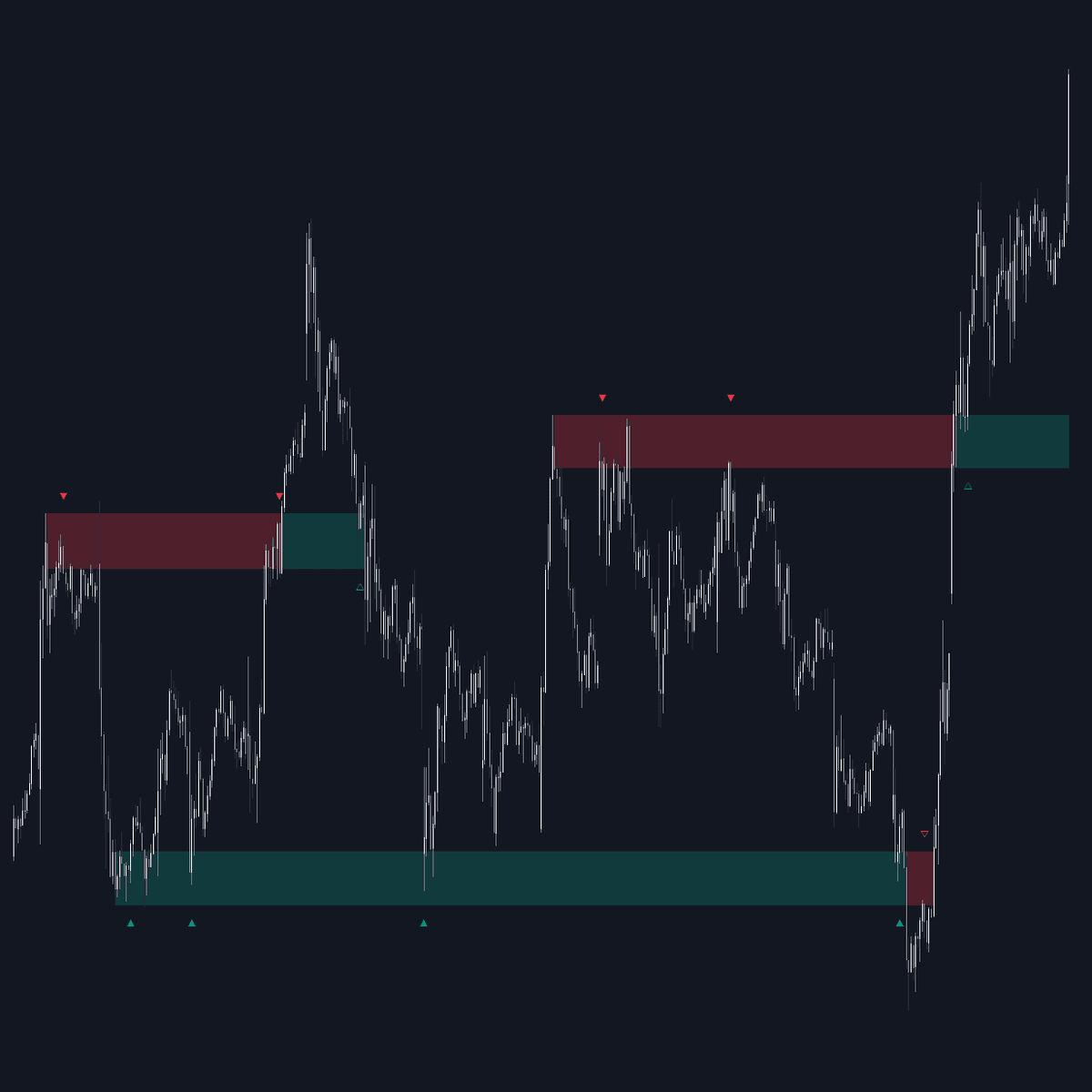

Breakouts with Tests & Retests turns swing points into areas of interest and then narrates every interaction: price testing the area, breaking out through it, or returning to retest it from the other side. Bullish swing areas draw in green, bearish in red, and every judgment runs on opens and closes (wicks are deliberately ignored), so labels reflect committed movement rather than probes.
How to Trade the Breakouts with Tests & Retests?
- Test (solid triangle): a bar opens inside the area and closes beyond it in the direction of the swing's bias. The level is doing its job.
- Breakout (color flip): a close through the area against its bias changes the zone's color, flagging the break the moment it completes.
- Retest (hollow triangle): after a breakout, a bar opening inside the area and closing outside in the breakout's direction confirms the flip, the classic continuation cue.
Width drives behavior: a higher Width lets price consolidate inside the area for longer, which tends to produce more test indications, while a longer-lived area offers more retest chances. Display options isolate bullish or bearish patterns when you only want one side of the market.
Breakouts with Tests & Retests Settings
- Display: both pattern types together, exclusively bullish or bearish, or Bullish OR Bearish, which tracks one side at a time.
- Width (default 1): scales the width of each swing area as a multiple of the 200-bar ATR.
- Maximum Bars (default 500): how far an area may extend from its start, or from the breakout bar once it has flipped, before it stops extending, whether or not it was tested.
- Display Test/Retest Labels and Minimum Bars: show every label (Minimum Bars sets the gap between them), or only the latest one.
- Set Back To Last Retest: pulls an expired area's right edge back to its last test or retest label.
- Swings: the Left and Right bar counts (defaults 10 and 1) a swing high or low must dominate, plus colors under Style and a separate Label Size setting.
Frequently Asked Questions
Free to use
Run it on Vela. Go further with a paid plan.
- Up to 500 Custom Alerts, with webhook automation
- Up to 10× the chart history of Free
- Orderflow lookback up to full history
- More Quant usage to customize it, plus extra usage when you need it
- Futures data alongside crypto, stocks, forex and commodities
Also works on

Related indicators
All 29 Breakout indicators
Run it on Vela. Make it yours with Quant.
Open this indicator free on Vela, our next-generation charting platform. Then ask Quant, our coding agent built into Vela, to retune it or turn it into a backtested strategy of your own.