Momentum Thrust
 By LuxAlgoAug 14, 2026
Momentum Thrust is an indicator on Vela, our next-generation charting platform, written in Pine Script®.
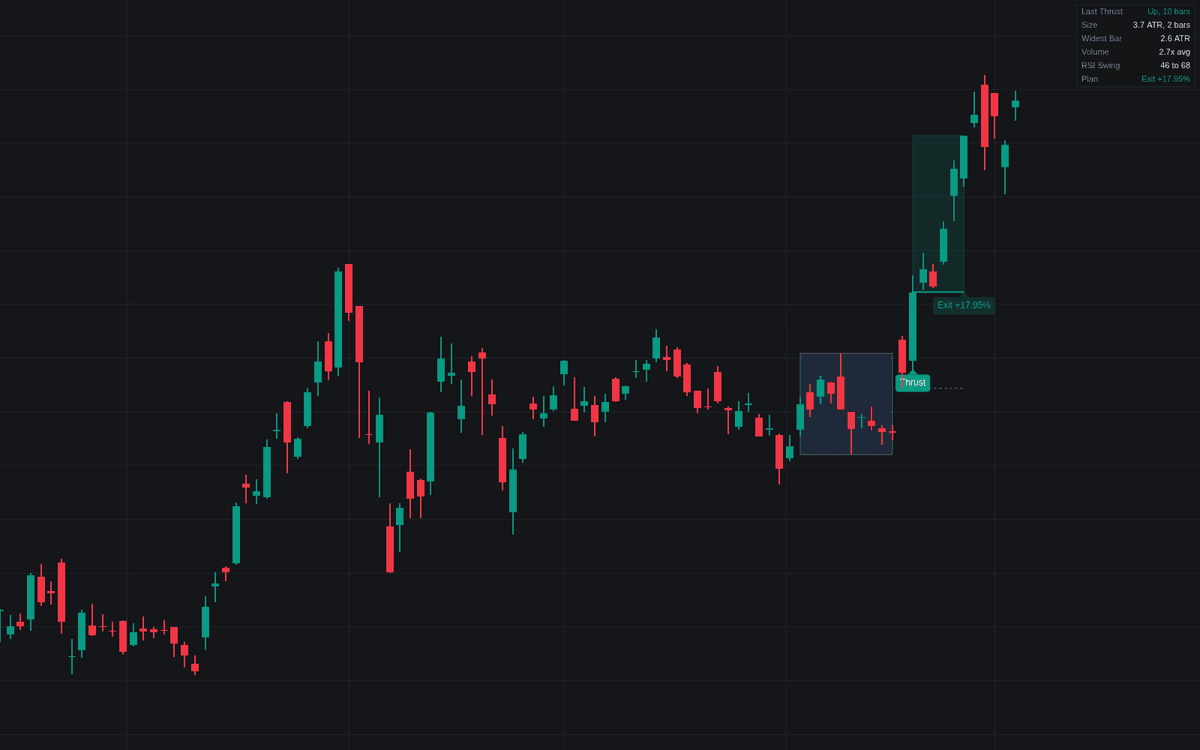

The Momentum Thrust is a specialized technical indicator designed to identify significant price breakouts that emerge from periods of low volatility, commonly referred to as quiet bases. By analyzing average true range, volume expansion, and RSI momentum swings, the indicator filters for high-conviction market moves that represent genuine trend initiations rather than mere noise. It provides a systematic framework for short-term momentum trading by highlighting ignition events and providing clear exit plans for follow-through strategies.
How to Trade the Momentum Thrust?
The indicator works by pinpointing the exact moment price leaves a period of consolidation. When a thrust is detected, the asset has broken out of a tight range with abnormal strength. To trade these events, look for the following:
- Identify Ignition: Focus on signals that occur after a confirmed quiet base. The indicator shades these bases, allowing you to see where the energy for the move originated.
- Evaluate Follow-Through: The tool automatically generates a trade plan. Entry is typically taken on the thrust candle, with an invalidation level set at either the ignition point or the opposite side of the base.
- Manage Exposure: The indicator features a holding clock, which defines the duration for the momentum to play out. The plan exits at the close once that bar count is reached, whatever the result, unless price closes through the invalidation level first.
- Observe Context: Pay close attention to the "Late" tags. These signify that a breakout is occurring after a prolonged move in one direction. While sometimes valid, these are often climax points where the risk of reversal is significantly higher.
Momentum Thrust Settings
Quiet Base
- Base Length: Sets the number of bars preceding an ignition that must remain within a tight, low-activity range.
- Maximum Base Width: Determines the allowable range of the base in multiples of the reference ATR.
- Maximum Base Activity: Defines how narrow the bars in the base must be to qualify as a breakout setup.
- Reference ATR Length: Sets the lookback period for the average true range used to normalize all volatility calculations.
Ignition
- Direction: Allows you to filter for bullish, bearish, or both types of thrusts.
- Ignition Window: The number of bars allowed for a burst of momentum to occur.
- Minimum Thrust: The minimum net close-to-close travel across the ignition window, measured in reference ATRs, for an event to count as a thrust.
- Range Expansion: Requires the widest bar in the ignition sequence to exceed a specific ATR multiplier.
- Close Location: Ensures the final ignition bar closes in the extreme portion of its range, indicating strong directional conviction.
- Volume Expansion: Toggles and sets the multiplier for volume spikes needed to confirm the thrust.
- RSI Swing Through Midline: Configures the RSI requirement for a rapid move through the 50 level.
Location
- Trend Context: The lookback period used to determine if the thrust is part of a larger, ongoing move.
- Late Thrust Run: The threshold for determining if a move is extended, triggering a "Late" tag.
- Track Late Thrusts: An option to include late-stage, potentially climactic thrusts in your active trade planning.
Follow-Through
- Holding Clock: The number of bars the trade is expected to maintain momentum before the plan concludes.
- Invalidation: Chooses whether to set the stop loss at the extreme of the ignition window or the opposite side of the base.
Frequently Asked Questions
Free to use
Run it on Vela. Go further with a paid plan.
- Up to 500 Custom Alerts, with webhook automation
- Up to 10× the chart history of Free
- Orderflow lookback up to full history
- More Quant usage to customize it, plus extra usage when you need it
- Futures data alongside crypto, stocks, forex and commodities

Related indicators
Run it on Vela. Make it yours with Quant.
Open this indicator free on Vela, our next-generation charting platform. Then ask Quant, our coding agent built into Vela, to retune it or turn it into a backtested strategy of your own.