Overnight & ETH Levels
 By LuxAlgoApr 27, 2026
Overnight & ETH Levels is an indicator on Vela, our next-generation charting platform, written in Pine Script®.
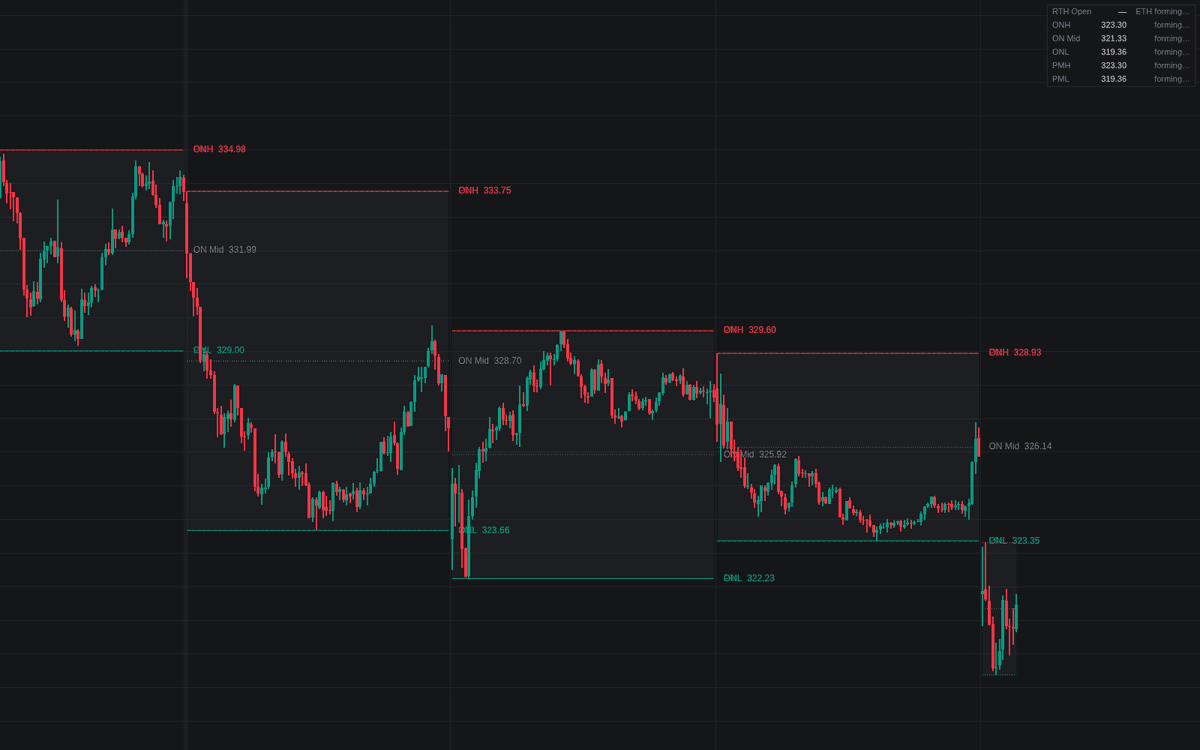

Overnight & ETH Levels freezes the overnight and ETH levels (the extremes formed outside regular hours) at the regular-session open and extends them across the day. The overnight window (18:00–09:30 New York time by default) supplies the overnight high, low, and midpoint (ONH, ONL, ON Mid); an optional pre-market window adds PMH and PML. While a window forms, its running extremes draw as dotted developing lines, and a dashboard classifies where the regular session opened relative to the overnight range and walks each high and low through untested, tested, broken, and faded states, marking ON Mid as reached once price touches it.
How to Trade the Overnight & ETH Levels?
- Open above ONH / below ONL: an out-of-range open: watch for acceptance or the fade back inside; both open-location alerts fire at the bell.
- Broken: a close beyond a level is acceptance in the break's direction.
- Faded: a close back inside after a break is the failed-break read, the classic cue for rotation back across the range.
- ON Mid reached: overnight inventory corrected back to the middle of the range.
Each level carries test and break alerts, the overnight extremes add fade alerts, and the midpoint has a touch alert.
Overnight & ETH Levels Settings
- Timezone (default America/New_York): the clock the session windows run on; Exchange uses the symbol's own timezone.
- Overnight (ETH) Session (default 1800-0930): the US index futures convention; the stock equivalent is 1600-0930.
- Regular Session (RTH) (default 0930-1600): where the levels freeze and are tracked.
- Pre-Market Session (default enabled, 0400-0930): also track PMH and PML.
- Display toggles: Overnight High / Low, Overnight Midpoint, Developing Levels, Fill Overnight Range, Level Labels, Show Dashboard, all enabled by default.
- Style inputs set per-level colors, the range fill color, and Line Width (default 1).
Frequently Asked Questions
Free to use
Run it on Vela. Go further with a paid plan.
- Up to 500 Custom Alerts, with webhook automation
- Up to 10× the chart history of Free
- Orderflow lookback up to full history
- More Quant usage to customize it, plus extra usage when you need it
- Futures data alongside crypto, stocks, forex and commodities

Related indicators
Run it on Vela. Make it yours with Quant.
Open this indicator free on Vela, our next-generation charting platform. Then ask Quant, our coding agent built into Vela, to retune it or turn it into a backtested strategy of your own.