Piercing Line
 By LuxAlgoApr 23, 2026
Piercing Line is an indicator on Vela, our next-generation charting platform, written in Pine Script®.
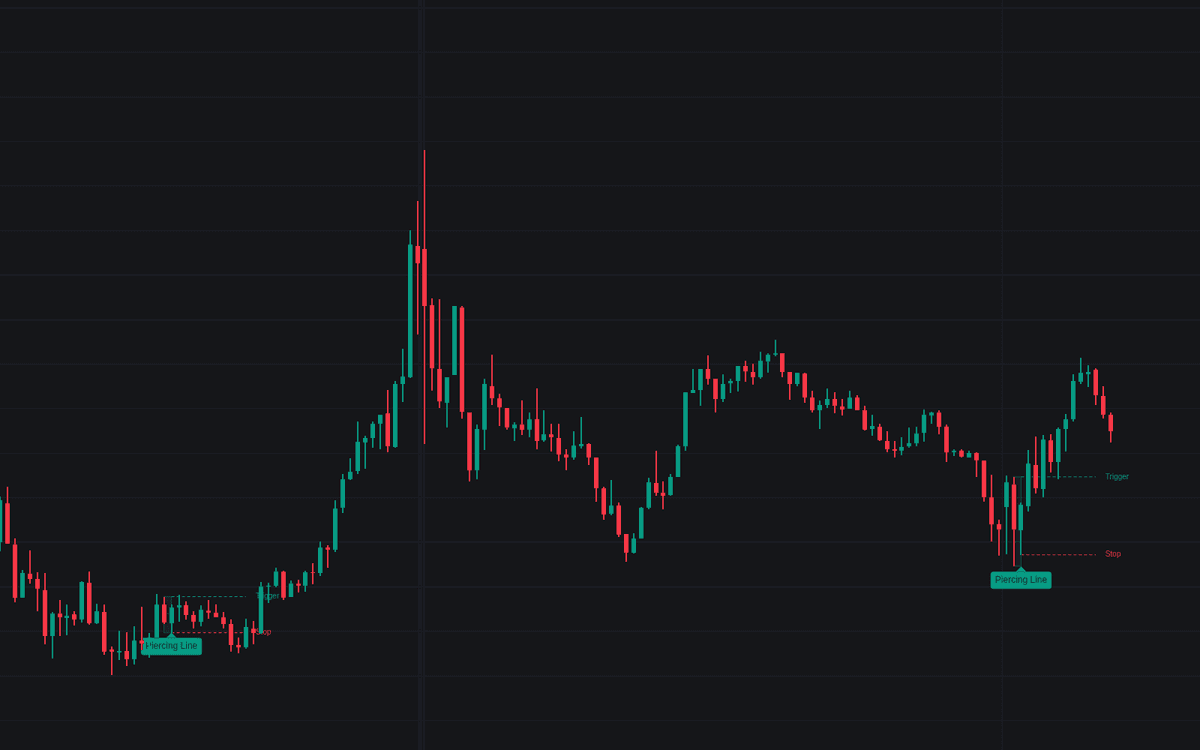

Piercing Line detects the classic two-candle bullish reversal: a long bearish candle, then a weak open answered by a close reclaiming more than half of the first body while staying below its open. The definitive clean build of the piercing line sizes the first candle against the average body of the preceding candles and screens prints by trend, location, and volume.
How to Trade the Piercing Line?
- Pattern label: the tooltip reports open qualification, penetration depth, volume versus average, and trigger and stop prices.
- Trigger break: with the default Pattern High trigger, the reversal is active once price trades above the pattern's high; the break fires an alert.
- Invalidation: a trade back below the second candle's low (the rejected gap-down low) is tracked by a dashed stop level and alert.
Deeper closes are stronger evidence; the next candle closing higher is the conventional confirmation, with its own alert.
Piercing Line Settings
- Open Requirement (default Below Prior Close (Classic)): Strict wants a gap below the prior low; Relaxed accepts an open at the prior close.
- Body Average Length (default 14): candles in the average body that sizes the first candle.
- Long Body Multiplier (default 1): minimum first-candle body as a multiple of that average.
- Minimum Penetration % (default 50): how far up the first body the close must reach.
- Downtrend Filter (default enabled), SMA Length (default 50): the first candle must close below the average.
- New Low Location (default disabled), Window (default 20): the pattern must print the window's lowest low.
- Volume Filter (default disabled), Multiple (default 1), Length (default 20): requires elevated second-candle volume.
- Trigger & Stop Levels (default enabled), Trigger Level (default Pattern High), Levels Extension (default 10): the drawn reference levels; Style toggles cover the rest.
Frequently Asked Questions
Free to use
Run it on Vela. Go further with a paid plan.
- Up to 500 Custom Alerts, with webhook automation
- Up to 10× the chart history of Free
- Orderflow lookback up to full history
- More Quant usage to customize it, plus extra usage when you need it
- Futures data alongside crypto, stocks, forex and commodities

Related indicators
Run it on Vela. Make it yours with Quant.
Open this indicator free on Vela, our next-generation charting platform. Then ask Quant, our coding agent built into Vela, to retune it or turn it into a backtested strategy of your own.