Pivot Strength
 By LuxAlgoJun 15, 2026
Pivot Strength is an indicator on Vela, our next-generation charting platform, written in Pine Script®.
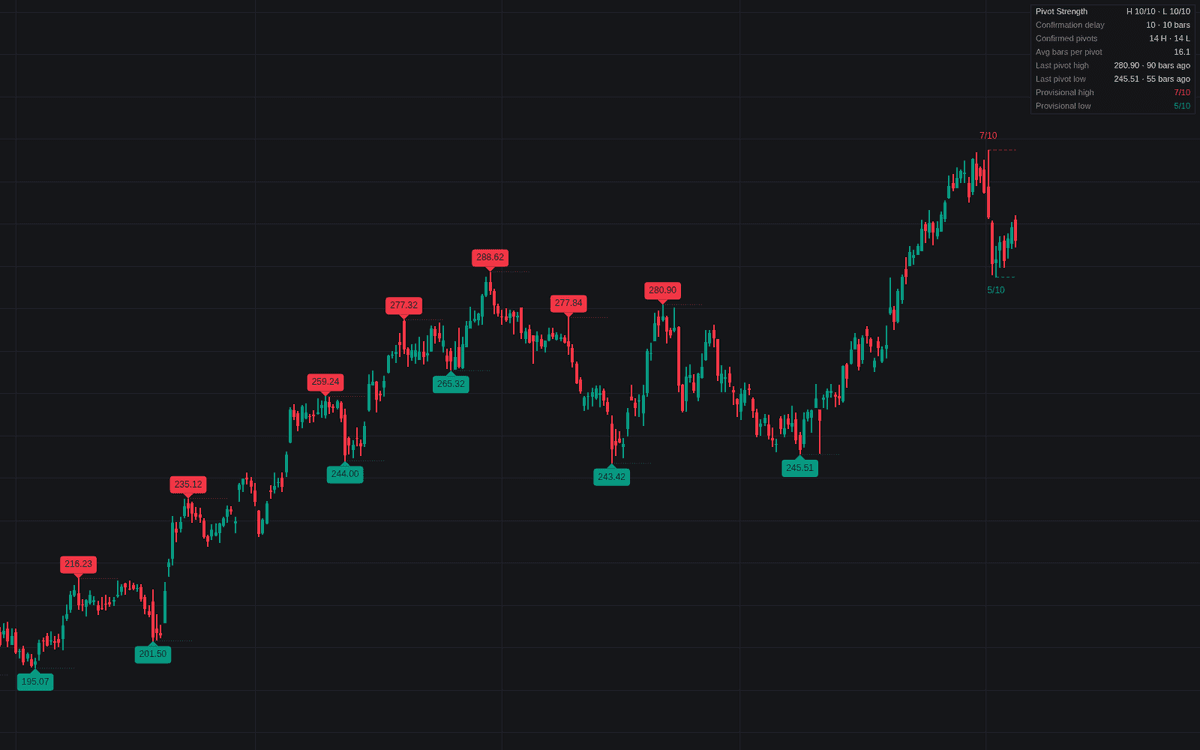

Pivot Strength turns the bar-count definition of a swing point into an honest chart object: a pivot high must exceed the highs of its left-side bars and remain unexceeded through its right-side bars before a label prints, with the mirror rule for lows. The definitive clean build of pivot strength makes the cost of that rule visible: a dotted trace joins each confirmed pivot to the bar that confirmed it, Right bars later. Once confirmed, a pivot never moves.
How to Trade the Pivot Strength?
- Confirmed labels: filled labels carrying the pivot price are final, ready anchors for structure levels, trendlines, and stops.
- Provisional markers: hollow counters show right-side bars printed versus required on the oldest unconfirmed candidate; they can move or vanish until the window completes.
- Strength as a scale dial: small settings map fine swings, large settings the major legs. The dashboard's average-bars-per-pivot row shows which scale you are reading.
Three alerts fire on confirmation: pivot high, pivot low, or either.
Pivot Strength Settings
- Highs - Left / Right (defaults 10 and 10): bars a candidate high must exceed before it and remain unexceeded after it; Right is also the confirmation delay.
- Lows - Left / Right (defaults 10 and 10): the mirror windows for pivot lows.
- Pivot Price Labels (default enabled): prints the price inside each confirmed label.
- Confirmation Delay Trace (default enabled): dotted line from each pivot to its confirming bar.
- Provisional Pivot Markers (default enabled): hollow marker plus progress counter on current candidates.
- Show Dashboard (default enabled, Top Right, Small): strength, delay, counts, average bars per pivot, last pivots, and candidate progress; Style inputs set colors and label size.
Frequently Asked Questions
Free to use
Run it on Vela. Go further with a paid plan.
- Up to 500 Custom Alerts, with webhook automation
- Up to 10× the chart history of Free
- Orderflow lookback up to full history
- More Quant usage to customize it, plus extra usage when you need it
- Futures data alongside crypto, stocks, forex and commodities

Related indicators
Run it on Vela. Make it yours with Quant.
Open this indicator free on Vela, our next-generation charting platform. Then ask Quant, our coding agent built into Vela, to retune it or turn it into a backtested strategy of your own.