Volume Zones Internal Visualizer
 By LuxAlgoFeb 5, 2025
Volume Zones Internal Visualizer is an indicator on Vela, our next-generation charting platform, written in Pine Script®.
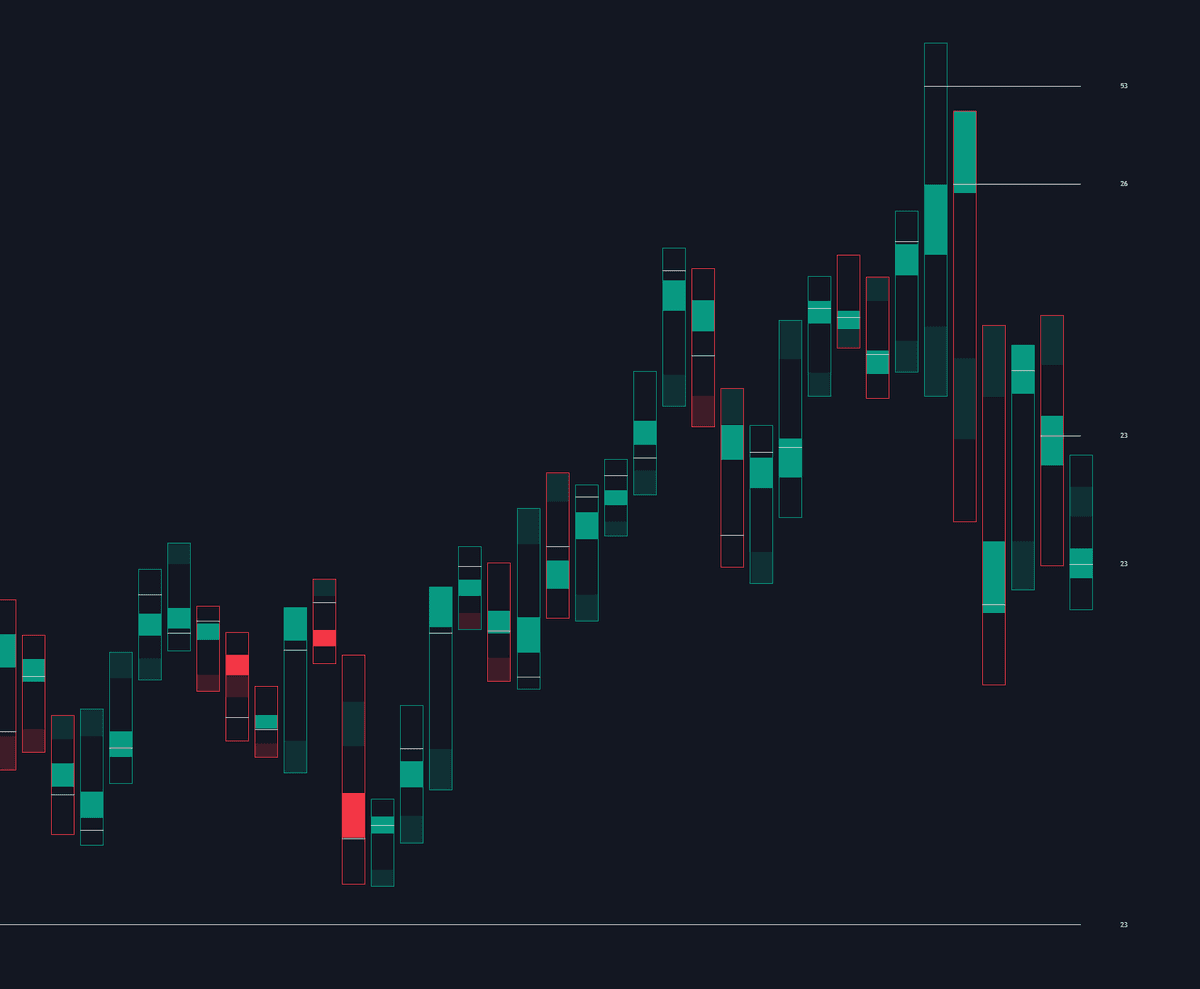

Volume Zones Internal Visualizer opens each chart candle to show where volume accumulated inside it. Lower-timeframe data assembles an intrabar volume profile for every candle, rendered as the indicator's own candlestick type: an outlined box for the range, a solid-colored zone over the heaviest volume, a transparent zone over the thinnest, and a line at the close of the single busiest lower-timeframe candle, the Peak Activity Level (PAL). It reads best with the regular chart hidden, or in a pane beside a conventional one.
How to Trade the Volume Zones Internal Visualizer?
- Solid zones: the highest-volume region of the candle, where that session's business concentrated and acceptance is strongest.
- Transparent zones: the least-traded stretch of the range, more likely to be traversed quickly on a revisit.
- PAL lines: each candle's peak-activity close extends into later sessions as a working level; once price crosses a PAL it counts as mitigated and stops displaying.
Unmitigated PALs mark the close of the busiest lower-timeframe candle inside earlier candles, so many traders study the reaction when price revisits one before timing entries and exits.
Volume Zones Internal Visualizer Settings
- Row Size: the number of rows in each candle's internal profile, the granularity of the zones.
- Intrabar Timeframe: which lower timeframe supplies the calculation data.
- Show Last Unmitigated PALs: how many uncrossed PALs stay extended forward.
- Style: element toggles and color controls.
Frequently Asked Questions
Free to use
Run it on Vela. Go further with a paid plan.
- Up to 500 Custom Alerts, with webhook automation
- Up to 10× the chart history of Free
- Orderflow lookback up to full history
- More Quant usage to customize it, plus extra usage when you need it
- Futures data alongside crypto, stocks, forex and commodities
Also works on

Related indicators
All 30 Volume Profile indicators
.png&w=3840&q=75)
Run it on Vela. Make it yours with Quant.
Open this indicator free on Vela, our next-generation charting platform. Then ask Quant, our coding agent built into Vela, to retune it or turn it into a backtested strategy of your own.