Volume Profile Matrix
 By LuxAlgoMay 2, 2023
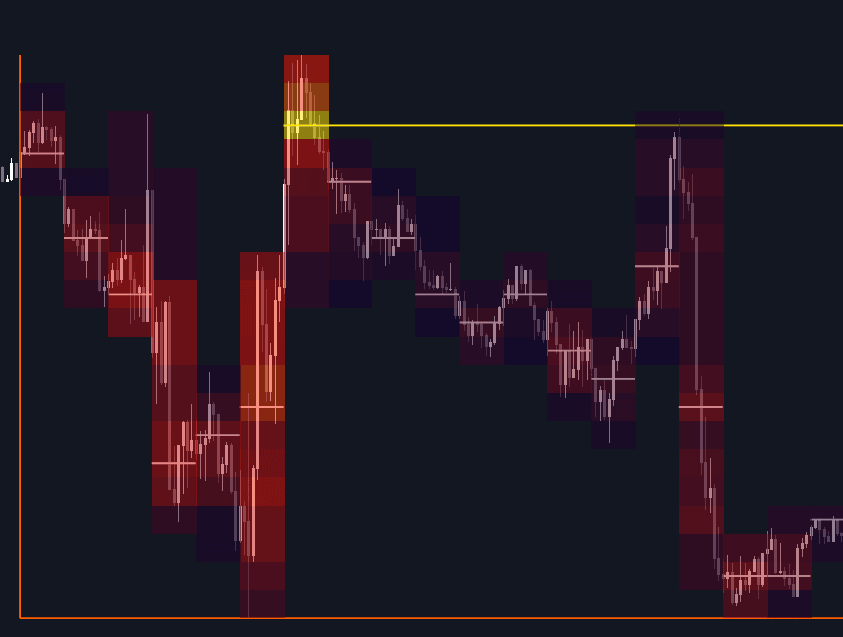

Volume Profile Matrix reworks the classic volume profile by adding calculation intervals: rather than one histogram spanning the whole window, the lookback is divided into columns, each carrying its own row-by-row volume reading. Cells are color-graded by activity: warmer hues flag heavier trade, red marks significant action, and the single busiest cell in the grid is highlighted yellow, so areas of interest can be watched moving through time instead of being flattened into one silhouette.
How to Trade the Volume Profile Matrix?
- Warm cells: concentrations of trading activity that repeatedly attract price, frequent areas of interest for entries, exits, and reaction trades.
- Per-column point of control: each interval marks its estimated heaviest price level; a chain of these stepping directionally shows acceptance migrating with the move.
- Projected level: the grid's highest-volume level extends to the most recent bar, keeping the dominant reference visible where trading happens now.
Because intervals are recalculated as data arrives, the matrix may repaint and back-paint. Treat it as a liquidity map for locating recurring areas of interest rather than as a bar-by-bar trigger.
Volume Profile Matrix Settings
- Lookback: how many recent bars feed the calculation. Short for tactical reads, long for structural context.
- Columns: the number of vertical intervals the window is split into.
- Rows: the number of horizontal intervals per column, setting the grid's price granularity.
Frequently Asked Questions
Free indicator
Get free access to this indicator on the platforms below.

The Library is free. Quant makes it yours.
Pull any concept or indicator into Quant: rebuild it, retune it, or turn it into a backtested strategy of your own.