All indicators

Opening Range with Breakouts & Targets

By LuxAlgoSep 17, 2024

Static chart image

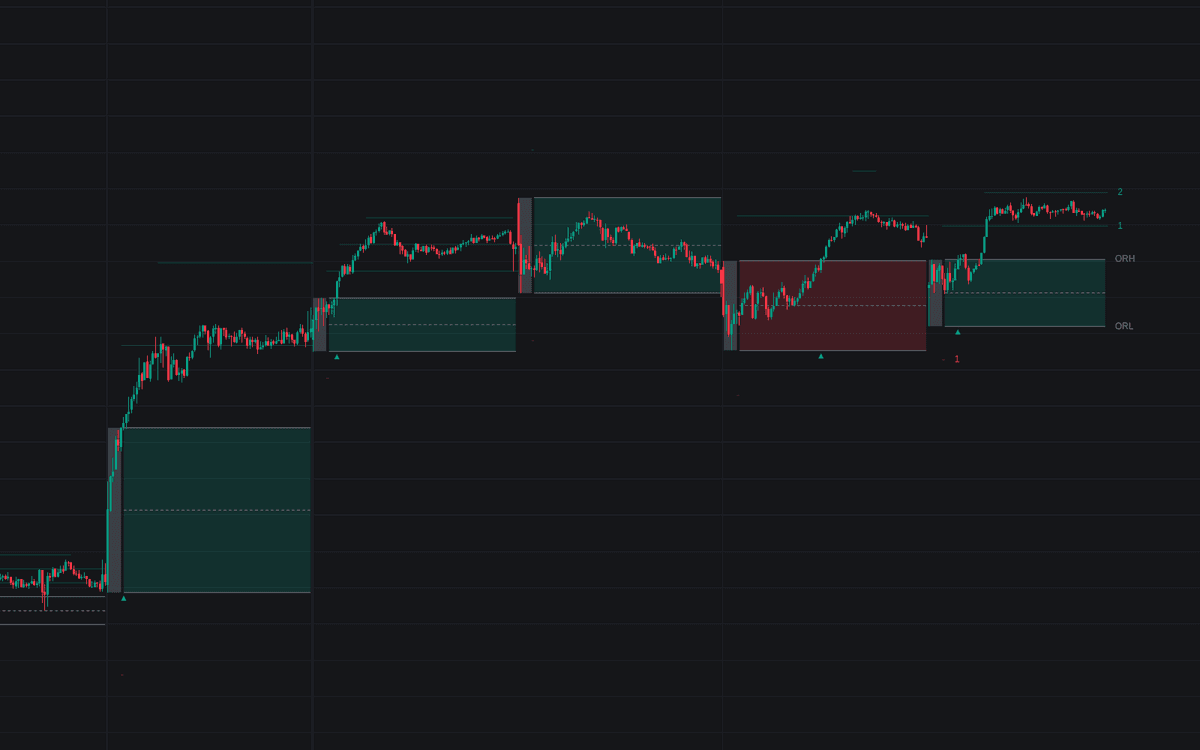
Opening Range with Breakouts & Targets harnesses the power of the renowned Opening Range Breakout strategy, greatly valued by seasoned traders like Toby Crabel and Mark Fisher. This indicator is designed to capture and illustrate the pricing activity from the initial period of any given trading session. It further reveals potential price breakouts from that range and targets projected from the range's width.

How to Trade the Opening Range Indicator?

indicator image

The Opening Range (OR) is indispensable for differentiating between ranging and trending market conditions. By employing a systematic approach to establish the range, traders can make informed decisions and compare patterns, fostering more credible hypotheses regarding daily price movements.

Pro Tip: On an anticipated "Range Day", the Opening Range may suit reversal strategies targeting the range's opposite edge or its mean. However, it's predominantly applied for breakout strategies on "Trend Days" to pursue further price ascent or descent.

The Opening Range Breakout Strategy (ORB) advocates a strategic framework for taking positions based on precise OR-determined points, adaptable across diverse markets and trading techniques.

  • Identify Opening Range High & Low: These are the maximum and minimum prices within your designated post-market-opening timeframe, modifiable to fit users' trading inclinations. Common range durations vary from 5 to 60 minutes.
  • Spot a Breakout Paired with Volume Increase: Breakouts occur when prices breach the OR High (ORH) or OR Low (ORL). Detecting increased volume during these breakouts is essential to authenticate the movement's strength.
  • Risk Management: Users can tailor risk management strategies utilizing the Opening Range. Options include setting a stop-loss at the OR Mean (ORM) or the range's opposing edge, while profits might be aimed at the script's initial price target. Alternatively, integrating a Moving Average (MA) as a dynamic stop-loss while using price targets for gradual exits are viable strategies this indicator supports.

Tailoring with Breakout Signals

indicator image

Breakout signals trigger upon breaching the Opening Range, signified by arrows flanking the range's top and bottom boundaries.

Traders may overlay a signal bias using a directional filter based on today's OR relative to the previous one, helping minimize false signals.

  • Should today's OR exceed the prior day's OR, the Zone is Green.
  • Conversely, if it's beneath, the Zone is Red.

When enabling signal biases, contrary direction signals trigger upon crossing the first target in the said direction.

Setting Targets for Success

indicator image

The Opening Range indicator's targets continuously generate based on a percentage of the range's width. Targets offer two distinct presentation modes:

  • Extended: Projects targets to the current bar, showcasing all surpassed targets within a session.
  • Adaptive: Displays only the nearest two targets around the price, providing a clearer view.

Features and Settings

Analyzing Market Trends Historically

The indicator can be personalized for both real-time or historical trend examination, presenting an option to display solely current or comprehensive historic data, ideal for clutter-free charting when in use.

Customizing the Time Period

Determining the opening range's timeframe is at the trader's discretion. The default stands at 30 minutes but is adjustable via the "Custom Range" setting. Simply enable this feature and define your desired range duration.

indicator image

Integrating a Session Moving Average

The Session Moving Average serves as a resetting Moving Average, refreshing per new session start, thus offering an impartial MA from the ongoing session's data.

Note: For custom time ranges, session commencement aligns with the Opening Range start.

indicator image

Advanced Configuration Options

  • Historical Data Display: Opt to view only current session data or an entire history.
  • Opening Range Time Frame: Pick your preferred range creation time. It adjusts according to session starts, changing as the chart does.
  • Custom Range Flexibility: Allow a custom time range by enabling this setting and entering your desired time parameters and timezone.
  • Breakout Signal Bias Configuration: Decide if Breakout Signals should incorporate a Daily Directional Bias.
  • Target Percentage Determination: Establish the percentage of range width for target increments.
  • Target Cross Reference: Select whether the Close or High/Low price acts as the crossing reference point for Targets. Targets multiply when this level is passed.
  • Target Visualization: Choose among visual styles for target display.
  • Session Moving Average Activation: Activate an optional Moving Average resetting per session start (beginning of opening range).

FAQ

How can I access the Opening Range with Breakouts & Targets indicator?

You can get access on the LuxAlgo Library for charting platforms like TradingView, MetaTrader (MT4/MT5), and NinjaTrader for free.

What is the primary benefit of using this indicator?

This indicator helps traders identify and capitalize on potential breakout scenarios, and manage risks through systematic range analysis, aligning with their specific trading preferences and market expectations.

Can I use the indicator for both reversal and breakout strategies?

Yes, the Opening Range is versatile, suited for both strategies depending on the day’s anticipated market movement."}骤assistant _union_reprend<|vq_2359|>Here's the optimized SEO description for the

Free indicator

Get free access to this indicator on the platforms below.

TradingView
NinjaTrader
MetaTrader 4/5

The Library is free. Quant makes it yours.

Pull any concept or indicator into Quant: rebuild it, retune it, or turn it into a backtested strategy of your own.