Andrews' Pitchfork
 By LuxAlgoMay 28, 2026
Andrews' Pitchfork is an indicator on Vela, our next-generation charting platform, written in Pine Script®.
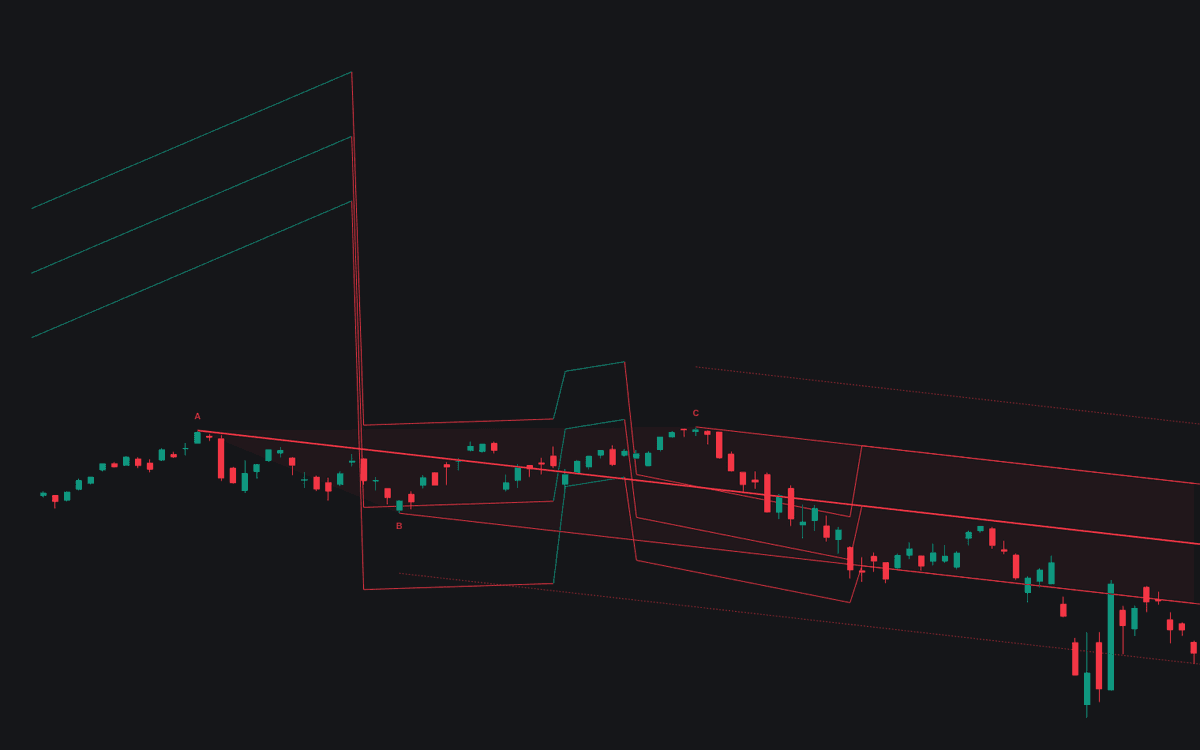

Andrews' Pitchfork keeps a fork on the chart and current without manual anchoring. In Auto mode the three most recent confirmed alternating swing pivots become A, B and C, and the build constructs Andrews' Pitchfork from them: a thicker median line from the handle through the B-C midpoint, parallel tines through B and C, optional dotted warning lines beyond, and a shaded interior. Fresh pivots re-anchor the fork automatically; Manual mode builds one fixed fork from three timestamps, snapping anchors to their bars' extremes.
How to Trade the Andrews' Pitchfork?
- Median line tag: the median is the fork's center of gravity and the standard rotation objective for entries taken near a tine. A Median Line Touch alert covers it.
- Tine test: price testing a tine and closing back inside the fork is a potential reaction point, with alerts on both tines.
- Tine break: a close outside the fork that survives its retest hints at acceleration or a change of character; warning lines repeat the median-to-tine spacing so the slope still frames price after a break.
Andrews' Pitchfork Settings
- Variant (default Standard): Standard anchors the median at pivot A; Schiff slides the anchor halfway toward B in price, Modified Schiff in both price and time. Both flatten steep forks.
- Anchor Mode (default Auto): auto re-anchoring on fresh pivots, or one fixed manual fork.
- Swing Length (default 14): bars each side confirming a pivot; larger values anchor on bigger swings, updating with that delay.
- Warning Lines (default 1, up to 4): extra parallels beyond each tine; 0 hides them.
- Pivot A Time, Pivot B Time, Pivot C Time: manual anchors, which must alternate and sit in time order.
- Style: Fork Fill (on) and Pivot Labels (on).
Frequently Asked Questions
Free to use
Run it on Vela. Go further with a paid plan.
- Up to 500 Custom Alerts, with webhook automation
- Up to 10× the chart history of Free
- Orderflow lookback up to full history
- More Quant usage to customize it, plus extra usage when you need it
- Futures data alongside crypto, stocks, forex and commodities

Related indicators
Run it on Vela. Make it yours with Quant.
Open this indicator free on Vela, our next-generation charting platform. Then ask Quant, our coding agent built into Vela, to retune it or turn it into a backtested strategy of your own.