Futures Roll Dates
 By LuxAlgoJul 11, 2026
Futures Roll Dates is an indicator on Vela, our next-generation charting platform, written in Pine Script®.
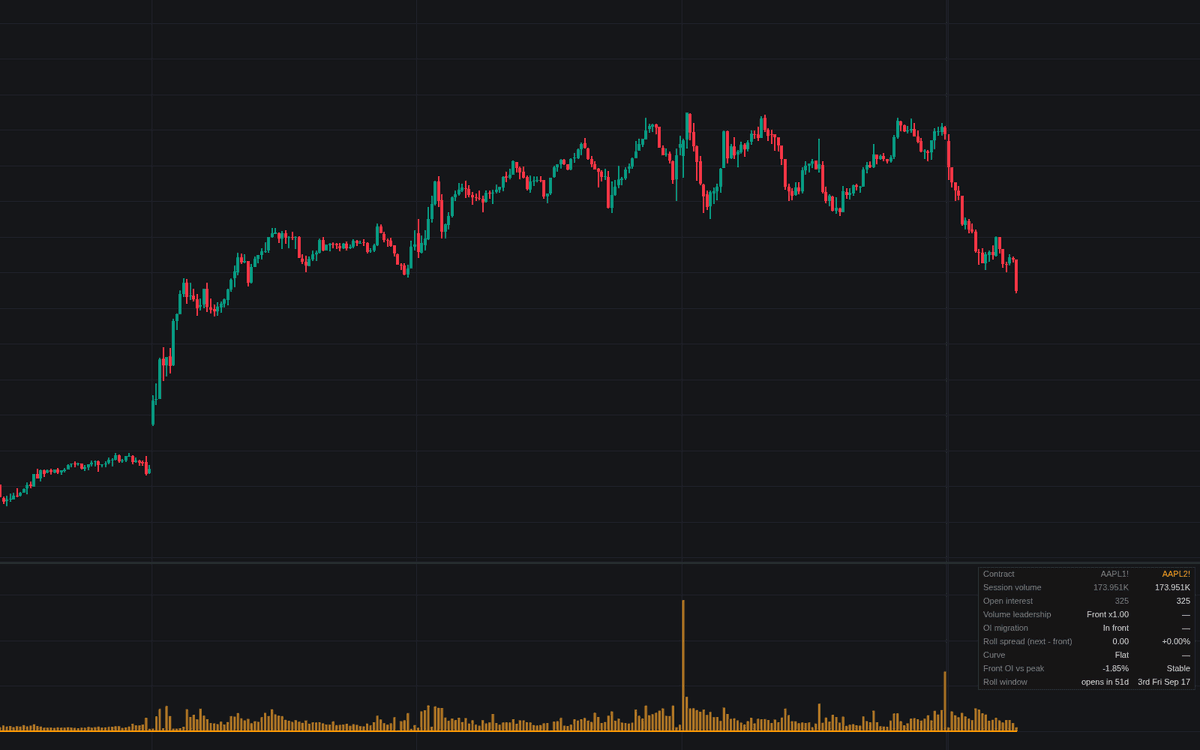

Futures Roll Dates builds the roll mechanism into one pane from the chart's own futures root, the concept's first dedicated build. Front and next contract volume print side by side with open interest lines, the scheduled window ahead of expiration is shaded, and the two data-driven markers of futures roll dates (the next month out-trading the front, and open interest migrating) are stamped as they occur. A dashboard adds roll spread, curve state and a front-month OI collapse check.
How to Trade the Futures Roll Dates?
- ROLL marker: the next contract out-trading the expiring one is the classic sign the roll has happened. Execution in the abandoned front month decays within days.
- OI marker: open interest crossing into the next month confirms positions migrated rather than day-traded.
- Window shading: two contracts share the flow inside the window. Read surges and gaps there accordingly.
- Gap diamonds: a large new-session gap inside the roll context on a continuous chart is flagged as a possible splice artifact. Verify the vendor's adjustment method before trusting it.
Futures Roll Dates Settings
- Roll Schedule (default Quarterly (equity index)): the third-Friday quarterly cycle, the monthly commodity cycle, or Off for data-driven detection only.
- Roll Window Length (Days) (default 8): days shaded ahead of the anchor.
- Volume Noise Floor (Contracts) (default 100): minimum next-month volume before the trigger fires.
- Front OI Peak Lookback (Days) (default 20) and Front OI Collapse Threshold (%) (default 25): the front-month collapse check.
- Gap ATR Length (default 14) and Gap Flag Threshold (x ATR) (default 1.0): the splice-gap flag.
- Display: Contract Volume Columns, Open Interest Lines, Roll Event Markers, Flag Roll-Window Gaps On Chart plus both Shade Roll Window toggles and the Dashboard (all on).
Frequently Asked Questions
Free to use
Run it on Vela. Go further with a paid plan.
- Up to 500 Custom Alerts, with webhook automation
- Up to 10× the chart history of Free
- Orderflow lookback up to full history
- More Quant usage to customize it, plus extra usage when you need it
- Futures data alongside crypto, stocks, forex and commodities

Related indicators
.png&w=3840&q=75)
.png&w=3840&q=75)
Run it on Vela. Make it yours with Quant.
Open this indicator free on Vela, our next-generation charting platform. Then ask Quant, our coding agent built into Vela, to retune it or turn it into a backtested strategy of your own.