Liquidity Price Depth Chart
 By LuxAlgoNov 14, 2023
Liquidity Price Depth Chart is an indicator on Vela, our next-generation charting platform, written in Pine Script®.
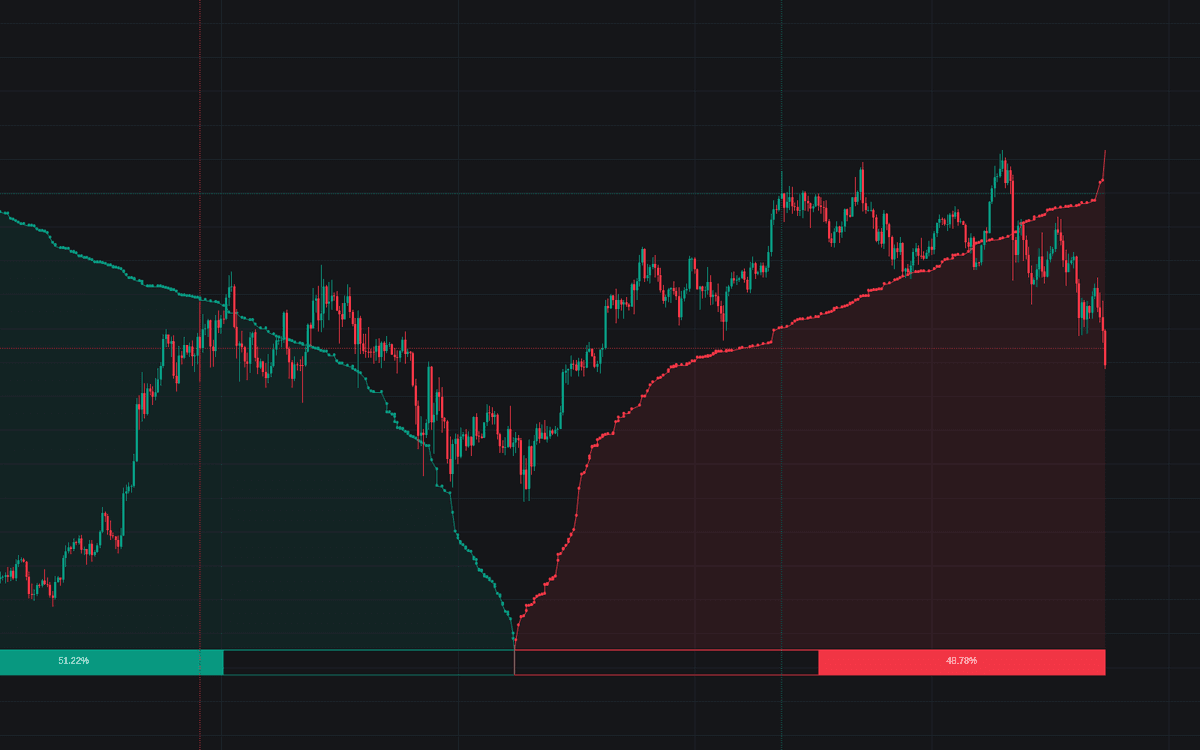

Liquidity Price Depth Chart re-imagines the DOM-style depth view using nothing but your chart's visible range: bullish prices are sorted into a dotted, line-connected curve on the left, bearish prices on the right, and the whole picture recalculates the moment the visible range changes. What you get is a depth silhouette of exactly the window you are studying: where liquidity stacked up, and for which side.
How to Trade the Liquidity Price Depth Chart?
- Line displacement: the further a stretch of the curve pushes along the x-axis, the more volume those prices carried. Pronounced displacement flags zones of interest and possible larger moves ahead.
- Dotted horizontal lines: mark the highest-volume bullish and bearish prices in the range, usable as support and resistance references.
- Shape changes: a "V"-shaped profile flattening into rectangles signals liquidity clusters: densely packed prices where positions accumulate and volatility can turn elevated or non-stationary.
- Voids: reading the dots without their connecting lines reveals empty pockets that can play a significant role in later price action.
- Sentiment %: a percentage at the base of each side reports whether bullish or bearish activity dominates the visible range.
Liquidity Price Depth Chart Settings
- Bullish Price Highest Volume Location: marks the maximum-volume bullish price with a dotted level across the depth chart and a dotted vertical line at the candle where it printed.
- Bearish Price Highest Volume Location: the same marker for the bearish side.
- Bullish Volume % / Bearish Volume %: display each side's share of volume directly on the chart.
- Volume % Box Padding: sets the height of the percentage boxes as a share of the visible price range.
Frequently Asked Questions
Free to use
Run it on Vela. Go further with a paid plan.
- Up to 500 strategy alerts, with webhook automation
- Up to 10× the chart history of Free
- Orderflow lookback up to full history
- More Quant usage to customize it, plus extra usage when you need it
- Futures data alongside crypto, stocks, forex and commodities
Also works on

Related indicators
%202.png&w=3840&q=75)
.png&w=3840&q=75)
Run it on Vela. Make it yours with Quant.
Open this indicator free on Vela, our next-generation charting platform. Then ask Quant, our coding agent built into Vela, to retune it or turn it into a backtested strategy of your own.